Superb quality and spec AB-Com PULSe 4K SE. Crazy offer! Only £99! FREE UK DELIVERY! 4K UHD, Enigma 2, Multiboot 4 images & more!...
Superb quality and spec AB-Com PULSe 4K Rev II Twin Satellite tuner only £149! FREE UK DELIVERY! 4K UHD, Enigma 2, SATA HDD facility, Multiboot 4 images & more!...

[VU+ Ultimo] New VIX Image Vu+ Ultimo Version 2.4 15/05/2012 - DISCUSSION ONLY -

Thank you. It did the trick. Had to lower the values

Dunno why it doesn't come with lower values from start ..

no matter what default values we use some one is always going to be on the wrong end of them, this is the reason for the OSD plugin so you can tailor it to your own setup.


I'm not overscaning anything on TV. All images i tested so far ( blackhole and openPli ) are fine.

Normal channel image is fine in Vix too. This is just a menu problem.

Cheers. :D

overscan or what ever the manufacturer decides to call it comes already turned on for almost all TV's. which is the reason for the OSD plugin in the first place.
 
Your are both correct and i've found the "overscaning" on one of the Viera menus.

It's off and now i see what portion of image i've been missing .. :eek:

Thank you both
 
Your are both correct and i've found the "overscaning" on one of the Viera menus.

It's off and now i see what portion of image i've been missing .. :eek:

Thank you both

Always more than happy to help where ever possible.
 
It's off and now i see what portion of image i've been missing .. :eek:
It is unbelievable that TV-producers still set the defaults to overscan and still promote the set as 'HD'.........
And AFAIK there's no TV manual in the world that gives a clear and easy to understand explanation on this.
 
Your are both correct and i've found the "overscaning" on one of the Viera menus.

It's off and now i see what portion of image i've been missing .. :eek:

Thank you both

And that is the whole point, people with overscan on aren't getting the full picture.....
 
And even worse: they get a garbled picture, as every pixel is displayed as 1.05 pixel......

Correct

Overscan usually hides garbage and noise that surrounds the image on some channels, some programs, some commercials, and some news spots during newscasts that are visible in 1:1 mode. One of the biggest offenders is a black/white dashed data strip that appears along the top of the 4:3 image during some commercials and news stories, as well as older programs,
The manufacturers have it on by default so they are not innundated by their customers thinking they have a fault with their TV and tbh the average joe and family will never know, people here are finding out because the menus are mapped 1:1
 
Hi,
(Almost) All full hd TVs normally have a display size setting without overscan. HD ready TVs normally have to live with overscan. One problem is that it is seldom called overscan.

When you have enabled overscan not only the size of GUI is limited but also your TV has to scale ALL TV signals even 1080i if you have Full HD TV.

Short:OVERSCAN IS BAD:-)

ciao
 
Re Image Release 2.4
Hi guys. I read the forum thread relating to Vers 2.4 with interest and found the contents most informative. However I do have some questions relating to the latest version-:

With reference to the previous version 2.3 I sent you guys several error logs relating to the software crashing when searching the EPG. I now find that the software crashes just as frequently when changing channels quickly with version 2.4. Did you address the bug in the previous software?
With the previous release the "Information Box" contained ECM speeds, with the latest release I have to press OK twice to obtain the ECM information, is there a setting to define the data contained in the Info Box?
On several "settings pages" I note there is a symbol "Info", which I presume is a button, I cannot find the button on my controller, can you help?
Looking at the Help function I note the controller illustrated is not for the Ultimo, is there an update available?
I hope the above makes sense and I look forward to your comments. :confused::confused::confused::confused:
 
Re Image Release 2.4
Hi guys. I read the forum thread relating to Vers 2.4 with interest and found the contents most informative. However I do have some questions relating to the latest version-:

With reference to the previous version 2.3 I sent you guys several error logs relating to the software crashing when searching the EPG. I now find that the software crashes just as frequently when changing channels quickly with version 2.4. Did you address the bug in the previous software?
Every crashlog we receive is being looked into. As we have many fixes and enhancements in each new version, I can't be sure about your specific logs. But I can for sure say that we're not experiencing many crashes at all. On the contrary: 2.4 is a very stable image.

With the previous release the "Information Box" contained ECM speeds, with the latest release I have to press OK twice to obtain the ECM information, is there a setting to define the data contained in the Info Box?
The ECM-info has been moved to the second info bar, as most users don't need that.

On several "settings pages" I note there is a symbol "Info", which I presume is a button, I cannot find the button on my controller, can you help?
The info-button is on a number of boxes the same as the guide- or EPG-button.

Looking at the Help function I note the controller illustrated is not for the Ultimo, is there an update available?
Most users don't use the R/C that comes with the Ultimo, but use the standard one that comes with the other boxes. But if you look at which buttons the help-functions points, I'm pretty sure you can easily find the corresponding buttons on the Ultimo-R/C.
 
Hi,
concernng zapping and crashing I never had a crash while I was only zapping and I am a fast zapper. What about a crashlog from such a crash?

With your ECM speed I think you can setup cccam info to show a box. What you see when you press OK twice is the second info bar and the content is defined by the skin.

I use a Harmony but I think I remember that info is the epg button.

ciao
 
There is indeed a bug, that has been resolved in the next build.
You could update via telnet:
Code:
init 4
opkg update
opkg upgrade
init 6
 
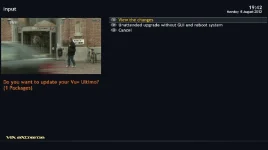
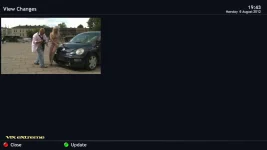
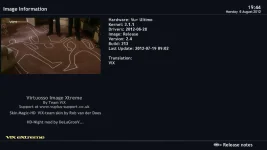
Since I've upgraded to 2.4 build 213 I keep getting the 'Upgrade available' icon blinking in the OSD and the LCD. When I go to Setup - Software Update it says 1 Package available to be installed. I perform the upgrade, reboot and after 5 minutes, the blinking icons reappears.

screenshot.webpscreenshot1.webpscreenshot3.webp
 
opkg update

root@vuultimo:~# opkg update
Downloading http://enigma2.world-of-satellite.com/feeds/2.4/vuultimo/3rdparty/Packages.gz.
Inflating http://enigma2.world-of-satellite.com/feeds/2.4/vuultimo/3rdparty/Packages.gz.
Updated list of available packages in /var/lib/opkg/openvix-3rdparty.
Downloading http://enigma2.world-of-satellite.com/feeds/2.4/vuultimo/all/Packages.gz.
Inflating http://enigma2.world-of-satellite.com/feeds/2.4/vuultimo/all/Packages.gz.
Updated list of available packages in /var/lib/opkg/openvix-all.
Downloading http://enigma2.world-of-satellite.com/feeds/2.4/vuultimo/mipsel/Packages.gz.
Inflating http://enigma2.world-of-satellite.com/feeds/2.4/vuultimo/mipsel/Packages.gz.
Updated list of available packages in /var/lib/opkg/openvix-mipsel.
Downloading http://enigma2.world-of-satellite.com/feeds/2.4/vuultimo/vuultimo/Packages.gz.
Inflating http://enigma2.world-of-satellite.com/feeds/2.4/vuultimo/vuultimo/Packages.gz.
Updated list of available packages in /var/lib/opkg/openvix-vuultimo.
root@vuultimo:~#


opkg list-upgradable

root@vuultimo:~# opkg list-upgradable
enigma2-plugin-extensions-netcaster - 2.8+git4520+074e3cc-r10 - 2.8+git4787+6e9bbcb-r10
root@vuultimo:~#
 
root@vuultimo:~# opkg remove netcaster
No packages removed.
root@vuultimo:~#


:confused:
 

OpenViX Feeds Status

Back
Top