Superb quality and spec AB-Com PULSe 4K SE. Crazy offer! Only £99! FREE UK DELIVERY! 4K UHD, Enigma 2, Multiboot 4 images & more!...
Superb quality and spec AB-Com PULSe 4K Rev II Twin Satellite tuner only £149! FREE UK DELIVERY! 4K UHD, Enigma 2, SATA HDD facility, Multiboot 4 images & more!...

[GiGaBlue HD800SE] New ViX Team Gigablue HD800SE OE3.0 Release Discussion

I have a problem on thor 0.8W, when i change to Viasat Explorer from UPC Direct provider, the box is freezing and the only thing to make it work again is to unplug it.
Another thing is that on playing movies the sound dissapears for few seconds and from time to time the screen is blank and the hdmi is syncronizing again.
 
i have a small issue with ccams not showing in Menu/Setup/System/VIX/Install Local Extension ,i have tried many different cccams but none are showing up ,ive ftp the ipks to temp as per instruction but to no avail any idea's looks a great image not giving upon this 1 ,also tried to reflash but it doesent seem to be playing ball.
 
try FTPing to Var/Volatile/Tmp instead.

and all ViX compatible cams can be found here.

Code:
http://www.4shared.com/dir/wnyHV50A/VIX_CAMS.html
 
Which software were you using to ftp it?

If /tmp is not working try going through /var/volatile/tmp
 
Which software were you using to ftp it?

If /tmp is not working try going through /var/volatile/tmp

:Dthanks guys you stopped the red mist in the nik of time all sorted now :thumbsup:
 
You know theres thanks button:D;):D
 
I used the fixes provided (OSD etc) and it's a wonderful image, working uber quick using the 28.2 Auto Bouquet plugin and CCcam, great work yet again folks
 
hit a problem ,i flashed back to team red image ,used the old bootloader for this ,then i decided to flash back to the new vix image ,used the new bootloader for this ,when i try to load the vix image at start i get 'boot usb ' but no conf 'comes up then it just carries on loading the old team red image ,bit lost now anyone know whats wrong .:confused:
 
Check the image file is on the root of the usb and no other files are on.it or any other usb sticks are inserted.
 
hi ,still no joy ,checked all of the above several times the vix load screen comes up and then loads team red :confused:
 
hit a problem ,i flashed back to team red image ,used the old bootloader for this ,then i decided to flash back to the new vix image ,used the new bootloader for this ,when i try to load the vix image at start i get 'boot usb ' but no conf 'comes up then it just carries on loading the old team red image ,bit lost now anyone know whats wrong .:confused:

Make sure you are using the very latest boot loader. Also in gigablue>se> try renaming noforce to force.
 
Hi,

first thanks for this wonderful image for the gigable se. :)

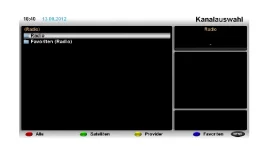
I've found one bug. Switching between radio and tv don't work. If i press the button TV/RAD only the channel list are opens. :confused:
I use the standard ViX-skin without any changes. Also after a clean flash it don't works.

Thanks...
 
Hi,

first thanks for this wonderful image for the gigable se. :)

I've found one bug. Switching between radio and tv don't work. If i press the button TV/RAD only the channel list are opens. :confused:
I use the standard ViX-skin without any changes. Also after a clean flash it don't works.

Thanks...

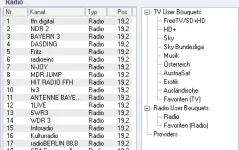
You need to setup a radio bouquet, then navigate to radio stations that way.
 
I've a radio bouquet. ;)

With other images like openMIPS or openAAF it works perfect. The problem are only on the openViX images. :(
Same thing with other settings...
 
What does does openaaf take you to radio bouquet when pressing radio button? Then TV bouquets by pressing it again? Personally I just manually switch to radio bouquet like I do for TV channels. Never use the TV/Radio button on any receiver.
 
Yes, when i watch TV and press the TV/RAD button the radio channell list opens. By pressing again the button it goes back to the tv channell list.

I think it's only a mistake in the keymap.xml.

screenshot_radio.webpradio_boquet.webp
 
Just installed this (build 268) yesterday. So far so good - working without a hitch so thanks to all involved. Going to try the remotestream plugin today - I understand it may not be supported (or at least not tested) so I'll see how I get on.
 
Just installed this (build 268) yesterday. So far so good - working without a hitch so thanks to all involved. Going to try the remotestream plugin today - I understand it may not be supported (or at least not tested) so I'll see how I get on.

if you mean the remotestreamconvert plugin then yes it's fully working and supported within the ViX image, I use it my self on a daily basis to stream channels from one receiver to another and it works flawlessly.
 
Thanks Pheonix. Yes I just installed remotestremconvert plugin in the last few minutes to stream some channels on 5W from my Vu+ duo to my GigaBlue and indeed it works flawlessly. I'm delighted!
 

OpenViX Feeds Status

Back
Top