Superb quality and spec AB-Com PULSe 4K SE. Crazy offer! Only £99! FREE UK DELIVERY! 4K UHD, Enigma 2, Multiboot 4 images & more!...
Superb quality and spec AB-Com PULSe 4K Rev II Twin Satellite tuner only £149! FREE UK DELIVERY! 4K UHD, Enigma 2, SATA HDD facility, Multiboot 4 images & more!...

New vu+ solo2 USB DVB Turbo not recognised.

  • Thread starter Thread starter linuxUser
  • Start date Start date
L

linuxUser

Guest
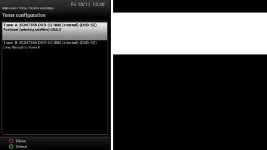
menu_tuners.webpFirst off hello everyone- first post and still learning about OpenVIX!

After doing a fair bit of reading I bought a new vu+ solo2 from Wos
so that I could watch HD satelite and HD terestrial.

Code:
http://www.world-of-satellite.co.uk/VU/VU-Solo-2-Solo2-White-Editon-Twin-Tuner-DVB-S2-HD-Enigma2-Linux-Satellite-Receiver

Box came installed with OpenVix (latest)

After 3 day of messing about and reading forums, I have satellite configured,
but I cannot see anywhere in the GUI to configure the USB Turbo DVB receiver.

Plus points:

I particularly like having a full Linux CLI with package manager. :-)
Remote control over the LAN is a great feature using OpenWebIF, which DOES help because the remote control seems to be quite erratic. :-(

I have tried installing the USB turbo drivers both from the UI menu and CLI but either way,
DVB-T / C unit does not appear in 'Tuners' menu

Tehnical details follow:

Code:
Box
Brand & Model: 	Vu+ Solo²
Chipset: 	Broadcom 7356
Main Memory: 	312264 kB free / 572492 kB total
Box Uptime: 	1d 6:45

Software
System OE: 	OE-Alliance 3.4
Firmware version: 	OpenViX 4.2.013 (2016-11-13)
Kernel / Drivers: 	3.13.5 / 20151201

Tuners
Tuner A 	BCM7356 DVB-S2 NIM (internal) (DVB-S2)
28.2° E / RT HD
Tuner B 	BCM7356 DVB-S2 NIM (internal) (DVB-S2)

Code:
root@vusolo2:~/opkg# opkg install enigma2-plugin-drivers-dvb-usb-turbo | tee opkg_install_enigma2-plugin-drivers-dvb-usb-turbo
Installing enigma2-plugin-drivers-dvb-usb-turbo (1.0-r9) on root.
Downloading http://www.openvix.co.uk/feeds/openvix/release/4.2/vusolo2/vusolo2/enigma2-plugin-drivers-dvb-usb-turbo_1.0-r9_vusolo2.ipk.
Installing kernel-module-cypress-firmware (3.13.5-.2) on root.
Downloading http://www.openvix.co.uk/feeds/openvix/release/4.2/vusolo2/vusolo2/kernel-module-cypress-firmware_3.13.5-.2_vusolo2.ipk.
Configuring kernel-module-cypress-firmware.
Configuring enigma2-plugin-drivers-dvb-usb-turbo.

Code:
root@vusolo2:~# lsmod
Module                  Size  Used by
ipv6                  370396  35
brcmfb                  1590  3
dvb_bcm7356          1425402  25 brcmfb
dvb_base             4584137  125 dvb_bcm7356
bcm_event               2821  5 dvb_bcm7356
procmk                  1668  2 dvb_bcm7356,bcm_event
8192cu                550809  0
vuplus_tuner_turbo_driver   392384  1
cypress_firmware        1580  1 vuplus_tuner_turbo_driver
dvb_usb_v2             14033  1 vuplus_tuner_turbo_driver
xfs                   678713  0
libcrc32c                714  1 xfs

Code:
auser@debian86:~$ lsusb
Bus 002 Device 002: ID 8087:0024 Intel Corp. Integrated Rate Matching Hub
Bus 002 Device 001: ID 1d6b:0002 Linux Foundation 2.0 root hub
Bus 001 Device 005: ID 0bda:5729 Realtek Semiconductor Corp. 
Bus 001 Device 004: ID 0489:e062 Foxconn / Hon Hai 
Bus 001 Device 003: ID 03eb:880e Atmel Corp. 
Bus 001 Device 002: ID 8087:0024 Intel Corp. Integrated Rate Matching Hub
Bus 001 Device 001: ID 1d6b:0002 Linux Foundation 2.0 root hub
Bus 004 Device 001: ID 1d6b:0003 Linux Foundation 3.0 root hub
Bus 003 Device 002: ID 046d:c077 Logitech, Inc. 
Bus 003 Device 001: ID 1d6b:0002 Linux Foundation 2.0 root hub

I have read quite a lot on this topic before posting .
and was expecting this device to 'just work'

Any help will be greatly appreciated

Thanks.
 
Last edited by a moderator:
Welcome to the forum.

What happens when you install the drivers by command line?
Code:
opkg install enigma2-plugin-drivers-dvb-usb-turbo
 
Thanks for your prompt reply.

As it happens I had edited the answer to your question into my First Post! :)
 
DOH!
I now see that the lsusb section above is an error and find that now I cannot edit my first Post.

I didn't notice that telnet session had closed whilst I was composing the message
so that lsusb output was actually from an intel laptop!

Sorry for any confusion.

root@vusolo2:~# lsusb
Bus 001 Device 002: ID 2b19:a111
Bus 004 Device 002: ID 0bda:8178
Bus 001 Device 001: ID 1d6b:0002
Bus 002 Device 001: ID 1d6b:0002
Bus 003 Device 001: ID 1d6b:0002
Bus 004 Device 001: ID 1d6b:0002
Bus 005 Device 001: ID 1d6b:0001
Bus 006 Device 001: ID 1d6b:0001
Bus 007 Device 001: ID 1d6b:0001
Bus 008 Device 001: ID 1d6b:0001

0bda:8178
is the Wifi USB Stick: https://wiki.debian.org/rtl819x#rtl8192cu

So 2b19:a111 is the VU+ Turbo USB DVB-C/T2 Hybrid Tuner

Google search for usb id found this thread
which tells that drivers have gone into openpli feed and device does work.

http://forums.openpli.org/topic/37868-drivers-vu-usb-turbo-tuner/page-4
 
Last edited by a moderator:
Enable debug logs, reboot the receiver, then upload your debug log as an attachment

Menu > System > Logs > Settings
 
Attaching the log to post may be better.

This is my first time using your forum software!

I am getting used to how it works.

Thankyou for your attention.
Sorry I have to leave now.
Will be back later.
 
Issue may be here. I'll ask one of the coders to have a look.

Code:
<    30.456> [NimManager][enumerateNIMs] slot: 0 - entry: {'isempty': False, 'frontend_device': 0, 'type': 'DVB-S2', 'name': 'BCM7356 DVB-S2 NIM (internal)'}
<    30.458> [eDVBFrontend] getDeliverySystem FE_GET_PROPERTY failed: Bad file descriptor (0)
<    30.459> [NIM] dvb type from DVB API  
<    30.460> [NIM] get types from delsys ['DVB-S', 'DVB-S2']
<    30.460> [NimManager][enumerateNIMs] slot: 1 - entry: {'isempty': False, 'frontend_device': 1, 'type': 'DVB-S2', 'name': 'BCM7356 DVB-S2 NIM (internal)'}
<    30.461> [eDVBFrontend] getDeliverySystem FE_GET_PROPERTY failed: Bad file descriptor (0)
<    30.461> [NIM] dvb type from DVB API  
<    30.461> [NIM] get types from delsys ['DVB-S', 'DVB-S2']
 
1) Flash the box with the latest image (4.2.016).
2) Connect to the box via telnet.
3) At the command line, "opkg install enigma2-plugin-drivers-dvb-usb-turbo".
4) Save the Putty log of step 3 and upload here.
5) At the command line, "reboot".
6) At the command line, "cat /proc/bus/nim_sockets".
7) Save the Putty log of step 6 and upload here.
 
Thankyou Huevos

Very happy to report DVB-T2 working with latest image. :)

Code:
Box
Brand & Model: 	Vu+ Solo²
Chipset: 	Broadcom 7356
Main Memory: 	493868 kB free / 572492 kB total
Box Uptime: 	0:01
Software
System OE: 	OE-Alliance 3.4
Firmware version: 	OpenViX 4.2.016 (2016-11-17)
Kernel / Drivers: 	3.13.5 / 20151201

Code:
root@vusolo2:/media/hdd/logs# opkg update
Downloading http://www.openvix.co.uk/feeds/openvix/release/4.2/vusolo2/3rdparty/Packages.gz.
Updated source 'openvix-3rdparty'.
Downloading http://www.openvix.co.uk/feeds/openvix/release/4.2/vusolo2/all/Packages.gz.
Updated source 'openvix-all'.
Downloading http://www.openvix.co.uk/feeds/openvix/release/4.2/vusolo2/mips32el/Packages.gz.
Updated source 'openvix-mips32el'.
Downloading http://www.openvix.co.uk/feeds/openvix/release/4.2/vusolo2/vusolo2/Packages.gz.
Updated source 'openvix-vusolo2'.
Downloading http://www.openvix.co.uk/feeds/openvix/release/4.2/vusolo2/vusolo2_3rdparty/Packages.gz.
Updated source 'openvix-vusolo2_3rdparty'.

root@vusolo2:/media/hdd/logs# opkg upgrade

root@vusolo2:/media/hdd/logs# opkg install enigma2-plugin-drivers-dvb-usb-turbo
Installing enigma2-plugin-drivers-dvb-usb-turbo (1.0-r9) on root.
Downloading http://www.openvix.co.uk/feeds/openvix/release/4.2/vusolo2/vusolo2/enigma2-plugin-drivers-dvb-usb-turbo_1.0-r9_vusolo2.ipk.
Installing vuplus-tuner-turbo (3.13.5-20150303) on root.
Downloading http://www.openvix.co.uk/feeds/openvix/release/4.2/vusolo2/vusolo2/vuplus-tuner-turbo_3.13.5-20150303_vusolo2.ipk.
Installing kernel-module-dvb-usb (3.13.5-.2) on root.
Downloading http://www.openvix.co.uk/feeds/openvix/release/4.2/vusolo2/vusolo2/kernel-module-dvb-usb_3.13.5-.2_vusolo2.ipk.
Installing kernel-module-cypress-firmware (3.13.5-.2) on root.
Downloading http://www.openvix.co.uk/feeds/openvix/release/4.2/vusolo2/vusolo2/kernel-module-cypress-firmware_3.13.5-.2_vusolo2.ipk.
Installing kernel-module-dvb-usb-v2 (3.13.5-.2) on root.
Downloading http://www.openvix.co.uk/feeds/openvix/release/4.2/vusolo2/vusolo2/kernel-module-dvb-usb-v2_3.13.5-.2_vusolo2.ipk.
Configuring kernel-module-dvb-usb.
Configuring kernel-module-dvb-usb-v2.
Configuring vuplus-tuner-turbo.
Configuring kernel-module-cypress-firmware.
Configuring enigma2-plugin-drivers-dvb-usb-turbo.

root@vusolo2:/media/hdd/logs# reboot

Broadcast message from root@vusolo2 (pts/0) (Sat Nov 19 20:10:43 2016):

The system is going down for reboot NOW!

Code:
root@vusolo2:/media/hdd/logs# cat /proc/bus/nim_sockets
NIM Socket 0:
        Type: DVB-S2
        Name: BCM7356 DVB-S2 NIM (internal)
        Frontend_Device: 0
NIM Socket 1:
        Type: DVB-S2
        Name: BCM7356 DVB-S2 NIM (internal)
        Frontend_Device: 1

NIM Socket 2:
        Type: DVB-C
        Name: Vuplus DVB-T/C USB NIM(TURBO)
        Frontend_Device: 2
 

OpenViX Feeds Status

Back
Top