Superb quality and spec AB-Com PULSe 4K SE. Crazy offer! Only £99! FREE UK DELIVERY! 4K UHD, Enigma 2, Multiboot 4 images & more!...
Superb quality and spec AB-Com PULSe 4K Rev II Twin Satellite tuner only £149! FREE UK DELIVERY! 4K UHD, Enigma 2, SATA HDD facility, Multiboot 4 images & more!...

Newbie help

DEZ1115

Forum Supporter
Donated Member
Joined
Nov 5, 2013
Messages
3
Reaction score
0
Points
0
Age
65
Hi
I have been trying to set up my new receiver with a few teething problems, so i thought i would download and install the latest image "789" and start a fresh.

I am struggling to get the CCcam installed and also a decent channel list.

I at one stage to transfer the cam onto the receiver via vuu07 but it wouldn't recognise it?

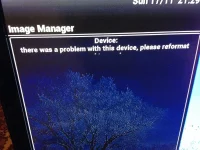
I am now worried about a message that appears on screen (see attached image)

Is this anything to worry about and how do i "format" it?

Thanks in advance

Dez
 

Attachments

  • VIX.webp
    VIX.webp
    100.8 KB · Views: 21
OK.. 1st i would reflash your Duo with build 789.. Do a fresh download from >>>HERE<<<

Format your usb stick in FAT32.. with HP formatting Tool.. ( Google It and install on your lappy )..

Then Also download your CCcam ipk file from >>>HERE<<<

FTP that ipk file into the tmp folder of your Duo..

Then on your remote.. Blue button > Vix > Install local extention.. And follow the on-screen instructions..
 
Thanks Mr.Mister

I will try that later when i get home.

I take it that the on screen message was nothing to panic about then?

Thanks again

Dez
 
Hi

Your also have to config your CCcam.cfg file which is then placed in var/etc folder to allow CCcam to read your card.

regards
 
So we don't confuse a newbie. The CCcam.cfg file sometimes goes in different places depending on the image.

With ViX images the CCcam.cfg file goes into the /etc/ folder.
 
So we don't confuse a newbie. The CCcam.cfg file sometimes goes in different places depending on the image.

With ViX images the CCcam.cfg file goes into the /etc/ folder.

I may be wrong but if i remember correctly /etc/ is a symlink to /var/etc/ so it should work in both locations, as i said i could be wrong however as i always just use /etc/ my self.
 
I was going to mention that symlink might point it to the same location, but I did not want to confuse.

The real point is that in a current ViX image with a fresh install there is no /var/etc/ folder.

So if you are advising a newbie using ViX to FTP a file into /var/etc/ you would have to explain how to create a new folder as well.
 

OpenViX Feeds Status

Back
Top