Superb quality and spec AB-Com PULSe 4K SE. Crazy offer! Only £129! FREE UK DELIVERY! 4K UHD, Enigma 2, Multiboot 4 images & more!...
Superb quality and spec AB-Com PULSe 4K Rev II Twin Satellite tuner only £179! FREE UK DELIVERY! 4K UHD, Enigma 2, SATA HDD facility, Multiboot 4 images & more!...

No Display after bootloader update

ukdirtyboy

New member
Joined
Aug 3, 2011
Messages
42
Reaction score
0
Points
0
Age
53
hi guy dont normal post cos i tend to read others comment and find answer but i need help
usb formated usb stick to fat loaded duo_cfe_3_0_usb file flashed it and got message to remove and reboot
then loaded ViX-2.3.133-vuduo_usb files but on a reboot i get no display on panel only a red led and no video out put
and ideas i have tryed duo_cfe_3_0_usb files again but no joy have i brickedthe box it will be a first for me done it hunreds for times
thanks for any feedback you can give and merry xmas and happy new year to all
ste:confused:
 
tryed null modem cable with hyperterm no respones
 
Last edited:
I would be exceptionally surprised if you did indeed brick the box but a bad bootloader is certainly one way in which to cause permanent damage, turn the box off and unplug it till morning and try again is about all i can suggest for now.
 
@uk

probaly just a typo but as regards to the image you do mean 2.3-311-153?

and not 113..... i dont even know if there is such a release.

regards: canthackit
 
did as you send "Disconnect anything attached inc HDD. Then try again. " @ 2.45 am 9.55 next morning still no display apart from red led not even the fan spins now found about 6 of the same subject anyone know if jtag recover possible ? and yeah typo 2.3-311-153 was the file i was going to flash but didnt get that far just flashed the load all ok as normal message to turn off remove pen stick and reboot i loaded the flash files for 2.3-311-153 and inserted pen drive in front usb and turned on and no display just a red light from the led
tryed putty vu utility hyper term all no output or response
 
jtag and the like is an extreme move, and little or no current surport available

I would start again, load the new drivers via usb , then seperately and after restarting the unit with the new drivers, shut it down, and load the latest VIX image
 
I have the same problem and still i have done this as they recomended and last time was the same procedure and it went really good then, why not now?
I dont have any USB sticks more the one i use for flash and YES the flash files and folder structure is correct in the USB stick so wath now?
 
Last edited by a moderator:
jtag and the like is an extreme move, and little or no current surport available

I would start again, load the new drivers via usb , then seperately and after restarting the unit with the new drivers, shut it down, and load the latest VIX image

Have done many times @Basilyyoung even trying the usb DUO Boot loader update(duo_cfe_3_0_usb.zip)
from vuplus website gives me nowt the usb pen drive light does not flash light up etc and i get no messages from the front display only the red led on dim
the box is alive ican feel heat from the cpu etc but no usb operation at all not comport functions too
am a but lost now
so maybe without a box till newyear now oh bugger LOL
 
Who bears the responsibility now?
After you have done it after recomended procedure that you should, and yet it does not work at all?
 
at present, I have not updated my unit, and dont plan too, untill saturday, as I have urgent family bussiness to attend to
so sadly, I cant help any further, untill then

how ever, many peeps are using the new drivers/images with out issue, so its some thing that has been missed or misunderstood
 
cant be done it jumps over the USB read and goes to starting at once and nothing happends
 
at present, I have not updated my unit, and dont plan too, untill saturday, as I have urgent family bussiness to attend to
so sadly, I cant help any further, untill then

how ever, many peeps are using the new drivers/images with out issue, so its some thing that has been missed or misunderstood

Wath is to missunderstand.
Put in the flash boot on usb stick, flash, turn of.
put in the ViX-2.3.153 on usb stick, flash, turn on

It worked last time on ViX-2.3.133 but now all is fxxxd up
 
on the usb stick....there should be a single folder, with the relivent files within....what have you got on your stick??

as it appears to me, that the unit does not see the update files
 
Wath is to missunderstand.
Put in the flash boot on usb stick, flash, turn of.
put in the ViX-2.3.153 on usb stick, flash, turn on

It worked last time on ViX-2.3.133 but now all is fxxxd up

"Wath is to missunderstand"

well others are not having issues, you are, so something is not correct
 
on the usb stick....there should be a single folder, with the relivent files within....what have you got on your stick??

as it appears to me, that the unit does not see the update files

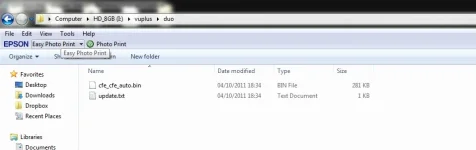
The duo_cfe_3_0_usb.zip has a file called VUPLUS in that you have DUO in that folder you have files, cfe_cfe_auto.bin and update.txt, the box flash it, thats OK.
The ViX-2.3.153-vuduo_usb.zip has vuplus\duo\kernel_cfe_auto.bin, vuplus\duo\reboot.update, vuplus\duo\root_cfe_auto.jffs2

After you flash the bootloader and after reboot it just jump over the USB read and goes to reading... direct, why?
 
duo.webpheres my flash drive with DUO Boot loader update duo_cfe_3_0_usb.zip bootloader after that i get nothing it dont even try and was downloaded from the vuplus site then rebooted then loaded the ViX-2.3.153 on usb stick, flash, turn on but no display
tried loading bootloader again but nothing no display etc
i will try anything you offer at wits end not tv over xmas dang
 
The duo_cfe_3_0_usb.zip has a file called VUPLUS in that you have DUO in that folder you have files, cfe_cfe_auto.bin and update.txt, the box flash it, thats OK.
The ViX-2.3.153-vuduo_usb.zip has vuplus\duo\kernel_cfe_auto.bin, vuplus\duo\reboot.update, vuplus\duo\root_cfe_auto.jffs2

After you flash the bootloader and after reboot it just jump over the USB read and goes to reading... direct, why?
Pege63 your problem is not the same as mine yours reads the usb my dont read any thing
 
switch off your box at the back switch, put the usb stick with new bootloader into the front of your box, switch on the box, wait till it tells you to reboot box then switch off the box, remove stick, [ dont switch the box on just yet ]put the stick into pc, remove the bootloader file, then put the new image on to the stick and insert to the front of the box, switch the box on and it should flash the new image...
 

OpenViX Feeds Status

Back
Top