Superb quality and spec AB-Com PULSe 4K SE. Crazy offer! Only £99! FREE UK DELIVERY! 4K UHD, Enigma 2, Multiboot 4 images & more!...
Superb quality and spec AB-Com PULSe 4K Rev II Twin Satellite tuner only £149! FREE UK DELIVERY! 4K UHD, Enigma 2, SATA HDD facility, Multiboot 4 images & more!...

No EPG after transponder changes

spevs

Forum Supporter
Donated Member
Joined
Mar 9, 2012
Messages
270
Reaction score
6
Points
18
As of this morning I've lost ITV1HD (Wales) ITV2HD, ITV4HD, after running AutoBouquetMaker I have the channels back but now not getting any programme info in EPG or nothing listed for now & next, strangely the new ITV4HD Bouquet does have info like it was before, I suffered the same issue with QuestHD last week (& it's still the same). Anyone have an idea when things should catch up, obviously no recordings for me on the affected channels................:confused::confused:
 
they emptyd 2 transponders with ITV 2 HD + 3 HD + 4 HD + ITV Be .etc
 
Wierdly, I just fired the same Bouquets to my Vu Duo4k & I'm getting all the epg & programme info, what could be wrong with my Vu Uno4Kse to cause this behaviour......?
 
As of this morning I've lost ITV1HD (Wales) ITV2HD, ITV4HD, after running AutoBouquetMaker I have the channels back but now not getting any programme info in EPG or nothing listed for now & next, strangely the new ITV4HD Bouquet does have info like it was before, I suffered the same issue with QuestHD last week (& it's still the same). Anyone have an idea when things should catch up, obviously no recordings for me on the affected channels................:confused::confused:

@spevs - Quest HD has a full now/next/schedule EPG on the Freesat bouquet since shortly after your post on this last week and my reply afterwards. I'm using ITV London bouquet. No issues with Quest or ITV1/2/4HD either. Freesat are obviously moving around transponders as the SD versions are dropped but are slow at populating the now/next and schedule EPG data it seems. Perhaps try a different region or use the Sky bouquet in ABM?
 
Wierdly, I just fired the same Bouquets to my Vu Duo4k & I'm getting all the epg & programme info, what could be wrong with my Vu Uno4Kse to cause this behaviour......?

If you are getting different EPG data from the same apparent ABM region settings on different receivers, it might be another setting causing an issue. Ensure you have refreshed the Sky/Freesat configs in the ABM menu.
 
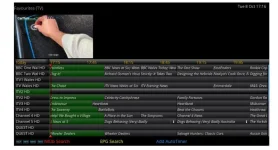
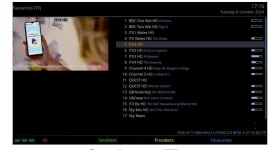
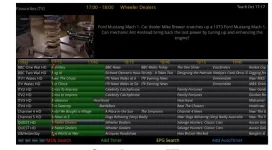
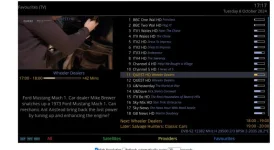
I have three boxes two Uno4Kse's & one Duo4Kse. I make the Bouquets on one of my Uno's edit them on a PC using DreamboxEdit then fire the same bouquets to all three boxes. Last week when I had the issue with QuestHD, I didn't bother to update all three boxes as my setup wasn't working correctly, however, now i've had to rescan again and many more channels are now affected. I did what I did last week on the box I run AutoBouquetMaker and encountered the same issue in that the new channels were'nt showing programme info. The difference today is I've sent the same Bouquets to my Duo which immediately I rebooted with all the programme data is there as can be seen from the following screen shots. The top two are from the Uno

Screenshot 2024-10-08 171630.webp

Screenshot 2024-10-08 171656.webp

Screenshot 2024-10-08 171739.webp

Screenshot 2024-10-08 171801.webp

As you will see I have two entries for each of the channels with the missing data (and on both boxes no picture is visible) reason for doing this was to have some info visible on the epg whilst I seeked a solution. The Answer I'm looking for is why is the Duo picking this up and the Uno isn't. (I have sent to the same file to my other Uno and that too is not picking up the programme info).................Please help someone, hopefully it will be a simple setting............
 
maybe delete the epg file and do a reload
 
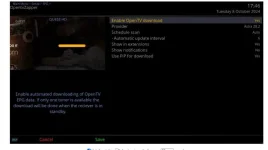
I think I might have fixed it, my Duo was set up with OpenTV EPG Downloader enabled

Screenshot 2024-10-08 174629.webp

Since enabling this on one of my Uno's that to is now showing programme info..................:eek:
 
Ok - I see that you are not actually running ABM on the other boxes, but just copying over the bouquet files - correct?

You may need to update the provider files (in the ABM menu) on the other boxes. I've just checked my Freesat London bouquet and EPG and all the ITV variants and Quest HD are ok. Alternatively, use a Sky region when you initially run ABM before you copy to the other boxes.

How do you keep the bouquets in step? Run ABM on one box and copy over at regular intervals? I just let ABM run a couple of times a week on a PowerTimer on my various machines and it keeps them up to date. There's a lot of transponder moves going on and it is difficult to ensure your bouquets and EPG data are kept current.
 
I think I might have fixed it, my Duo was set up with OpenTV EPG Downloader enabled

View attachment 66878

Since enabling this on one of my Uno's that to is now showing programme info..................:eek:

That updates the EPG schedule data. The now/next info associated with individual channels is only loaded when you zap to the channel. If the service ID data is wrong (e.g. due to outdated ABM) because of a recent transponder move, then the now/next info may be missing.
 
Thanks for your help Joe_90, after enabling OpenTV both Uno's are behaving like the Duo, Yes I manually update the Bouquets with DreamBoxEdit because I like to have a specific order, it is a pain in the backside but not to bad as at least I have three boxes that all look the same. Hopefully, someone will find this post useful in the future.......
 
This is an EPG issue, not an ABM issue. I have therefore moved the posts. You did not say how you used to obtain EPG before. If it was Rytec, the service references need to be provided to the Rytec team.

If you want ABM to create bouquets with channels in a particular order, you can use a custom mix/favourite file. Upload your existing bouquets in a new thread.
 
Hi Abu Baniaz, where would you like me to create a new thread to get help with customized bouquets.............thanks
 

OpenViX Feeds Status

Back
Top