Superb quality and spec AB-Com PULSe 4K SE. Crazy offer! Only £99! FREE UK DELIVERY! 4K UHD, Enigma 2, Multiboot 4 images & more!...
Superb quality and spec AB-Com PULSe 4K Rev II Twin Satellite tuner only £149! FREE UK DELIVERY! 4K UHD, Enigma 2, SATA HDD facility, Multiboot 4 images & more!...

[VU+ Duo] no FTP access

chadda

Member
Joined
Sep 24, 2011
Messages
118
Reaction score
0
Points
16
Location
Liverpool ---- Spain
ahoy there chaps.

Just update my DOu from Sept12 VIX to newest and now unable to access FTP. I have tried Dreamboxedit, DCC and direct browser access and non connect.

When I use DreamBoxEdit to test the Ip connection & username/password, the connection(port 80) works fine but the username password (port 21) does not connect. The direct browser access does not bring up a login page.

I have tried rebooting the router, stopping starting the FTP in Network settings and none work.

Any Ideas? Is there a Telnet reset I can try?
 
was that a version 2 of VIx? if you restored the settings, that is your issue.

Flash new without restoring
 
Apologies if this does not apply, If you read the guide that came with the 3 series images it says the following below. There was a chap messing around for a few days with the same issue as you until he flashed fresh.

Code:
All Users - A full flash is required
You can not use backup restore or online update from 2.4 with this image
 
I flashed yesterday with the newest image I could find on the VU+ website. I am using the default settings in Dreamboxedit except that I have not entered a password. The IP test comes up successful but the test User name says it cannot connect to the port 21. When I try to Ping the box it says 'target host not reachable'.

What should I think about next?:confused:
 
Hi mate

When you reflash the box with a new image your user name and password are deleted so if you telnet the box and type root then return you should be able to put your password in then try again.
 
You should be entering a password in DBE. default is dreambox but highly recommended that you personalise it.


Tapatalker
 
A virgin flashed box has no password; you can telnet & FTP using 'root' as username and leaving the password blank.

Thanks,
Think I am automatically applying passwords in the last few months after being affected by the Aidra virus.


Tapatalker
 
In dcc there is a tab that says telnet

Enter the command in there
 
How do I do that?:sofahide:
Well done for asking.

There is the following tutorial if you want to use the Windows version
Code:
[url]http://www.world-of-satellite.com/showthread.php?12558-Tutorial-How-to-enable-the-default-Telnet-client-in-Windows-7[/url]
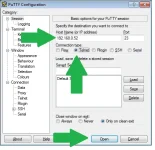
However, I like to use Putty
Click on Telnet
Enter IP address
Press Open
(You can save so next time you can just click on a preconfigured stting)

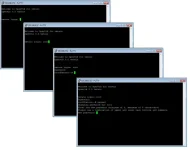
You will be prompted for a user name to login, default is
Code:
root
If you have a Password, you will be prompted for it

Once you have logged in, you will be at "command prompt", (sorry don't know proper name)
Code:
root@receivername:~#

You then enter the command you want and press return.
In your case, to set a password. Not a typo, that is how you spell it.
Code:
passwd
 

Attachments

  • Putty 01.webp
    Putty 01.webp
    27.4 KB · Views: 20
  • Putty 02.webp
    Putty 02.webp
    15 KB · Views: 18
Last edited:
Hi

Ok from windows click on start button and select all programes then accessories then select command prompt you will get a popup dos box on screen.

Type "telnet" without quote marks press return screen will change saying ms telnet > now type "open" without quotes and the IP address of the receiver then press return

You will now see screen change again welcome to open vix for vuduo or if a solo vusolo openvix 3.0 vuduo or vusolo, under that heading will be vuduo or solo login here type "root" without quotes again and press return
it will ask for password simply press return and you see boot up info to add your password type at the prompt "passwd" and return then type in your own password return it will then ask you to retype again do that it will acknowledge the change. I would normally then close the command prompt box and test again login in with the new password so login:root password:******* whatever u did.

Now go back and see if your dreamedit works as long as that has the same user/password details it should work.
 
i'm havin trouble ftp'ing now too!!! ive followed above instructions changed my password a few times and still cant connect!! ive tried filezilla, dcc and vucc and nothing!! could it be a problem with my box? ive checked the ftp set up and it says its running.... not sure which version vix I have....I updated a couple of months back...please help! lol
 
Hi mate

Can you telnet the box, would suggest you reflash with the latest software if you go into menu and click on information your find the build number there.
When you flash try with your own IP addy for the stb by disable dchp you can also test the connection with network test. if that does not work then allow by enable dchp for your router to assign a ip number to the box once done u can check the number in the network settings.
remember when you have reflashed your user / password is just root then press return twice make sure any ftp dreamedit etc are set the same, once your sure you can connect by whatever device u use then you can go about making changes to the password again changing the data in the proggy your using to communicate
 
Hi mate

Can you telnet the box, would suggest you reflash with the latest software if you go into menu and click on information your find the build number there.
When you flash try with your own IP addy for the stb by disable dchp you can also test the connection with network test. if that does not work then allow by enable dchp for your router to assign a ip number to the box once done u can check the number in the network settings.
remember when you have reflashed your user / password is just root then press return twice make sure any ftp dreamedit etc are set the same, once your sure you can connect by whatever device u use then you can go about making changes to the password again changing the data in the proggy your using to communicate

thanks mate, I can telnet my box so a reflash looks like my only option.....was hoping to keep my bouguets I made....never mind......ive not done nothing major on my box for a while so remembering it all is going to be a challenge!!
 

OpenViX Feeds Status

Back
Top