Superb quality and spec AB-Com PULSe 4K SE. Crazy offer! Only £129! FREE UK DELIVERY! 4K UHD, Enigma 2, Multiboot 4 images & more!...
Superb quality and spec AB-Com PULSe 4K Rev II Twin Satellite tuner only £179! FREE UK DELIVERY! 4K UHD, Enigma 2, SATA HDD facility, Multiboot 4 images & more!...

[VU+ Duo4K SE] Only recording 2 chnnels again

mitchelln

New member
Joined
Aug 16, 2021
Messages
87
Reaction score
0
Points
0
Hi.

I upgraded my OpenVix to 6.2.011 last week and since then I've once again got the problem where it will only allow me to record two channels at the same time. Trying to add more results in a message pop up saying there is no available tuner.
This was all working fine before I upgraded. I could happily record 4 or more channels whilst watching another. My tuner list is below:
Tuner A
Vuplus DVB-S NIM(45308X FBC) (DVB-S2X)
Tuner B
Vuplus DVB-S NIM(45308X FBC) (DVB-S2X)
Tuner C
Vuplus DVB-S NIM(45308X FBC) (DVB-S2X)
Tuner D
Vuplus DVB-S NIM(45308X FBC) (DVB-S2X)
Tuner E
Vuplus DVB-S NIM(45308X FBC) (DVB-S2X)
Tuner F
Vuplus DVB-S NIM(45308X FBC) (DVB-S2X)
Tuner G
Vuplus DVB-S NIM(45308X FBC) (DVB-S2X)
Tuner H
Vuplus DVB-S NIM(45308X FBC) (DVB-S2X)
Tuner I
Vuplus DVB-T NIM(BCM3466) (MultiType DVB-C/T2)
Tuner J
Vuplus DVB-T NIM(BCM3466) (MultiType DVB-C/T2)

Tuner A and B are set to simple mode each with its own LNB. I note Tuner C now says its set to FBC Automatic connected to Tuner A, which I think has changed since the upgrade. I've attached a screenshot of the tuner screen.
I tried a full re-tune, but that didn't help. Any ideas what could be wrong please?

Thanks
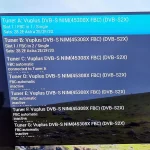
IMG_20221129_215624.webp
 
Hi.

I upgraded my OpenVix to 6.2.011 last week and since then I've once again got the problem where it will only allow me to record two channels at the same time. Trying to add more results in a message pop up saying there is no available tuner.
This was all working fine before I upgraded. I could happily record 4 or more channels whilst watching another. My tuner list is below:
Tuner A
Vuplus DVB-S NIM(45308X FBC) (DVB-S2X)
Tuner B
Vuplus DVB-S NIM(45308X FBC) (DVB-S2X)
Tuner C
Vuplus DVB-S NIM(45308X FBC) (DVB-S2X)
Tuner D
Vuplus DVB-S NIM(45308X FBC) (DVB-S2X)
Tuner E
Vuplus DVB-S NIM(45308X FBC) (DVB-S2X)
Tuner F
Vuplus DVB-S NIM(45308X FBC) (DVB-S2X)
Tuner G
Vuplus DVB-S NIM(45308X FBC) (DVB-S2X)
Tuner H
Vuplus DVB-S NIM(45308X FBC) (DVB-S2X)
Tuner I
Vuplus DVB-T NIM(BCM3466) (MultiType DVB-C/T2)
Tuner J
Vuplus DVB-T NIM(BCM3466) (MultiType DVB-C/T2)

Tuner A and B are set to simple mode each with its own LNB. I note Tuner C now says its set to FBC Automatic connected to Tuner A, which I think has changed since the upgrade. I've attached a screenshot of the tuner screen.
I tried a full re-tune, but that didn't help. Any ideas what could be wrong please?

Thanks

View attachment 64483

Post your settings file (/etc/enigma2)
 
It is set up wrong. Only Tuner A is configured.
 
You need to get it right and then make a backup. That way if something does go wrong you can restore the backup.

And if you are losing these settings we need to know how so we can fix it.

Personally I reflash my boxes several times a day during testing and don't lose these settings.
 
Here is my settings file. Any help would be most appreciated. This 2 channel limitation is rendering the box unusable. Both Tuners appear to be configured.
View attachment settings.txt
 
Last edited:
Have you changed your LNB too? Please describe your hardware setup as fully as possible (dish, lnb, diseqc switches, splitters).


Code:
config.Nims.0.advanced.lnb.1.diseqcMode=1_0
config.Nims.0.advanced.sat.192.lnb=1
config.Nims.0.diseqcA=282
config.Nims.0.diseqcB=3601
config.Nims.0.diseqcC=3601
config.Nims.0.diseqcD=3601
config.Nims.0.powerMeasurement=False
config.Nims.1.advanced.lnb.2.diseqcMode=1_0
config.Nims.1.advanced.sat.192.lnb=2
config.Nims.1.diseqcA=282
config.Nims.1.diseqcB=3601
config.Nims.1.diseqcC=3601
config.Nims.1.diseqcD=3601
config.Nims.1.powerMeasurement=False
config.Nims.2.advanced.lnb.1.lof=unicable
config.Nims.2.advanced.lnb.1.scrList=1
config.Nims.2.advanced.lnb.1.unicableManufacturer=Dura-Sat(DUR-line)
config.Nims.2.advanced.lnb.1.unicableProduct=UK101
config.Nims.2.advanced.sat.192.lnb=1
config.Nims.2.advanced.sat.282.lnb=1
config.Nims.2.advanced.sats=282
config.Nims.3.advanced.sats=192
config.Nims.8.terrestrial=All regions, United Kingdom, (Europe DVB-T/T2)
config.Nims.9.terrestrial=All regions, United Kingdom, (Europe DVB-T/T2)
 
Have you changed your LNB too? Please describe your hardware setup as fully as possible (dish, lnb, diseqc switches, splitters).


Code:
config.Nims.0.advanced.lnb.1.diseqcMode=1_0
config.Nims.0.advanced.sat.192.lnb=1
config.Nims.0.diseqcA=282
config.Nims.0.diseqcB=3601
config.Nims.0.diseqcC=3601
config.Nims.0.diseqcD=3601
config.Nims.0.powerMeasurement=False
config.Nims.1.advanced.lnb.2.diseqcMode=1_0
config.Nims.1.advanced.sat.192.lnb=2
config.Nims.1.diseqcA=282
config.Nims.1.diseqcB=3601
config.Nims.1.diseqcC=3601
config.Nims.1.diseqcD=3601
config.Nims.1.powerMeasurement=False
config.Nims.2.advanced.lnb.1.lof=unicable
config.Nims.2.advanced.lnb.1.scrList=1
config.Nims.2.advanced.lnb.1.unicableManufacturer=Dura-Sat(DUR-line)
config.Nims.2.advanced.lnb.1.unicableProduct=UK101
config.Nims.2.advanced.sat.192.lnb=1
config.Nims.2.advanced.sat.282.lnb=1
config.Nims.2.advanced.sats=282
config.Nims.3.advanced.sats=192
config.Nims.8.terrestrial=All regions, United Kingdom, (Europe DVB-T/T2)
config.Nims.9.terrestrial=All regions, United Kingdom, (Europe DVB-T/T2)
Thanks for the reply.
No, nothing has changed in my setup. All I did was upgrade OpenVix and started getting the issue. It was running fine for months before recording many simultaneous channels fine.
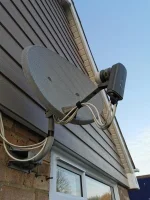
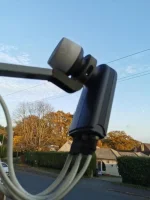
I have no idea what make the dish and LNBs are I'm afraid. It was here when we moved into the the house. I suspect it is a standard Sky setup. It has 2 LNBs wired into Tuner A and B. No switches or splitters.
 
Last edited:
Your previous screenshot showed the tuner config overview. Select tuner A, then take a screenshot. Do the same for B. I think it is correct, but let's double check.

Note:Tuner configuration not in use stay in the settings file to allow people to switch back.
 
Your previous screenshot showed the tuner config overview. Select tuner A, then take a screenshot. Do the same for B. I think it is correct, but let's double check.

Note:Tuner configuration not in use stay in the settings file to allow people to switch back.
Okay, will do.

I've also found the place in the log file where we there was a recording in progress and we were watching another channel. Then a 2nd recording started and we were kicked off the channel we were watching due to lack of a free tuner

354849.5634> [RecordTimer] activating state 1 (Prepared)
<354849.5646> [RecordTimer] Found enough free space to record
<354849.5653> [RecordTimer] Filename calculated as: '/media/hdd/movie/20221201 2114 - ITV1 HD - New_ I'm A Celebrity___ Get Me Out Of Here'
<354849.5654> [Navigation] recording service: 1:0:19:5104:80F:2:11A0000:0:0:0:
<354849.5658> [eDVBResourceManager] allocate channel.. 080f:0002
<354849.5658> [eDVBResourceManager] available channel.. 07e3:0002
<354849.5658> [eDVBResourceManager] available channel.. 0814:0002
<354849.5659> [eDVBServicePMTHandler] allocate Channel: res -6
<354849.5659> [eDVBServiceRecord] RECORD service event 0
<354849.5660> [RecordTimer] 'prepare' failed: error -6
<354849.5661> [RecordTimer] backoff: retry in 5 seconds
<354849.5662> [eDVBServiceRecord] stop recording!
<354849.5662> [eDVBServiceRecord] (was not recording)
<354849.5663> [Trashcan] Recording(s) in progress: 1
<354849.5665> [RecordTimer] prepare failed
<354849.5666> [RecordTimer] zap without asking
<354849.5688> [Skin] Processing screen 'MessageBoxSimple' from list 'MessageBoxSimple, MessageBox', position=(0, 0), size=(1920 x 1080) for module 'MessageBox'.
<354849.5775> [Screen] Warning: Skin is missing element 'icon' in <class 'Screens.MessageBox.MessageBox'>(In order to record a timer, the TV was switched to the recording service!
).<354849.5775>
<354849.5778> [Skin] Attribute 'scrollbarMode' (with value of 'showOnDemand') in object of type 'eLabel' is not implemented!
<354849.5816> [Pixmap] setPixmapNum(1) failed! defined pixmaps: []
<354849.5819> [MessageBox] Timeout set to 20 seconds.
<354849.5834> [Skin] Processing screen 'MessageBoxSimple_summary' from list 'MessageBoxSimpleSummary, MessageBoxSummary, ScreenSummary, MessageBoxSimple_summary, MessageBox_summary, SimpleSummary', position=(0, 0), size=(480 x 320) for module 'ScreenSummary'.
<354849.5860> [RecordTimer] ok, zapped away
<354849.6123> [Navigation] playing ref 1:0:19:5104:80F:2:11A0000:0:0:0:
<354849.6127> [eDVBCAService] free slot 0 demux 0 for service 1:0:1:1678:7E3:2:11A0000:0:0:0::Sky Arts
<354849.6127> [eDVBCAService] free service 1:0:1:1678:7E3:2:11A0000:0:0:0::Sky Arts
<354849.6198> [eTSMPEGDecoder] decoder state: play, vpid=ffffffff, apid=ffffffff
<354849.6198> [eDVBPCR0] DEMUX_STOP ok
<354849.6199> [eDVBPCR0] destroy
<354849.6199> [eDVBVideo0] DEMUX_STOP ok
<354849.6206> [eDVBVideo0] VIDEO_STOP ok
<354849.6242> [eDVBVideo0] destroy
<354849.6243> [eDVBAudio0] AUDIO_STOP ok
<354849.6525> [eDVBAudio0] DEMUX_STOP ok
<354849.6525> [eDVBAudio0] AUDIO_CONTINUE ok
<354849.6616> [eDVBAudio0] destroy
<354849.6616> [eDVBText0] DEMUX_STOP ok
<354849.6616> [decoder][eDVBText] stopCaching
<354849.6621> [eDVBText0] destroy
<354849.6621> [decoder][eDVBText] resetPID
<354849.6621> [decoder][eDVBText] freeCache
<354849.6635> [eDVBLocalTimerHandler] remove channel 0x2086ad0
<354849.6636> [eEPGTransponderDataReader] remove channel 0x2086ad0
 
You have one LNB, not two. It has four universal outputs. Your tuner configurations should be:
Tuner A: Simple, Single, 28.2
Tuner B: Simple, Single, 28.2

The channels/services change transponders. This is possibly why the clash sometimes happen and other times do not. It has been more than 4 years since this issue was first reported, best you get a Unicable LNB. When you get it, adapt your tuner configuration to match the new hardware.
 
You have one LNB, not two. It has four universal outputs. Your tuner configurations should be:
Tuner A: Simple, Single, 28.2
Tuner B: Simple, Single, 28.2

The channels/services change transponders. This is possibly why the clash sometimes happen and other times do not. It has been more than 4 years since this issue was first reported, best you get a Unicable LNB. When you get it, adapt your tuner configuration to match the new hardware.
Yes, that is what they are both set to currently. This problem only started after upgrading OpenVix last week. It has been happily recording multiple simultaneous recordings for months without problem. Now it flatly refuses to simultaneously record/watch more than 2 channels every single time. The problem became apparent within hours of the upgrade. I shouldn't have to go out and spend money on something that was working perfectly happily before. Times are tight.
 
I have uploaded the debug logs where the issue occurs and checked other receivers. There is nothing more to do until it is fixed, if it ever is.

If you don't want to get a unicable LNB, OpenPLi does not have the issue.
 
Yes, that is what they are both set to currently. This problem only started after upgrading OpenVix last week. It has been happily recording multiple simultaneous recordings for months without problem. Now it flatly refuses to simultaneously record/watch more than 2 channels every single time. The problem became apparent within hours of the upgrade. I shouldn't have to go out and spend money on something that was working perfectly happily before. Times are tight.
Unless you also have a lnb for 19.2E ? Your settings file is really screwed
 
Last edited by a moderator:

OpenViX Feeds Status

Back
Top