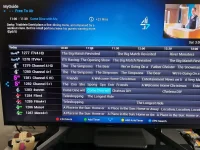
Superb quality and spec AB-Com PULSe 4K SE. Crazy offer! Only £99! FREE UK DELIVERY! 4K UHD, Enigma 2, Multiboot 4 images & more!...
Superb quality and spec AB-Com PULSe 4K Rev II Twin Satellite tuner only £149! FREE UK DELIVERY! 4K UHD, Enigma 2, SATA HDD facility, Multiboot 4 images & more!...

[VU+ Duo4K SE] Only recording 2 chnnels again

Just for info:

Movieorganisor plugin will cause crashes on python 3 images. You have enabled collections feature already, so uninstall Movieorganisor if you have not done so already
You are using AutoBouquets 28.2E as well as AutoBouquetsMaker. Really no need for both.
OpenTV EPG reader parses the data better than CrossEPG downloader.

If you want to, best to stop Enigma2 with "init 4" command and delete the tuner configuration lines from your settings file and re-set correctly.

config.Nims.0.advanced.lnb.1.diseqcMode=1_0
config.Nims.0.advanced.sat.192.lnb=1
config.Nims.0.diseqcA=282
config.Nims.0.diseqcB=3601
config.Nims.0.diseqcC=3601
config.Nims.0.diseqcD=3601
config.Nims.0.powerMeasurement=False
config.Nims.1.advanced.lnb.2.diseqcMode=1_0
config.Nims.1.advanced.sat.192.lnb=2
config.Nims.1.diseqcA=282
config.Nims.1.diseqcB=3601
config.Nims.1.diseqcC=3601
config.Nims.1.diseqcD=3601
config.Nims.1.powerMeasurement=False
config.Nims.2.advanced.lnb.1.lof=unicable
config.Nims.2.advanced.lnb.1.scrList=1
config.Nims.2.advanced.lnb.1.unicableManufacturer=Dura-Sat(DUR-line)
config.Nims.2.advanced.lnb.1.unicableProduct=UK101
config.Nims.2.advanced.sat.192.lnb=1
config.Nims.2.advanced.sat.282.lnb=1
config.Nims.2.advanced.sats=282
config.Nims.3.advanced.sats=192
config.unicable.unicableManufacturer=Dura-Sat(DUR-line)
config.unicable.unicableProduct=UK101


These should be the correct ones

config.Nims.0.diseqcA=282
config.Nims.1.diseqcA=282
config.Nims.8.terrestrial=All regions, United Kingdom, (Europe DVB-T/T2)
config.Nims.9.terrestrial=All regions, United Kingdom, (Europe DVB-T/T2)
 
Thanks for the info. I turned on the OpenTV EPG as there was an issue with Channel 5 info disappearing from the EPG listing. I'll turn off the CrossEPG now. I'll also uninstall the Movieorganiser.

I'm wondering if something stuffed my Tuner config during the upgrade. A new default applied possibly? I did try switching from Simple to Advanced modes when I first had the issue, but I don't think I saved anything as it looked too complicated. But I wonder if something gets written to the config that switching back to simple mode does not remove perhaps?

I'll delete all the config.Nims entries and replace them with just the four lines.

Thanks for your help and patience
 
Performing a software update won't change your tuner configuration.

The values in the settings files are not the active tuner configuration. Yes, please correct your tuner configuration in the settings files to keep things to the point.

Using Putty, login then:
init 4

Then using FTP/file editor change the file to be correct. Transfer it back

Using Putty
init 3

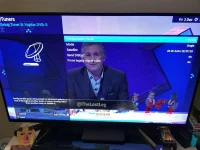
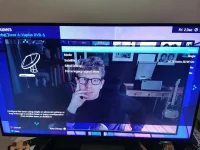
After it restarts, please post the pictures of tuner configuration, enter the actual tuners, not just the overview showing all tuners.

Just for thouroughness:
I think there is a way in factory reset to remove tuner configuration, but I have never tried it.
 
turned on the OpenTV EPG as there was an issue with Channel 5 info disappearing from the EPG listing.

EPG is one thing.
Bouquets is another thing.

The channel name changing in bouquets had nothing to do with EPG and this has been fixed on the satellite.
 
EPG is one thing.
Bouquets is another thing.

The channel name changing in bouquets had nothing to do with EPG and this has been fixed on the satellite.
Okay, but for me turning on OpenTV EPG appeared to fix the problem. Is there a better way to update things when channel info disappears? Thanks!
 
Just for info:

Movieorganisor plugin will cause crashes on python 3 images. You have enabled collections feature already, so uninstall Movieorganisor if you have not done so already
You are using AutoBouquets 28.2E as well as AutoBouquetsMaker. Really no need for both.
OpenTV EPG reader parses the data better than CrossEPG downloader.

If you want to, best to stop Enigma2 with "init 4" command and delete the tuner configuration lines from your settings file and re-set correctly.

config.Nims.0.advanced.lnb.1.diseqcMode=1_0
config.Nims.0.advanced.sat.192.lnb=1
config.Nims.0.diseqcA=282
config.Nims.0.diseqcB=3601
config.Nims.0.diseqcC=3601
config.Nims.0.diseqcD=3601
config.Nims.0.powerMeasurement=False
config.Nims.1.advanced.lnb.2.diseqcMode=1_0
config.Nims.1.advanced.sat.192.lnb=2
config.Nims.1.diseqcA=282
config.Nims.1.diseqcB=3601
config.Nims.1.diseqcC=3601
config.Nims.1.diseqcD=3601
config.Nims.1.powerMeasurement=False
config.Nims.2.advanced.lnb.1.lof=unicable
config.Nims.2.advanced.lnb.1.scrList=1
config.Nims.2.advanced.lnb.1.unicableManufacturer=Dura-Sat(DUR-line)
config.Nims.2.advanced.lnb.1.unicableProduct=UK101
config.Nims.2.advanced.sat.192.lnb=1
config.Nims.2.advanced.sat.282.lnb=1
config.Nims.2.advanced.sats=282
config.Nims.3.advanced.sats=192
config.unicable.unicableManufacturer=Dura-Sat(DUR-line)
config.unicable.unicableProduct=UK101


These should be the correct ones

config.Nims.0.diseqcA=282
config.Nims.1.diseqcA=282
config.Nims.8.terrestrial=All regions, United Kingdom, (Europe DVB-T/T2)
config.Nims.9.terrestrial=All regions, United Kingdom, (Europe DVB-T/T2)

Movieorganiser does not cause crashes in python 3 - I use the python 3 modded version all the time
 
Last edited:
I think the "fix" you observed was coincidental. The EPG and channel names were fixed on the satellite, although ABM had hacks to stop name changing to what was on satellite for a while.
Are you talking about EPG or bouquets?
Please refer to this if it helps clarify: https://www.world-of-satellite.com/showthread.php?63049-Bouquets-EPG-amp-Channel-navigation


With regards to EPG, I am suggesting the following:
Cease using CrossEPG downlaoder
Commence/continue to use OpenTV EPG. Use the downloader to automate EPG acquisition
See here: https://www.world-of-satellite.com/showthread.php?63896-Setting-up-Sky-UK-epg-download
 
Last edited:
Performing a software update won't change your tuner configuration.

The values in the settings files are not the active tuner configuration. Yes, please correct your tuner configuration in the settings files to keep things to the point.

Using Putty, login then:
init 4

Then using FTP/file editor change the file to be correct. Transfer it back

Using Putty
init 3

After it restarts, please post the pictures of tuner configuration, enter the actual tuners, not just the overview showing all tuners.

Just for thouroughness:
I think there is a way in factory reset to remove tuner configuration, but I have never tried it.

Okay, so I followed these steps and the Tuner config now looks like this. Which is interesting because before it just had one line "Configuration mode. Simple" and no other lines. So it looks like something had really screwed my tuner set up. Looks like it's fixed now and recording more than two channels simultaneously.
Thanks for helping sort it!
 

Attachments

  • IMG_20221202_222427_1.webp
    IMG_20221202_222427_1.webp
    51.9 KB · Views: 16
  • IMG_20221202_222439.webp
    IMG_20221202_222439.webp
    55.6 KB · Views: 14
Last edited:
Re. removing CrossEPG and using OpenTV instead. Will that still download EPG data for my Freeview tuner as well as FreeSat?
Thanks.
 
Last edited:
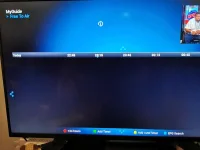
Great. Now I've got a blank EPG. I tried deleting the cache and refreshing, but still blank. Tried going back to CrossEPG. It downloads channels and event data and parses it, but same result. Totally busted EPG. Getting rather fed up with this now. Just as well I backed up my config. How anyone buying one of these devices from Amazon would cope is beyond me. The setup is far too complicated and full of jargon plus baffling and conflicting options.
IMG_20221202_231807.webp
 
Last edited:
Great. Now I've got a blank EPG. I tried deleting the cache and refreshing, but still blank. Tried going back to CrossEPG. It downloads channels and event data and parses it, but same result. Totally busted EPG. Getting rather fed up with this now. Just as well I backed up my config. How anyone buying one of these devices from Amazon would cope is beyond me. The setup is far too complicated and full of jargon plus baffling and conflicting options.
View attachment 64499

If you have both satellite and terrestrial tuners in your box


menu/setup/epg/settings/

enable eit EPG = yes
enable freeview EPG = yes
enable freesat epg = no
enable openTV EPG = yes

To get your Freeview EPG data just tune into BBC1 from your aerial and wait approx 5 to 10 minutes for the ePG to populate over the air.

To get your satellite EPG data back tune into the Sky IEPG data 1 channel for 5 to 10 minutes to fetch the Sky EPG over the air.
Press the TV button on the remote then select green (satellite) then 28.2E Astra 2E/2F/2G services then scroll up/down until you get to IEPG data 1. Select this channel and remain on it for 5 to 10 minutes. Your screen will be blank. The list you scroll up/down is arranged alphabetically.

Now check you have a populated EPG


After this
menu/setup/EPG/opentv EPG downloader
Enable OpenTV download = Yes
Show in extensions = yes
Press green to save

Now whilst watching normal TV press the blue button
You should get an extension menu where one of the options is " OpenTV EPG forced download" this should also populate the blank satellite data.


With both Freeview and OpenTV configured your future EPG data should automatically be populated over the air.


One gotcha may be if you go on holiday and your box remains in deep standby for perhaps a week or more and never wakes up for recording in that time then the EPG will not be updated.

I get around this problem by having a couple of record timers which activate each day for 15 minutes each. One timer records IEPG data 1 (destination folder = trash) at 6:30 . The other timer records BBC1 on terrestrial (destination folder = trash) at 7:00 . After recording both timers put the box back into deep standby afterwards. This allows my box to always have an up-to-date EPG if I'm away from home for an extended period and allows the autotimers to set record timers when I'm still away.
 
Last edited:
Great. Now I've got a blank EPG. I tried deleting the cache and refreshing, but still blank. Tried going back to CrossEPG. It downloads channels and event data and parses it, but same result. Totally busted EPG. Getting rather fed up with this now. Just as well I backed up my config. How anyone buying one of these devices from Amazon would cope is beyond me. The setup is far too complicated and full of jargon plus baffling and conflicting options.
View attachment 64499

Bouquet = list of channels
EPG = the electronic programme guide data for each of the channels

The screen shot above shows no channels associated with your MyGuide Bouquet. This is NOT the same as not having EPG data
First you must have a bouquet with a list of channels. No channels in the list then there is nothing for which to fetch the EPG data.
You then populate the epg data for those channels via various methods including over the air and via the internet.

Deleting the EPG cache only deletes the EPG data. It does not delete the list of channels in the bouquet.

You don't have a broken EPG, you have a broken Bouquet called MyGuide

To perhaps give yourself give yourself more information try
menu/setup/user interface/channel selection/always show bouquets = yes
When you now press your epg/guide button on the remote you should first get a screen with all the bouquets on your box. You can select any of them to see if the EPG data is populated for the channels in that bouquet.
 
Yes, setting up these boxes is a huge leaning curve. To me, the biggest hurdle is people mixing up Bouquets and EPG. They are two completely different things. And then there is the fascination of using the EPG screens as the channel selection method. Once you get to grips with the channel selection methods, by all means use the EPG screens. Once you unlearn the Sky terminology, it is a lot easier.

The setting the option to always show bouquets mentioned above will help you a lot. I would also recommend you enable the option "Show service type icons"
Menu > Setup > User Interface > Channel Selection >
or in Live TV (no screens showing), up button, Menu > Menu (Configuration)

You have a twin Terrestrial tuner unit. I am presuming it connected to an aerial as you have configured it. To me you should be viewing/recording mainly on those and you would seldom get these conflicts.

May I suggest the following:
Please read the guides I linked to in post 28 if you have not done so already.
Stop using AutoBouquets 28.2E, uninstall it actually. Just use AutoBoquetsMaker (ABM), this is because it will make both Terrestrial and Satellite bouquets.
In ABM configuration, enable the option to add provider name to bouquets. This will help distinguish the channels.
In ABM, providers order, make the Freeview provider first.
Run/execute/scan ABM to create the bouquets.

Just going through your settings file again, I have noticed that you are also using EPG importer. This is going to lead to clashes in EPG data. The data on the satellite is slightly different to what the Rytec team get from various websites. Please un-install EPG importer or remove the schedule/providers.

You have also used EPG refresh. Which services (channels) are you zapping to? The plugin does things randomly and will take up a tuner when it does it's thing, although it last run on [FONT=&quot]Saturday, November 19, 2022 10:32:24 PM

[/FONT]
PS, to take clear screenshots:
https://www.world-of-satellite.com/showthread.php?44054-How-to-take-screen-shots-How-to-attach-files
 
Thanks for the responses. The problem my setup has all grown organically as I was trying things out to try to get the best experience.
Looks like what I need to do is strip it all back and start again.
I do get the concept of the bouquets, but at the end of the day all I want is a guide that shows the channels I want in the order that I want and that can take hours of faffing pulling in working channels from the various bouquets to get all the HD channels and secondary channels from the hundreds available and listing just right. Thank goodness for the DreamEPG app.
 
Thanks for the responses. Much appreciated.
The problem is my setup has all grown organically as I was trying things out to try to get the best outcome over the last 18 months.
Looks like what I need to do is strip it all back and start again.
I do get the concept of the bouquets, but at the end of the day all I want is a guide that shows the channels I want in the order that I want. That can take hours of faffing pulling in channels from the various bouquets to get all the HD channels and secondary channels listing just right. Thank goodness for the DreamEPG app. Plus there are so many channels in the lists, a lot of which won't tune as they are on paid services. So finding a working UK FTA Channel 4 HD, for example, is a right mission. It doesn't list in the HD bouquet due to Channel 4/FreeSat wrangles, but is actually available, but you have to know which one of the four listed ones works.
On the plus side, I've now got working ITV 2-4 in HD now after this round of channel hunting :)
But again, I suspect there is a much easier way to do this that I just don't know about.
 
Last edited:
Thanks for the responses. Much appreciated.
The problem is my setup has all grown organically as I was trying things out to try to get the best outcome over the last 18 months.
Looks like what I need to do is strip it all back and start again.
I do get the concept of the bouquets, but at the end of the day all I want is a guide that shows the channels I want in the order that I want. That can take hours of faffing pulling in channels from the various bouquets to get all the HD channels and secondary channels listing just right. Thank goodness for the DreamEPG app. Plus there are so many channels in the lists, a lot of which won't tune as they are on paid services. So finding a working UK FTA Channel 4 HD, for example, is a right mission. It doesn't list in the HD bouquet due to Channel 4/FreeSat wrangles, but is actually available, but you have to know which one of the four listed ones works.
On the plus side, I've now got working ITV 2-4 in HD now after this round of channel hunting :)
But again, I suspect there is a much easier way to do this that I just don't know about.

I was lucky in that before buying a box someone of the Topfield forum (a box I owned for many years before switching to enigna2/openvix) posted a Youtube video of a Enigma 2 box they had purchased. They recommended that it was much easier to organise channels using the Bouquet Editor in the web interface.

Find the IP of your box, menu/information/network/IP, and type this number into the address bar of the internet browser on your PC. The web interface (webif) should appear in your browser. One of the options in the Webif is the Bouquets Editor. This will allow you to select or create a bouquet, highlight channels and delete them with a single click or use you mouse to drag them to a new position in the list. Possibly using the webif is 100x faster than trying to do the same on the box with the remote control :) I assume it's similar to third party apps such as DreamEPG.
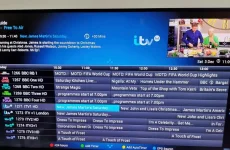
In the latest versions of Bouquet Editor against each channel there is a little icon to zap to the channel to play it immediately on your TV so if you have 4 versions of, say, Channel 4 HD in the list you can select the zap icon for each in turn to see which one displays a TV picture before perhaps deleting the rest from the listings. (Just be careful with part time channels which may not start until 7 pm)

I assume that you have found in ABM the menu option to "hide sections" which can hide things such as "pay for view" so you don't have to spend time manually deleting them from your Bouquets.
 
This is all I'm trying to achieve. It took me over an hour via DreamEPG just to get the top 40 channels to list in this logical order. Moving channels about is very flaky in that app. Is there an easier way to achieve this? I don't think what I'm wanting here is a particularly unusual use case. Thanks!
IMG_20221203_110956.webpIMG_20221203_110655.webp
 
Last edited:

OpenViX Feeds Status

Back
Top