Superb quality and spec AB-Com PULSe 4K SE. Crazy offer! Only £99! FREE UK DELIVERY! 4K UHD, Enigma 2, Multiboot 4 images & more!...
Superb quality and spec AB-Com PULSe 4K Rev II Twin Satellite tuner only £149! FREE UK DELIVERY! 4K UHD, Enigma 2, SATA HDD facility, Multiboot 4 images & more!...

[VU+ Duo4K SE] Only recording 2 chnnels again

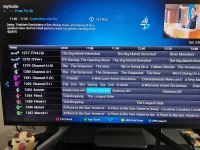
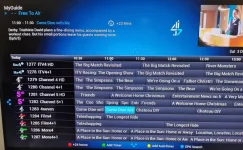
This is all I'm trying to achieve. Just took me over an hour via DreamEPG to get it to list in this order. Moving channels about is very flaky in that app. Is there an easier way to achieve this? Thanks!
View attachment 64500View attachment 64501

Webif - see the post I sent at the same time as your post.

By the way, the WebIf has a option (little camera icon on the opening Webif screen) to display a picture/screen shot of what the box is outputting to your TV. If you right click on the picture you have the option to "save image as" which means that you don't have to use a camera to capture screen shots.


My personal preference in the grid EPG is to display 30 minutes of epg history so that a program near the end hasn't already scrolled to the left of the EPG and cannot be seen. In your example the EPG would start at 10:00 with a red line showing the current time at 10:30. menu/setup/epg/epg settings/Maintain old EPG data for = 30
 
Last edited:
Thanks for the responses. Much appreciated.
The problem is my setup has all grown organically as I was trying things out to try to get the best outcome over the last 18 months.
Looks like what I need to do is strip it all back and start again.
I do get the concept of the bouquets, but at the end of the day all I want is a guide that shows the channels I want in the order that I want. That can take hours of faffing pulling in channels from the various bouquets to get all the HD channels and secondary channels listing just right. Thank goodness for the DreamEPG app. Plus there are so many channels in the lists, a lot of which won't tune as they are on paid services. So finding a working UK FTA Channel 4 HD, for example, is a right mission. It doesn't list in the HD bouquet due to Channel 4/FreeSat wrangles, but is actually available, but you have to know which one of the four listed ones works.
On the plus side, I've now got working ITV 2-4 in HD now after this round of channel hunting
But again, I suspect there is a much easier way to do this that I just don't know about.
 
Sorry, realise I've been replying to the wrong thread. Trying to do this on my phone and everything is tiny! Apologies.

Webif is indeed a much easier way to edit the channels. Thank you!
 
Last edited:
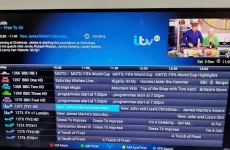
This is all I'm trying to achieve. It took me over an hour via DreamEPG just to get the top 40 channels to list in this logical order. Moving channels about is very flaky in that app. Is there an easier way to achieve this? I don't think what I'm wanting here is a particularly unusual use case. Thanks!
IMG_20221203_110956.webpIMG_20221203_110655.webp
 
This is all I'm trying to achieve. It took me over an hour via DreamEPG just to get the top 40 channels to list in this logical order. Moving channels about is very flaky in that app. Is there an easier way to achieve this? I don't think what I'm wanting here is a particularly unusual use case. Thanks!
View attachment 64503IMG_20221203_110655.webp
 
shouldn't take this long - if on Windows use Echannelizer - the free version is good enough for doing this setup - just load the bouquets, select the one you want to change and move up/down and write back to the receiver
 
You could have used the remote.

Channel 4 HD is in the bouquets. That Freesat /Sky issue was fixed a while back.

Anyway, lets create a favourites.xml file for you so ABM creates the bouquet you want. Upload the following files from /etc/enigma2 You will have to zip them before uploading.

lamedb
Everything ending in .tv
Everything ending in. radio
 
Last edited:
How do I install ABM please? I can't see it listed in the plug in downloads. Thanks.
 
It is pre-installed in the image. You will find it in the tuners and scanning menu.

If you uninstalled it, you will have to re-install it.
Manu > Plugins > Green (download) > System plugins
 
You could have used the remote.

Channel 4 HD is in the bouquets. That Freesat /Sky issue was fixed a while back.

Anyway, lets create a favourites.xml file for you so ABM creates the bouquet you want. Upload the following files from /etc/enigma2 You will have to zip them before uploading.

lamedb
Everything ending in .tv
Everything ending in. radio

Here are the files. Thanks for helping me with this. Learning a lot! :)
View attachment Bouquets.zip
 
I'll have a look later tonight.

Thank you!

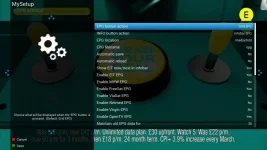
Also, I'm trying to follow your instructions on setting up ther EPG. I have no enable freeview EPG option.
EPG_Options.webp

I also can't find the IEPG data 1 channel from the TV green button satellite menu.
 
Thank you!

Also, I'm trying to follow your instructions on setting up ther EPG. I have no enable freeview EPG option.
View attachment 64506

I also can't find the IEPG data 1 channel from the TV green button satellite menu.

Sorry, my mistake - there is no Freeview option just eit EPG. Then if you have blank EPG on the terrestrial channels just tune into a terrestrial channel that carries the information such as BBC1. It takes a few minutes to populate - afterwards on shutdown/startup the information is stored/read from disk and immediately available and updated over the air to remain up-to-date.

Are you sure that IEPG data 1 is not in the list just after Ideal World - assuming that you have selected Sky Free to Air (FTA) channels rather than Freesat channels in ABM.

Sky FTA gives you all the Freesat channels plus a few others.

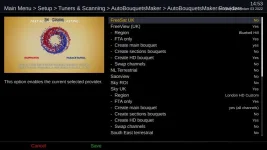
Here is my ABM setting for Freeview via the Bluebell Hill transmitter and Sky FTA - note I have Freesat disabled because I has elected to have a few more channels.

ABM.webp

Here is my list of channels with IEPG in the list

iepg.webp
 
@adm
The IEPG data 1 channel is technically not a viewable service. We added a service hack to ABM to change the service type then changed ABM to allow EPG types so they shows in bouquets and service lists. He was not using AutoBouquetsMaker (ABM). He was using AutoBouquets 28.2E (AB 28.2E) which does not have the coding to change the service type of the IEPG channel. The AB 28.2 E bouquet names have the "--" by default.


Code:
https://github.com/oe-alliance/AutoBouquetsMaker/commit/be8f74f3236f5642b20daf3a255213f9c4f12918

https://github.com/oe-alliance/AutoBouquetsMaker/commit/8ceb6791ed787902ef19b81b27bb7c5ab17067e7
 
Last edited:
Please transfer this favourites xml file to /etc/enigma2/AutoBouquetsMaker/custom/ Then run ABM.

For Sky UK, I have used your option "West Dorset HD", also selected FTA only.
For Terrestrial, use your region.

ABM will create a bouquet using the services it finds. This will mean that you do not have to change things when service references change. You will have to edit the xml file when the channels change official numbers. I only did the first 47 channels in your FTA bouquet, you had the official ones after that. Hopefully it makes sense to you when you read it. Otherwise, post back and someone will assist.

If it is too complicated, we can help you to use manual edits using E-channelizer, Openwebif, Dreamboxedit or the remote. etc.
 

Attachments

Last edited:
Please transfer this favourites xml file to /etc/enigma2/AutoBouquetsMaker/custom/ Then run ABM.

For Sky UK, I have used your option "West Dorset HD", also selected FTA only.
For Terrestrial, use your region.

ABM will create a bouquet using the services it finds. This will mean that you do not have to change things when service references change. You will have to edit the xml file when the channels change official numbers. I only did the first 47 channels in your FTA bouquet, you had the official ones after that. Hopefully it makes sense to you when you read it. Otherwise, post back and someone will assist.

If it is too complicated, we can help you to use manual edits using E-channelizer, Openwebif, Dreamboxedit or the remote. etc.

Oh, that is brilliant. Thank you very much. I had to stop playing with it yesterday as the family were watching TV and I didn't want to risk breaking it all! I need to set aside a good couple of hours when no one is using it to sort it out once and for all :)
 
I'm not sure if it's the same as what you call DreamEPG app but I use the Dreambox Edit app => https://dreambox.de/board/index.php?thread/15282-dreamboxedit-7-2-1-0-support-download/
I find it really useful and works pretty well
I managed to setup my own bouquet by creating it and then dragging in all the channels I wanted in it from the ABM bouquets and even added some of my own Picons using it. I use this to tweak my bouquet from time-to-time and it nearly always does what I want
Its a bit fiddly to begin with but once you know the way it works it is pretty good. The tip I would give for this (that is not overly intuitive) is each time you use it, import the bouquets from the box (overwriting the local stored copy directory) and then you should be good to go. To search for channels (on the left panel) use the first box (under the word "Services" and use the % delimiter. So.. to find all BBC channels pop %BBC% in that field, to find all HD channels use %HD%, etc. Use the other fields as required. You can then drag the channels over to the right (where you will have right clicked and created your own Bouquet) and drop them over that bouquet. You can then select that bouquet on the right and move the channels up and down as you desire. You can also right click on a channel on the right and add your own Picon file and do other magic if you like too.
Once finished simply upload it all to the box and then do a full restart of the box and you are good to go once you go into the EPG and use the prev/next buttons to select your newly created bouquet. Select one of the channels in your new bouquet to make it zap/change to it and that bouquet will then be remembered the next time you go into the EPG.

Hope that helps in some small way.
 
Last edited:

OpenViX Feeds Status

Back
Top