Superb quality and spec AB-Com PULSe 4K SE. Crazy offer! Only £129! FREE UK DELIVERY! 4K UHD, Enigma 2, Multiboot 4 images & more!...
Superb quality and spec AB-Com PULSe 4K Rev II Twin Satellite tuner only £179! FREE UK DELIVERY! 4K UHD, Enigma 2, SATA HDD facility, Multiboot 4 images & more!...

[Mut@nt] HD51 OpenViX 5.1.027 will not return to Deep Standby affter recording

Mickkie

Forum Supporter
Donated Member
Joined
Nov 3, 2017
Messages
256
Reaction score
8
Points
18
Hi All,

I recently updated to OpenViX 5.1.027, which comes with kernel 4.10.12 and drivers 20180424 and noticed two problems related to waking up from and returning to Deep Standby:

1. When the box wakes up from Deep Standby by a timer to start a recording, the framebuffer switches on too and the front panel shows the channel the tuner is set at the time. If the TV happens to be on, then the program playing at the time is of course visible on TV. With previous OpenViXimages the framebuffer would not start up and the front panel remained switched off.

2. Once the recording is finished the box remains switched on, until it is put into Standby or Deep Standby manually.

Is this a known bug, or do I need to (re)set some setting in the menus?

PS. I used a couch-flash, but can try a USB flash too if needed.
 
Once every week or 2, my ET10K wakes up from deep standby to record, but does not go back to standby during the recording.

(Most of my timers are set to go to deep standby after recording, and this always works.)

I'm not using 027 yet.
 
Hi
Somewhat related but quite distinctly different issue with my Power Timer.

In my case, I am getting constant dialogs to say a Timer wants to shut the box down (return to deep st/by) regardless of the box being in use for (sometimes hours).
The Power Timer itself does seem to work OK, by waking up and recording and returning to deep stand by.

Example: box in deep standby (having woken up - recorded - returned to deep st/by), I arrive, start up box, watch live TV and/or watch a recording(s) - sometimes, maybe after several hours, up pops the dialog telling me that a Timer (presumably the latest one) wants to shut box down. If I am not there (making a cup of tea, feeding the cats etc) I can return to find the box has gone back to deep st/by.

I did once report this and was promised a fix, but many updates later, I still have the same issue.
 
…. isn't that what it's supposed to do, shut down the box if it's not recording or you're not watching a recording?
 
In my case, I am getting constant dialogs to say a Timer wants to shut the box down (return to deep st/by) regardless of the box being in use for (sometimes hours).

Sleep timer????

I have a power timer that puts the box into standby after 3 hours of not touching the remote. (and 10 minutes later another to put it into deep standby). If the remote is used the 3 hour time starts again.

The timer uses the sleep delay command.

The operation of this timer is identical to that leshay is describing in that after 3 hours of not using the remote to change something the timer kicks in with the warning message. The 3 hours is my user configuration.

power_timer.webp
 
Last edited:
Hi

My Power Timer is set to go to deep st/by only if in st/by after 10 mins. So what is the connection between that and a dialog popping up after 2 or 3 or 4 hours whatever even if I am watching live TV or a recording?
 
The Power Timer itself does seem to work OK, by waking up and recording and returning to deep stand by.
That would be a Record Timer, not a Power Timer. The pop-up message should (IIRC) say which it is, which might help track down what is happening.

My Power Timer is set to go to deep st/by only if in st/by after 10 mins.
Is that the only Power Timer you have? If so, you should never see a prompt from it.
 
That would be a Record Timer, not a Power Timer. The pop-up message should (IIRC) say which it is, which might help track down what is happening.

Is that the only Power Timer you have? If so, you should never see a prompt from it.

Hi

It is a Power Timer. As above, set to go to deep st/by after 10min only in st/by. The only one I have set up.

OK, the Record Timer wakes the box up, records and goes back to deep st/by (I don't know if it goes back to st/by and then the Power Timer puts it to Deep st/by)

In any case, I can't figure why the pop up dialog, (which does say a recording has ended and wants to shut the box down), occurs after such a long time while the TV has been in use, both live TV and watching recordings.
 
Hi

It is a Power Timer. As above, set to go to deep st/by after 10min only in st/by. The only one I have set up.

OK, the Record Timer wakes the box up, records and goes back to deep st/by (I don't know if it goes back to st/by and then the Power Timer puts it to Deep st/by)

In any case, I can't figure why the pop up dialog, (which does say a recording has ended and wants to shut the box down), occurs after such a long time while the TV has been in use, both live TV and watching recordings.

Speculation.......

Could it be that you are watching TV for ,say, an hour and then in the background a timer recording starts for a program on another channel. When the recording ends you have told your box to go to deep standby and hence the message you see. The box is only obeying your instructions? The box has no knowledge that you may still be watching something and is behaving in exactly the way it would if woken up from deep standby, recorded a program and then gone back into deep standby.

I don’t see the same because all my timers are set for “auto” operation after a recording ends. I read the auto instruction as:
i) If the box wakes up from deep standby to record it will return to deep standby afterwards.
ii) If I’m watching TV and a timer recording starts the box will stay operational afterwards to let me continue watching TV.

If the timers have been set for “After event = go to deep standby” that’s exactly what they will do irrespective of what you may be doing with the box.
 
If the timers have been set for “After event = go to deep standby” that’s exactly what they will do irrespective of what you may be doing with the box.

If there's another recording running, or you're watching a recording, there is no dialogue.

When watching live tv, the dialogue gives you a 2 minute shutting down warning, which you can cancel.
 
…. no idea what you mean.
 
When watching live tv,
or watching a previously recorded program(?)
The box has no way of telling that you are watching. It is "on", that is all that it knows.
Playing back a recording is something it can check, and it assumes someone is watching it.
The two states are different, and hence are treated differently.
 
In any case, I can't figure why the pop up dialog, (which does say a recording has ended and wants to shut the box down)....
If it's saying that a recording has finished then it's a Record Timer.

This, from adm, seems to be the likely cause?
Speculation.......

Could it be that you are watching TV for ,say, an hour and then in the background a timer recording starts for a program on another channel. When the recording ends you have told your box to go to deep standby and hence the message you see. The box is only obeying your instructions?
 
The box has no way of telling that you are watching. It is "on", that is all that it knows.
Playing back a recording is something it can check, and it assumes someone is watching it.
The two states are different, and hence are treated differently.
I class "watching tv" as the basic state the box is in when you switch on.
This "state" always goes to deep standby when timers end if that's what you've configured them to do.
 
The box has no way of telling that you are watching. It is "on", that is all that it knows.
Playing back a recording is something it can check, and it assumes someone is watching it.
The two states are different, and hence are treated differently.

Hi

Well, I would have thought that if it can detect that there have been key presses sent to it that it could conclude the box is 'in use' and cancel any pending calls to shut down.until the next time it finds itself in st/by mode.

If it is getting the request to shut down from a finished Recording Timer, where is that Timer getting that setting from? I mean, the only thing I have done to effect such things is to have the Power Timer to do it.
 
I class "watching tv" as the basic state the box is in when you switch on.
This "state" always goes to deep standby when timers end if that's what you've configured them to do.

Hi

I haven't explicitly set anything like that - which setting are you referring to?
 
Could it be that you are watching TV for ,say, an hour and then in the background a timer recording starts for a program on another channel. When the recording ends you have told your box to go to deep standby and hence the message you see. The box is only obeying your instructions?

Hi

I am not aware of having changed any settings that could cause Recordings to want to shut the box down?
 
Speculation.......

Could it be that you are watching TV for ,say, an hour and then in the background a timer recording starts for a program on another channel. When the recording ends you have told your box to go to deep standby and hence the message you see. The box is only obeying your instructions? The box has no knowledge that you may still be watching something and is behaving in exactly the way it would if woken up from deep standby, recorded a program and then gone back into deep standby.

I don’t see the same because all my timers are set for “auto” operation after a recording ends. I read the auto instruction as:
i) If the box wakes up from deep standby to record it will return to deep standby afterwards.
ii) If I’m watching TV and a timer recording starts the box will stay operational afterwards to let me continue watching TV.

If the timers have been set for “After event = go to deep standby” that’s exactly what they will do irrespective of what you may be doing with the box.


Hi

Well, I have just looked through all upcoming recording timers and every one has the After Event set to Auto. I haven't ever changed/used that setting in the past.
 
Hi

I am not aware of having changed any settings that could cause Recordings to want to shut the box down?

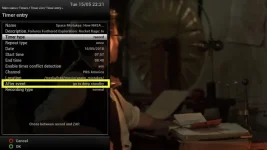
You possibly need to check all the timers for the After Event option setting
record_timer.webp
If any say go to standby or go to deep standby then this is what you are seeing
 

OpenViX Feeds Status

Back
Top