Superb quality and spec AB-Com PULSe 4K SE. Crazy offer! Only £99! FREE UK DELIVERY! 4K UHD, Enigma 2, Multiboot 4 images & more!...
Superb quality and spec AB-Com PULSe 4K Rev II Twin Satellite tuner only £149! FREE UK DELIVERY! 4K UHD, Enigma 2, SATA HDD facility, Multiboot 4 images & more!...

[Zgemma H9S] Openvix 6.0 Crashes

avi68

Member
Joined
Dec 18, 2013
Messages
307
Reaction score
0
Points
16
Hi all,

I have flashed 2 out of 3 boxes to Openvix 6. My Vu Zero which seems to be working fine and my Zgemma H9s which is having a lot of issues.

I followed the flash instructions given on the openvix 6 thread. I initially flashed with openvix 6.0.004 and just recently updated to openvix 6.0.006 and both versions have the same issues.

First issue is sometimes I cant access openwebif via browser. The box will carry on running but I just cannot access it via the web. This will then fix itself after a while and allow me access.

Second issue is when I try and change the channel via the openwebif browser the box will crash and restart. This does not happen on my vu zero which is on 6.0.006.

Third issue is whilst watching tv (only tested with iptv so far) the box will randomly restart itself. No buttons have been pushed, it will just do it on its own accord.

Last issue is if I change to an iptv channel and the channel is down and if I then change to another channel it wont show any video/audio, itll just appear blank. This also happens if I switch to a Freesat satellite channel. The only way to get anything to play (be it via satellite or iptv) is to reboot the box.

I did a fresh flash of 6.0.006 via usb on Wednesday and I also formatted the SD card (the boot card) inside the box. I then restored settings and plugins via my backup and cloned it to the SD card. I have always used the SD card to boot.

Has anyone experienced any of these issues? Any help would be greatly appreciated. Please see the attached crash logs.

Thanks

View attachment Enigma2_crash_2022-01-07_15-03-58.logView attachment Enigma2_crash_2022-01-07_14-23-32.logView attachment Enigma2_crash_2022-01-07_06-52-01.logView attachment Enigma2_crash_2022-01-07_06-50-43.log
 
1. I haven’t seen that type of crash (assign error in ebase) for almost 2 years, usually an issue I believe with corrupted FD’s
Try running your IPTV streams as streamtype 1 instead of 4097……… if your IPTV streams are from a provider then xtreamity is good for this as you can set stream type and play 1 or 4097
2. if you online flash with ImageManager and you run from the sd card, it will flash the root on the sd card, no need to revert and then reload the sd card.
3. there is no crash log from the webinterface issue.
 
1. I haven’t seen that type of crash (assign error in ebase) for almost 2 years, usually an issue I believe with corrupted FD’s
Try running your IPTV streams as streamtype 1 instead of 4097……… if your IPTV streams are from a provider then xtreamity is good for this as you can set stream type and play 1 or 4097
2. if you online flash with ImageManager and you run from the sd card, it will flash the root on the sd card, no need to revert and then reload the sd card.
3. there is no crash log from the webinterface issue.

Thanks for checking out the logs. I used Jedi as I prefer to use bouquets. I can change the iptv type in there to 1. I will give that a go next. Its weird how my Vu Zero works fine with the exact same config but this box doesn't. What do you mean by corrupted FD's?

2. Ah right, thanks for clearing that for me.

3. Ok thats odd, thanks for looking.
 
Can you post your tuner settings and also confirm whether you are just running it with Iptv bouquets and Jedi?… or do you use the sat or C/T connections?
I have my h9 setup with sd card, no issues . Also using web interface is not an issue……. How is the box connected to lan …. Plugs or direct ethernet cable or?
Would be nice if you could just flip to Xstreamity and try that
Its crashing because it believes you have a connection open ( don,t know if its a stream but probably) and its not open when it checks.
 
Can you post your tuner settings and also confirm whether you are just running it with Iptv bouquets and Jedi?… or do you use the sat or C/T connections?
I have my h9 setup with sd card, no issues . Also using web interface is not an issue……. How is the box connected to lan …. Plugs or direct ethernet cable or?
Would be nice if you could just flip to Xstreamity and try that
Its crashing because it believes you have a connection open ( don,t know if its a stream but probably) and its not open when it checks.

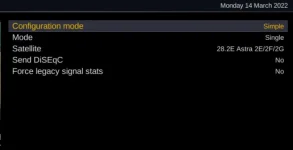
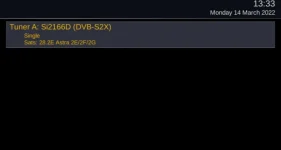
I have attached my tuner settings. So Im running this box with IPTV bouquets using Jedi and I also occasionally use the satellite for freesat.
Box is connected via ethernet directly to a managed switch.

So on the old openvix (5.4.16) I did have a weird issue where when I was watching an IPTV channel, then going to the freesat bouquets they would all be greyed out. The box thought I was using a tuner when I wasnt. If I decided to select the freesat channel it would just keep saying tuner not available. Ive had that weird issue for a while on this box. My other boxes run fine.

2.webp1.webp
 
I have attached my tuner settings. So Im running this box with IPTV bouquets using Jedi and I also occasionally use the satellite for freesat.
Box is connected via ethernet directly to a managed switch.

So on the old openvix (5.4.16) I did have a weird issue where when I was watching an IPTV channel, then going to the freesat bouquets they would all be greyed out. The box thought I was using a tuner when I wasnt. If I decided to select the freesat channel it would just keep saying tuner not available. Ive had that weird issue for a while on this box. My other boxes run fine.

View attachment 63467View attachment 63468
What size is the sd card??? As you are using the sdcard for root, you have as much flash memory as the sd card, so you do not need Cache flush plugin or swap file providing the sdcard is a decent size.
I am aware of tests with a large sdcard and Kodi etc and the box flew!
So assuming the sdcard is at least 16Gb, I would remove both the plugin and swap and see how that goes.
 
What size is the sd card??? As you are using the sdcard for root, you have as much flash memory as the sd card, so you do not need Cache flush plugin or swap file providing the sdcard is a decent size.
I am aware of tests with a large sdcard and Kodi etc and the box flew!
So assuming the sdcard is at least 16Gb, I would remove both the plugin and swap and see how that goes.

SD card is 16GB. Yes I am using the SD card for root. I dont have cache flush or swap file enabled. I dont understand why theres an issue, theres a lot of free space.
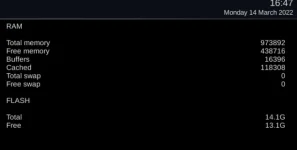
I have attached a screenshot of the memory page.

3.webp
 
SD card is 16GB. Yes I am using the SD card for root. I dont have cache flush or swap file enabled. I dont understand why theres an issue, theres a lot of free space.
I have attached a screenshot of the memory page.

View attachment 63469
There is not an issue with the sdcard- I just noticed in your Signature, cache flush and and the 256 MB swap, and wanted them disabled in case there was some issue there.
Just trying to understand why you get issues with webinterface and the fd issue that is killing the box
Can you post dmesgfrom crash log
 
Last edited:
There is not an issue with the sdcard- I just noticed in your Signature, cache flush and and the 256 MB swap, and wanted them disabled in case there was some issue there.
Just trying to understand why you get issues with webinterface and the fd issue that is killing the box
Can you post dmesgfrom crash log

Sorry I don't understand what you mean by "dmesgfrom crash log". Is there another log you require?
 
Sorry I don't understand what you mean by "dmesgfrom crash log". Is there another log you require?

OK - normally at the bottom of the crash log, there is also attached the dmseg (hardware log) - your logs just say dmseg, so I assumed that you had posted just the software crash info... but I guess not? - Really weird.

So a question .... how many bouquets & services within the bouquets are you running with??? Just trying to understand how the box is setup.
 
OK - normally at the bottom of the crash log, there is also attached the dmseg (hardware log) - your logs just say dmseg, so I assumed that you had posted just the software crash info... but I guess not? - Really weird.

So a question .... how many bouquets & services within the bouquets are you running with??? Just trying to understand how the box is setup.

I just looked through all the crash logs on the box and only one has the dmseg output (the first crash). I have attached it below.

So the box is pretty much a simple setup. Its scanning for freesat on 28.2e. I have 2 IPTV providers. Bouquets: Freesat = 23 bouquets, iptv1 = 35 bouquets, iptv2 = 63 bouquets.

Only additional plugin I use is Jedi. Everything else is standard. I scan using ABM (28.2e), use epg scanner for 28.2 and then jedi to scan iptv and epgimporter for iptv epg. Nothing else is added.View attachment Enigma2_crash_2022-03-12_16-43-50.log
 
Thanks for dmesg, although nothing obvious in the log.
When you get the crash, are you always in the jedi bouquets or carrying out some activity with Jedi??

The difficulty is that the crash is in the C++ code, so cannot (as normal) setup a trap and debug ....
 
Thanks for dmesg, although nothing obvious in the log.
When you get the crash, are you always in the jedi bouquets or carrying out some activity with Jedi??

The difficulty is that the crash is in the C++ code, so cannot (as normal) setup a trap and debug ....

So the best way to reproduce would be to use openwebif on a browser and then use the control on the left to change the channel on the box, this causes an instant crash.

But it also happens randomly, e.g. when watching a stream it will auto crash and restart.
 
So are you running a stream when you use the webif to change channel?
In fact do you usually just use the webif to run the box???
 
So are you running a stream when you use the webif to change channel?
In fact do you usually just use the webif to run the box???

Yes the stream is running on the box and sometimes I use openwebif to change the channel on the box.

No I use the control as well, its just sometimes I change the channel using openwebif.
 

OpenViX Feeds Status

Back
Top