Superb quality and spec AB-Com PULSe 4K SE. Crazy offer! Only £99! FREE UK DELIVERY! 4K UHD, Enigma 2, Multiboot 4 images & more!...
Superb quality and spec AB-Com PULSe 4K Rev II Twin Satellite tuner only £149! FREE UK DELIVERY! 4K UHD, Enigma 2, SATA HDD facility, Multiboot 4 images & more!...

[VU+ Duo2] OpenVix 6.8.002 Tuner Freq Feedback Details Incorrect

Rentakill

New member
Joined
Oct 4, 2012
Messages
7
Reaction score
0
Points
1
Age
52
What type of support thread are you creating?
Possible bug
What OpenViX Image build number are you using?
6.8.002
Have you tried re-flashing WITHOUT settings restore?
YES
Have you tried re-flashing WITH a settings restore?
NO
Hi there.

Runing an older VuDuo2 down under in NZ.

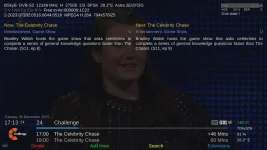
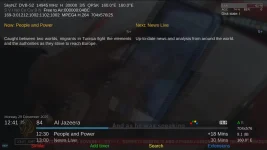
I noticed on the previous OpenVix 6.8.001 Version and now 6.8.002 that the Main Onscreen Graphic Display (After Zapping between Channels) displays the Incorrect Received Frequency Information.
Both installs were fresh installs with no Backup Settings loaded. Builds From Scratch.
Satellites .xml details are correct, LNB Configuration is also Correct - (Just a Single Cable / 10700Mhz LNB setup on a Single Satellite) So nothing Technical.

For Example:
Al jazeera Received on 12530 H 30000, 3/5 Fec.......... OpenVix Main GUI Displays it as 14945H 30000, 3/5 Fec.
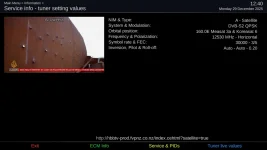
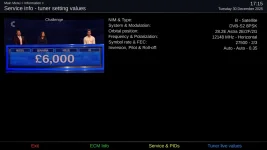
When using the Main Menu / Information / Service / Tuner Setting Values - The details reported are Correct. (See Pics)


This problem is only seen on the Vu+Duo2... My Vu Solo2 Boxes and Zgemma boxes that run the same 6.8.001 Versions are fine.

Any Ideas ?....

Anyone have any idea ?01 Incorrect Freq - Via Main Screen GUI Freq.webp02 Correct Freq - Via Information Panel.webp
 
So in Service Info screen what does it show if you press BLUE for "Tuner live values"?

Also, what is the LNB type? Can you post a grab of the tuner config?
 
But my guess is most likely a driver error on that box. And if so there is not much hope of fixing it. I seem to recall something similar on the original Ultimo.

On the Ultimo4k it displays properly.
 

Attachments

  • 1.webp
    1.webp
    80.3 KB · Views: 7
  • 2.webp
    2.webp
    48.8 KB · Views: 7
is there already a long time on duo 2 .Never mentioned it because it gives no problems viewing and scanning. Had it on 28.2E satelite
 
So in Service Info screen what does it show if you press BLUE for "Tuner live values"?

Also, what is the LNB type? Can you post a grab of the tuner config?
Hi there.

Second Picture of the Two is the Actual "Tuner Live Values" you mention.
LNB Configuration is as above. It's nothing Technical. No Multiswitch, DiseqC etc... Just a Single Cable System.
LNB is a Sharp 10700 Quad - Which are a pretty Solid LNB.

Using other Images such as Pli, Vti etc the box Reports the Correct Frequency Information. So definately looking like a OpenVix Code issue.

Cheers
Ren
 
But my guess is most likely a driver error on that box. And if so there is not much hope of fixing it. I seem to recall something similar on the original Ultimo.

On the Ultimo4k it displays properly.
Hi Huevos

Thanks for your reply. Yes - I only noticed it on the last two releases but only because Previous to that i was running PurE2 Images.
But yes, it doesn't affect the box's operation.
I guess the Duo2 is getting towards its end of life. Just a Pity as it's a bloody good Receiver


Cheers
Ren
 
"LNB is a Sharp 10700 Quad - Which are a pretty Solid LNB." ? So not a "Universal" LNB? Which is why I asked to see the tuner config.

Also, it seems strange other boxes would show the correct values if it were a fault in enigma.
 
is there already a long time on duo 2 .Never mentioned it because it gives no problems viewing and scanning. Had it on 28.2E satelite
Hi belljt

Thankyou for that.. So it is a bug with OpenVix. Thats good to know i'm not the only one to Notice.
Like you say. It gives no problem with Viewing and Scanning.

Cheers:
Ren
 
"LNB is a Sharp 10700 Quad - Which are a pretty Solid LNB." ? So not a "Universal" LNB? Which is why I asked to see the tuner config.

Also, it seems strange other boxes would show the correct values if it were a fault in enigma.
Hi there - Like i mentioned in the Original Post. It's a Pretty simple One Cable Solution.
No Universal - Just a Standard 10700Mhz LNB. But i get your Angle though - Add 200Mhz to the LO and yes id be seeing a similar problem.

The Fact that the Information Panel for Tuner Status Reports the Correct Frequency pretty much points to it being a coding error within the OpenVix Image. (Bellejt Confirmed the same Problem Earlier)

Configs are totally fine. Have been playing around with these boxes for the last 25 years.


Cheers
 
So if it is a "coding error" in enigma why does it only show on that box?
 
Last edited:
So if it is a "coding error" in enigma why does it only show on that box?
Hi Huevos.

I'm not sure why its only showing on the Duo2. hence why i have made the Post and have Bellejt also confirm the same issue.
Loading on any other image from Pli, Pure2 etc. - its fine. So, i think that points at it being an Openvix Issue.
I'm not overly too worried about it but thought it be a good idea to raise the issue.
 
PLi does it just the same as ViX, we just checked.

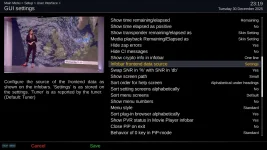
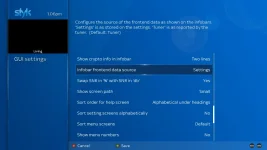
The difference between PLi and ViX is the default of "config.usage.infobar_frontend_source".

In ViX it displays the frontend info direct from the "tuner" and in PLi the default is from "settings", i.e. satellites.xml.

So the problem is drivers reporting the wrong tuner data. If you change "config.usage.infobar_frontend_source" to "settings" it will hide the erroneous data returned by the faulty drivers.
 

Attachments

  • 1.webp
    1.webp
    93.6 KB · Views: 7
Hi Huevos.

Your a Legend !. Found that Setting and Swapped it over. And its "Mint As".
Thankyou for that.
Now I'm going to Crack into a few Beers and Party the New Year in. Its 1pm here New Years Eve - Downunder Nz.

I'll Update the Box back to the Latest Revision of OpenVix tommorow.

Have a Good One.
 

Attachments

  • Gui Settings.webp
    Gui Settings.webp
    48.2 KB · Views: 11

OpenViX Feeds Status

Back
Top