
Superb quality and spec AB-Com PULSe 4K SE. Crazy offer! Only £99! FREE UK DELIVERY! 4K UHD, Enigma 2, Multiboot 4 images & more!...
Superb quality and spec AB-Com PULSe 4K Rev II Twin Satellite tuner only £149! FREE UK DELIVERY! 4K UHD, Enigma 2, SATA HDD facility, Multiboot 4 images & more!...
You are using an out of date browser. It may not display this or other websites correctly.
You should upgrade or use an alternative browser.
You should upgrade or use an alternative browser.
OpenViX 6.8 Release discussion thread
- Thread starter Huevos
- Start date

- Status
- Not open for further replies.


So can you telnet into box? (E.g with putty)Help! DM900, after having updated to OpenViX 6.8, the box turned off and it should have restrted, but did'nt restart. It keeps flashing red and nothing happens. Tried downloading OpenViX 6.8 on usb and plug it the box, but it does the same, keeps blinking red and it cannot restart, like is in a loop. I then downloade Open Vix 6,7, to see in that could restart the box, but i cannot. I tried leave it on and every ten minutes or so it riest to restart, but it can'nt. At the moment is still flashing/blinking red and nothin happens. Any idea? Thanks
if so then type init 4 (space between) and then enigma2 and see if it crashes and where and why.
Or... it is passing the EPG data but Openvix on the receiving side is not extracting it and using it.So it looks like the streaming of the S2X is not passing the EPG data in the stream whereas if it is a T2 stream then it is. Odd!
Could one of the developers let me know how I can check this please. It is stopping me from generating a local EPG from a streamed S2X channel from one Openvix 6.8.007 to another 6.8.007.. I think it may be that it is not a new issue as I remember trying to do it (via EPGrefresh fake recording) in 6.8.003 and it was not working there either. The Terresstrial ones are fine. Just the S2X streams dont produce any EPG data.
This is my S2X stream from Dreamexplorer on the Zgemma Box:
1_0_19_2865_7FE_2_11A0000_0_0_0 BBC One SouthWest HD
this is the resultant stream information on the SF8008 box:
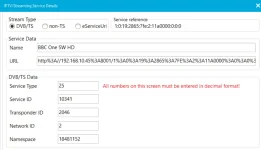
This is one of the terrestrial ones that works (in a different bouquet):
1_0_19_4500_4082_233A_EEEE0000_0_0_0
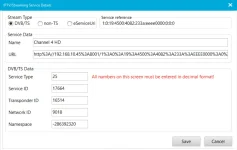
If I can supply any more information then please let me know.
Thanks
Paul

I am confused. Typical is to download and extract the EPG.DATA from the server box.
no Telnet, can'nt connect to the box at allSo can you telnet into box? (E.g with putty)
if so then type init 4 (space between) and then enigma2 and see if it crashes and where and why.
I'm not using a static ip and i do not have any password or login for the box. However, after many tries i managed to get into rescue mode, but could'nt upload openvix 6.8 from usb. After many tries i gave up and downloaded the last Dreambox update from Dreambox and it got the box started! From there i thought i could update Openvix 6.8 from my back up. It found the backup, but it crashed very quickly, so, somehow the update 6.8 in my back up must hvae been corrupted, the reason why it crashed to begin with. I've tried now many times to update a new OpenVix 6.8 from usb, but it does'nt find it and it keeps in booting in Dreambox. Can anybody help?Unless you are using a static ip the ip ddress will nit hve changed.
you login just with userid root password will not be set(which is probably why dreamedit fails)

abu baniaz
Moderator
Just for reference, the login is "root". There is no password unless you set one. (For a few years now, you have to set a password to FTP to it, but that is not required for now). If you cant boot into the receiver, you can find out the IP address from your router's page or Angry IP scanner or similar.
How do I do this please? I know nothing of it.I am confused. Typical is to download and extract the EPG.DATA from the server box.
Does not the setting "reload epg" in the epg settings (with a destination of the server box for the epg) not do this?
Thanks
Paul
Thanks, i got to the same conclusion...Just for reference, the login is "root". There is no password unless you set one. (For a few years now, you have to set a password to FTP to it, but that is not required for now). If you cant boot into the receiver, you can find out the IP address from your router's page or Angry IP scanner or similar.
2stein
ViX Beta Tester
what do you mean by "from usb". normally you flash an openvix image the same way you flash a dreamos image... from the pc using web browser. the only difference is that you have to unzip the openvix image (as @twol said) before you flash.I've tried now many times to update a new OpenVix 6.8 from usb, but it does'nt find it and it keeps in booting in Dreambox. Can anybody help?

DimitarCC
V.I.P
- Joined
- Dec 28, 2014
- Messages
- 342
- Reaction score
- 63
- Points
- 28
Not really....After tripple buffering added you can not do that with latest images. You have to install old openvix and then flash online...what do you mean by "from usb". normally you flash an openvix image the same way you flash a dreamos image... from the pc using web browser. the only difference is that you have to unzip the openvix image (as @twol said) before you flash.
2stein
ViX Beta Tester
well, maybe my memory tricks me, but during my multi-boot debugging i always flashed recent openvix images using rescue loader when the box didnt boot anymore, and i didnt have any problems.Not really....After tripple buffering added you can not do that with latest images. You have to install old openvix and then flash online...
this was the only method i could get the box to boot again. (in the meantime i found a better way using the rescue recovery console...)
Can you look at ChannelsImporter code?How do I do this please? I know nothing of it.
Does not the setting "reload epg" in the epg settings (with a destination of the server box for the epg) not do this?
Thanks
Paul
I'll try. I'm not a coder though and PY scares the bejesus out of me.Can you look at ChannelsImporter code?
As far as I remember (I wrote it years ago), it downloads the EPG.DATA file from the server box and loads it on the client box. Stream is via fallback tuner on the client. And it also download and loads the bouquet files. I can't help more because I am away from home.
I appreciate its normal to copy the EPG over but Isn't it also normal for the stream to contain the EIT data?Or... it is passing the EPG data but Openvix on the receiving side is not extracting it and using it.
Could one of the developers let me know how I can check this please. It is stopping me from generating a local EPG from a streamed S2X channel from one Openvix 6.8.007 to another 6.8.007.. I think it may be that it is not a new issue as I remember trying to do it (via EPGrefresh fake recording) in 6.8.003 and it was not working there either. The Terresstrial ones are fine. Just the S2X streams dont produce any EPG data.
This is my S2X stream from Dreamexplorer on the Zgemma Box:
1_0_19_2865_7FE_2_11A0000_0_0_0 BBC One SouthWest HD
this is the resultant stream information on the SF8008 box:
View attachment 68676
This is one of the terrestrial ones that works (in a different bouquet):
1_0_19_4500_4082_233A_EEEE0000_0_0_0
View attachment 68677
If I can supply any more information then please let me know.
Thanks
Paul
when I switch to a stream of BBC One on Satellite on the SF8008 it is full of errors about being no EIT data. Shouldn't this be transmitted within the stream - if not for noting else other than to get the now/next data. I think this is a bug.
here is the log when I switch to BBC One HD where there is no EPG data locally:
15:34:01.2679 [eDVBCAService] new service 1:0:19:2865:7FE:2:11A0000:0:0:0:http%3a//192.168.10.45%3a8001/1%3a0%3a19%3a2865%3a7FE%3a2%3a11A0000%3a0%3a0%3a0:BBC 1 SW HD (S)
15:34:01.2679 [eDVBCAService] add demux 0 to slot 0 service 1:0:19:2865:7FE:2:11A0000:0:0:0:http%3a//192.168.10.45%3a8001/1%3a0%3a19%3a2865%3a7FE%3a2%3a11A0000%3a0%3a0%3a0:BBC 1 SW HD (S)
15:34:01.2680 [eDVBDemux] open demux /dev/dvb/adapter0/demux0
15:34:01.2680 [eDVBSectionReader] DMX_SET_FILTER pid=0
15:34:01.2685 [eDVBDemux] open demux /dev/dvb/adapter0/demux0
15:34:01.2686 [eDVBSectionReader] DMX_SET_FILTER pid=18
15:34:01.2692 [Notifications] RemovePopup, id = ZapError
15:34:01.9234 [eDVBVideo0] VIDEO_GET_EVENT GAMMA_CHANGED 0
15:34:02.2147 [eDVBServicePMTHandler] PATready
15:34:02.2151 [eDVBServicePMTHandler] use pmtpid 0103 for service_id 2865
15:34:02.2152 [eDVBDemux] open demux /dev/dvb/adapter0/demux0
15:34:02.2157 [eDVBSectionReader] DMX_SET_FILTER pid=259
15:34:02.2162 [eDVBDemux] open demux /dev/dvb/adapter0/demux0
15:34:02.2165 [eDVBSectionReader] DMX_SET_FILTER pid=0
15:34:02.3261 [eConsoleAppContainer] Starting /usr/bin/grab
15:34:02.4172 [EventInfo] gotEvent, type: 'now', what: 'evUpdatedEventInfo', is timed repeat: False
15:34:02.4189 [EventInfo] gotEvent, timer is set to repeat event in 63 seconds
15:34:02.4199 [EventInfo] current event: None
15:34:02.4204 [EventInfo] gotEvent, type: 'next', what: 'evUpdatedEventInfo', is timed repeat: False
15:34:02.4215 [EventInfo] gotEvent, timer is set to repeat event in 63 seconds
15:34:02.4238 [eDVBDemux] open demux /dev/dvb/adapter0/demux0
15:34:02.4243 [eDVBSectionReader] DMX_SET_FILTER pid=18
15:34:02.5076 [eDVBServicePlay] eventNewProgramInfo timeshift_enabled=0 timeshift_active=0
15:34:02.5086 [eDVBServicePlay] have 1 video stream(s) (1450), and 2 audio stream(s) (1455, 1451), and the pcr pid is 1450, and the text pid is 1453
15:34:02.5094 [eTSMPEGDecoder] decoder state: play, vpid=1450, apid=1451
15:34:02.5096 [eDVBVideo0] DEMUX_STOP ok
15:34:02.5205 [eDVBVideo0] VIDEO_STOP ok
15:34:02.5210 [eDVBVideo0] destroy
15:34:02.5213 [eDVBVideo] Video Device: /dev/dvb/adapter0/video0
15:34:02.5216 [eDVBVideo] demux device: /dev/dvb/adapter0/demux0
15:34:02.5219 [eDVBVideo0] VIDEO_SET_STREAMTYPE 1 - ok
15:34:02.5221 [eDVBVideo0] DMX_SET_PES_FILTER pid=0x1450 ok
15:34:02.5225 [eDVBVideo0] DEMUX_START ok
15:34:02.5311 [eDVBVideo0] VIDEO_FREEZE ok
15:34:02.5313 [eDVBVideo0] VIDEO_PLAY ok
15:34:02.5315 [decoder][eDVBText] startPID entry M_is_stream 0
15:34:02.5318 [eDVBText0] DMX_SET_PES_FILTER pid=0x1453 ok
15:34:02.5320 [eDVBText0] DEMUX_START ok
15:34:02.5402 [decoder][eDVBText] startCaching M_is_stream 0
15:34:02.5424 [eDVBVideo0] VIDEO_SLOWMOTION 0 ok
15:34:02.5429 [eDVBVideo0] VIDEO_FAST_FORWARD 0 ok
15:34:02.5431 [eDVBVideo0] VIDEO_CONTINUE ok
15:34:02.5433 [eDVBAudio0] AUDIO_CONTINUE ok
15:34:02.5514 [EventInfo] gotEvent, type: 'now', what: 'evUpdatedInfo', is timed repeat: False
15:34:02.5529 [EventInfo] gotEvent, timer is set to repeat event in 63 seconds
15:34:02.5537 [EventInfo] current event: None
15:34:02.5541 [EventInfo] gotEvent, type: 'next', what: 'evUpdatedInfo', is timed repeat: False
15:34:02.5551 [EventInfo] gotEvent, timer is set to repeat event in 63 seconds
15:34:02.5603 [CI] recheckPMTHAndlers()
15:34:02.5608 [CI] recheck 0x80eaa8 1:0:19:2865:7FE:2:11A0000:0:0:0:http%3a//192.168.10.45%3a8001/1%3a0%3a19%3a2865%3a7FE%3a2%3a11A0000%3a0%3a0%3a0:BBC 1 SW HD (S)
15:34:02.5613 [eDVBCIInterfaces] gotPMT
15:34:02.5617 [eDVBDemux] open demux /dev/dvb/adapter0/demux0
15:34:02.5620 [eDVBSectionReader] DMX_SET_FILTER pid=259
15:34:02.7285 [eDVBVideo0] VIDEO_GET_EVENT GAMMA_CHANGED 0
15:34:03.2359 [eEPGChannelData] start reading events(1777905243)
15:34:03.2360 [eDVBSectionReader] DMX_SET_FILTER pid=3842
15:34:03.2363 [eDVBSectionReader] DMX_SET_FILTER pid=3003
15:34:03.2365 [eDVBSectionReader] DMX_SET_FILTER pid=18
15:34:03.2379 [eDVBSectionReader] DMX_SET_FILTER pid=18
15:34:03.2385 [eDVBSectionReader] DMX_SET_FILTER pid=18
15:34:03.2392 [eEPGChannelData] abort non avail OpenTV EIT reading
15:34:04.7893 [eDVBVideo0] VIDEO_GET_EVENT SIZE_CHANGED 1920x1080 aspect 3
15:34:04.7963 [eDVBVideo0] VIDEO_GET_EVENT FRAME_RATE_CHANGED 25000 fps
15:34:10.2404 [eEPGChannelData] abort non avail schedule reading
15:34:10.2409 [eEPGChannelData] abort non avail schedule other reading
15:34:10.2411 [eEPGChannelData] abort non avail FreeSat schedule_other reading
15:34:10.3138 [eEPGChannelData] nownext finished(1777905250)
15:34:10.3142 [eEPGChannelData] stop caching events(1777905250)
15:34:10.3143 [eEPGChannelData] next update in 60 min
Have you checked the stream in VLC to see what it contains.
No but if you tell me what I need to look for in VLC I will do so and report backHave you checked the stream in VLC to see what it contains.

- Status
- Not open for further replies.
Similar threads

- Replies
- 21
- Views
- 1K
[Mut@nt HD2400]
feeds and status-message.php for self built 6.8.007 ?
- Replies
- 6
- Views
- 599
- Replies
- 4
- Views
- 480
