
Superb quality and spec AB-Com PULSe 4K SE. Crazy offer! Only £129! FREE UK DELIVERY! 4K UHD, Enigma 2, Multiboot 4 images & more!...
Superb quality and spec AB-Com PULSe 4K Rev II Twin Satellite tuner only £179! FREE UK DELIVERY! 4K UHD, Enigma 2, SATA HDD facility, Multiboot 4 images & more!...
You are using an out of date browser. It may not display this or other websites correctly.
You should upgrade or use an alternative browser.
You should upgrade or use an alternative browser.
OpenViX 6.8 Release discussion thread
- Thread starter Huevos
- Start date

- Status
- Not open for further replies.


well its in my images - so which image version did you look at? was added April 9th, so images after that should have the .pycThe missing processing.py must be down to software update : any news ?
I have noticed that in the latest firmware releases the front panel display in standby does not dim as far as it used to in previous versions... on the lowest setting before off it is rather too bright in a darkened viewing room. Can this be adjusted please in the next release to as it was before?
Vu Uno 4k SE OpenVix 6.008
Vu Uno 4k SE OpenVix 6.008
Sorry that should read 6 8 007I have noticed that in the latest firmware releases the front panel display in standby does not dim as far as it used to in previous versions... on the lowest setting before off it is rather too bright in a darkened viewing room. Can this be adjusted please in the next release to as it was before?
Vu Uno 4k SE OpenVix 6.008
This is still an issue for me and I was wondering if anyone can shed light on why the EPG is transmitted (and is usable with things like EPGRefresh when it does its fake recording) with T2 streams but not with S2X streams. Why would S2X streams not pass the 7 days or so of EPG data like the T2 streams do? Even the iepg channel doesn't pass the data as I've tried EPG refresh on a client box and it is not picking anything up from the iepg stream it processes from my Zgemma h7s. When I do the same epgrefresh on the Zgemma h7S the EPG data is extracted as expected on both T2 and S2X channels.So it looks like the streaming of the S2X is not passing the EPG data in the stream whereas if it is a T2 stream then it is. Odd!
Last edited:
So I have to admit I have been not following this specific thread, so can you re - summarise the issue...... or point me to a previous post!This is still an issue for me and I was wondering if anyone can shed light on why the EPG is transmitted (and is usable with things like EPGRefresh when it does its fake recording) with T2 streams but not with S2X streams. Why would S2X streams not pass the 7 days or so of EPG data like the T2 streams do? Even the iepg channel doesn't pass the data as I've tried EPG refresh on a client box and it is not picking anything up from the iepg stream it processes from my Zgemma h7s. When I do the same epgrefresh on the Zgemma h7S the EPG data is extracted as expected on both T2 and S2X channels.
You have client boxes to a Zgemma h7s ? and how are you setting up the C/S setup

Why would EPGRefresh pick anything up from iEPG channel? That transponder doesn't have any eit. It is just a data stream that needs special custom handling to extract epg data, not something EPGRefresh can do.This is still an issue for me and I was wondering if anyone can shed light on why the EPG is transmitted (and is usable with things like EPGRefresh when it does its fake recording) with T2 streams but not with S2X streams. Why would S2X streams not pass the 7 days or so of EPG data like the T2 streams do? Even the iepg channel doesn't pass the data as I've tried EPG refresh on a client box and it is not picking anything up from the iepg stream it processes from my Zgemma h7s. When I do the same epgrefresh on the Zgemma h7S the EPG data is extracted as expected on both T2 and S2X channels.
Oh, yes, and sorry to state the obvious, UK satellite channels don't have eit. Only now/next and proprietary epg which EPGRefresh can't handle.
Last edited:
Does it not?? If I sit my zgemma on iepg channel 1_0_1_105D_7D4_2_11A0000_0_0_0 11778V for 10 minutes the whole of the satellite channels EPG data is populated. Doesn't EPGRefresh by doing a fake recording emulate this action? I admit, on the EPG Refresh I do a fake recording of S2X-BBC One HD and S2X-Channel 4 HD and S2X-iepg and Terrestrial-BBC1 HD SW but I always assumed that the tuning to iEPG channel was doing the heavy lifting.Why would EPGRefresh pick anything up from iEPG channel? That transponder doesn't have any eit. It is just a data stream that needs special custom handling to extract epg data, not something EPGRefresh can do.
Hi Twol.So I have to admit I have been not following this specific thread, so can you re - summarise the issue...... or point me to a previous post!
You have client boxes to a Zgemma h7s ? and how are you setting up the C/S setup
In essence - I tune all of my channels on the Zgemma (which I refer to as the "Master Box") and on this box (at the moment) I generate the EPG with EPGRefresh. On my other box (the box I use daily that has no connection to the satellite or T2) I stream the channels from the Zgemma Box using "Remote Channel Stream Converter" plugin on the Client box to pull the T2 and S2X bouquets over from the Zgemma.
This works very nicely and I happily (much to some peoples annoyance) record them on the "Slave" box and do pretty much everyting from the slave box.
The only fly in the ointment is the populating of the EPG. On the Zgemma it is working just fine. On the "slave" box it is not. I do not have this box setup in official "Client Mode" as I was finding it was taking up a whole tuner on the Zgemma for every Recording / Live watching whereas if I stream them with the method I use I can happily record 3 or 4 channels and watch another and if they are all on the same transponder it does not tie it up for each one.
I reiterate - this is working very nicely for 3 months.
To get around the lack of transmission of the EPG data in the S2X streams I have taken to setting up an NFS share pointing to the location of the EPG file on the "Master" box and setting up the "slave" box to point to it.
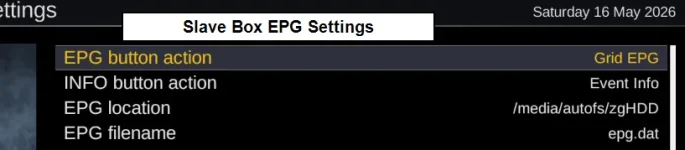
the "Master" box updates its EPG a couple of times a day and saves the EPG file every few hours (as it is always in standby).
The slave box loads the "remote" EPG data every hour from the remote share. It saves nothing to the "remote" EPG" itself apart from when (I assume) it reboots or gores to deep standby. This is also working very well but it was pointed out to me that this was a bad idea and "made no sense" so I was looking at getting the slave box to generate its own local EPG. This is where I have come unstuck because of the lack of transmission of the EPG data in the S2X streams. The T2 streams are fine and work with EPGRefresh on the client box but its a "no-go" on any of the satellite channels.
Hope that makes sense (my explanation) - even if the way I am doing it is not "traditional".
Thanks
Paul
Last edited:
It is a fact. There is no eit on UK satellite. That means no eit to forward to the client box.Does it not?? If I sit my zgemma on iepg channel 1_0_1_105D_7D4_2_11A0000_0_0_0 11778V for 10 minutes the whole of the satellite channels EPG data is populated. Doesn't EPGRefresh by doing a fake recording emulate this action? I admit, on the EPG Refresh I do a fake recording of S2X-BBC One HD and S2X-Channel 4 HD and S2X-iepg and Terrestrial-BBC1 HD SW but I always assumed that the tuning to iEPG channel was doing the heavy lifting.
EPGRefresh is just a zapper. It doesn't do anything. Enigma reads the EPG. Regarding the data on 11778V that is OpenTV format., not eit, and not forwarded to the client. Same with the Freesat epg, proprietary, not eit, and therefore not forwarded.
Your best bet would either be import XML EPG data online, or import and load EPG.DAT as I suggested previously.
Last edited:
OK, Now I understand. Thanks for the explanation - EPGRefresh only works for Teresstrial channels and never for any satellite channels in the UK (28.2e). I truly didn't realise that (and I expect a lot of people also don't).It is a fact. There is no eit on UK satellite. That means no eit to forward to the client box.
EPGRefresh is just a zapper. It doesn't do anything. Enigma reads the EPG. Regarding the data on 11778V that is OpenTV format., not eit, and not forwarded to the client. Same with the Freesat epg, proprietary, not eit, and therefore not forwarded.
Your best bet would either be import XML EPG data online, or import and load EPG.DAT as I suggested previously.
The 3rd option, of course, is to keep doing what I am doing and load the EPG by pointing the client box at the NFS share of the EPG on the Server box. Seems to have been working well so unless there is an overriding reason not to do that then I can see no harm coming from it. The only time it has ever presented an issue was when the box rebooted and failed to mount the NFS share. That has only happened twice in 3 months though and a full reboot of the client box sorts it out (and retelling the EPG screen to point back to the NFS share as it changes to "internal flash" when it does not find th NFS share.
Don't fancy the online EPG as it is never up to date with late program changes but I don't have an issue doing the Export and Import as you suggest but being a non programmer / scripter I found it too difficult to do and gave up before I even got started. I can't see any plugin that does the whole thing end-to-end or any script that is already working that I can schedule with Cron.
Thanks
Paul
Last edited:
So I have tried again. I am using Epg Export plugin with following settings:OK, Now I understand. Thanks for the explanation - EPGRefresh only works for Teresstrial channels and never for any satellite channels in the UK (28.2e). I truly didn't realise that (and I expect a lot of people also don't).
The 3rd option, of course, is to keep doing what I am doing and load the EPG by pointing the client box at the NFS share of the EPG on the Server box. Seems to have been working well so unless there is an overriding reason not to do that then I can see no harm coming from it. The only time it has ever presented an issue was when the box rebooted and failed to mount the NFS share. That has only happened twice in 3 months though and a full reboot of the client box sorts it out (and retelling the EPG screen to point back to the NFS share as it changes to "internal flash" when it does not find th NFS share.
Don't fancy the online EPG as it is never up to date with late program changes but I don't have an issue doing the Export and Import as you suggest but being a non programmer / scripter I found it too difficult to do and gave up before I even got started. I can't see any plugin that does the whole thing end-to-end or any script that is already working that I can schedule with Cron.
Thanks
Paul
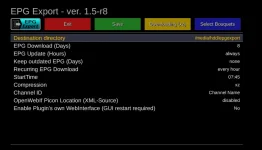
Which creates an xz export file.
Can I then use (on the slave box) epg-importer to point to this file on the NFS share while referncing the XML file creted by m3uiptv plugin as the channels.xml or do I have to firstly FTP it over. It would be nice if I can can point directly to it.
e.g.
zgemma.sources.xml and zgemma.channels.xml
In the sources can I point to an NFS location in the <URL> line
in the channels I somehow point to the xml bouquet file created by remote channels stream converter
It would be cool if the remote channel stream converter has the option to do a regular import of the EPG data from the same server that it gets it channels from

If I can that would look to be the best way without resorting to a script on the slave box (and cron)
Am I on the right path??
So, on the server box, you installed and ran epgexporter.
No point updating it hourly if EpgImporter only accesses the data daily.
After running epgexporter you should have a symlink: /etc/epgexport.
Check the server files are visible from your local network:
On the client box, install EpgImporter.
In /etc/epgimport you need to create a sources file.
Let's call it epgexport.sources.xml
Content of that file:
Change BOX_IP to the real IP of the server box.
Then in EpgImporter on the client, look for "EPG Export Server" and start a download.
No point updating it hourly if EpgImporter only accesses the data daily.
After running epgexporter you should have a symlink: /etc/epgexport.
Check the server files are visible from your local network:
Code:
http://BOX_IP/file?file=/etc/epgexport/epgexport.xml.xz
http://BOX_IP/file?file=/etc/epgexport/epgexport.channels.xml.xz
On the client box, install EpgImporter.
In /etc/epgimport you need to create a sources file.
Let's call it epgexport.sources.xml
Content of that file:
Code:
<?xml version="1.0" encoding="utf-8"?>
<sources>
    <sourcecat sourcecatname="EPG Export Server">
        <source
            type="gen_xmltv"
            nocheck="1"
            channels="http://BOX_IP/file?file=/etc/epgexport/epgexport.channels.xml.xz">

            <description>EPG Export Server</description>

            <url>
                http://BOX_IP/file?file=/etc/epgexport/epgexport.xml.xz
            </url>

        </source>
    </sourcecat>
</sources>
Change BOX_IP to the real IP of the server box.
Then in EpgImporter on the client, look for "EPG Export Server" and start a download.
Last edited:
Thanks for that clear explanation. I'll get on and do that next week.
Out of interest, what is "wrong" with what I'm doing now (ie. Just pointing the client box to the server box's epg file).
Is it because it saves it every shutdown and that risks corruption because it's a different box or a performance issue with nfs or is it a performance issue due to latency? Just curious really.
Thanks again
Paul
Out of interest, what is "wrong" with what I'm doing now (ie. Just pointing the client box to the server box's epg file).
Is it because it saves it every shutdown and that risks corruption because it's a different box or a performance issue with nfs or is it a performance issue due to latency? Just curious really.
Thanks again
Paul
Hi @Huevos ,Thanks for that clear explanation. I'll get on and do that next week.
Out of interest, what is "wrong" with what I'm doing now (ie. Just pointing the client box to the server box's epg file).
Is it because it saves it every shutdown and that risks corruption because it's a different box or a performance issue with nfs or is it a performance issue due to latency? Just curious really.
Thanks again
Paul
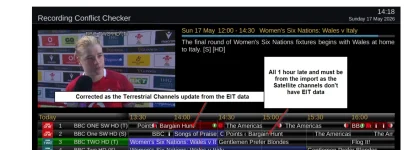
Your instructions worked a treat. I managed to get the EPG imported with one small (but critical) issue. The times of the programs in the EPG are exactly 1 hour ahead of where they should be. I checked the export file and, for example, the program "Bargain Hunt" was showing in the EPG for the Satellite Version as starting at 14:50hrs whereas in the export file it is correctly tagged at 13:50hrs. When I check the EPG on the master box the time is correct (13:50hrs) for both the (S) and the (T).
I checked the EPG Importer settings on the slave box and I cannot see anything that allows me to create an offset (presumably for British Summer Time). I also checked the time was correct
This is an example of the XML entries:
<programme start="20260517135000 -0000" stop="20260517143500 -0000" channel="BBC ONE SW HD (T)">
<title lang="en">Bargain Hunt</title>
<sub-title lang="en">Today's episode comes from Ardingly in West Sussex. Kate Bliss and Gary Pe guide the teams, and presenter Eric Knowles learns how lightweight baskets called trugs are made. [S,AD] [HD]</sub-title>
</programme>
..
..
<programme start="20260517135000 -0000" stop="20260517143500 -0000" channel="BBC One SW HD (S)">
<title lang="en">Bargain Hunt</title>
<sub-title lang="en">Today's episode comes from Ardingly in West Sussex. Kate Bliss and Gary Pe guide the teams, and presenter Eric Knowles learns how lightweight baskets called trugs are made. [S,AD] [HD]</sub-title>
</programme>
This is the EPG on the slave. Note that the (T) channels appear to have been corrected some time after the import the import one assumes by Enigma2 as they carry the full EPG/EIT data when streamed but the Satellite channels (which do not carry EPG) are all 1 hour out (and so I conclude must be from the import as no other source of data to populate them):
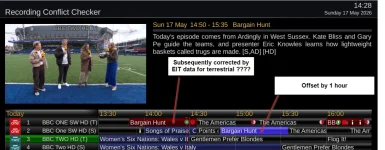
In Contrast this is the EPG on Master (source) box:
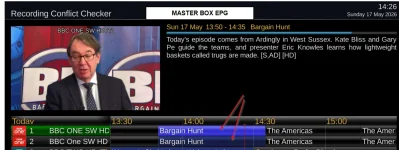
Odd or what!!
Thanks
Paul
Attachments
Last edited:
I don't know. Recheck timezone and DST of both boxes. Delete and rebuild the epg on both boxes. i.e. on the slave go in epg config and select delete. Do the same on the server. Delete the files created by the plugin. Let the server repopulate the epg. Recreate the xml files on the server by running epgexport. Run EpgImporter again on the client.
- Status
- Not open for further replies.
Similar threads

- Replies
- 86
- Views
- 3K

[Mut@nt HD2400]
feeds and status-message.php for self built 6.8.007 ?
- Replies
- 6
- Views
- 636
- Replies
- 6
- Views
- 756