
Superb quality and spec AB-Com PULSe 4K SE. Crazy offer! Only £129! FREE UK DELIVERY! 4K UHD, Enigma 2, Multiboot 4 images & more!...
Superb quality and spec AB-Com PULSe 4K Rev II Twin Satellite tuner only £179! FREE UK DELIVERY! 4K UHD, Enigma 2, SATA HDD facility, Multiboot 4 images & more!...
You are using an out of date browser. It may not display this or other websites correctly.
You should upgrade or use an alternative browser.
You should upgrade or use an alternative browser.
OpenViX 6.8 Release discussion thread
- Thread starter Huevos
- Start date

- Status
- Not open for further replies.

2stein
ViX Beta Tester
hi, wanted to install kodi plugin but i can't find it under extensions. do i have to add an additional feed?
btw. i like the new e2-darkos skin.

btw. i like the new e2-darkos skin.
Last edited:
ross_37
Forum Supporter

Hi
I have completed the upgrade but can't find the e2m3u2bouquet plugin in Plugins
I have tryied to find e2m3u2bouquet v0.9.1 but cant locate the IPK file
any pointer would be welcom
I have completed the upgrade but can't find the e2m3u2bouquet plugin in Plugins
I have tryied to find e2m3u2bouquet v0.9.1 but cant locate the IPK file
any pointer would be welcom

it was deleted from the feeds by the OE-A build team as not working - I have no information other than that - when I have time can try and verify but in meantime suggest you use m3uiptv plugin (in system extensions) that once installed is part of Enigma2 image. If you also change the EPG tp keep 7 days worth of information, if Provider supports will allow you to play old programs without having to record.Hi
I have completed the upgrade but can't find the e2m3u2bouquet plugin in Plugins
I have tryied to find e2m3u2bouquet v0.9.1 but cant locate the IPK file
any pointer would be welcom
ross_37
Forum Supporter
Thanks twol
I will download and try as an alternative
thanks
I will download and try as an alternative
thanks
nekrub2
Member
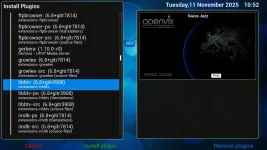
Where did you get it from? In the plugin server I see only hbbtv (6.8+gitr3908). Would be great to get it up and running again.I have no problems with HbbTV and ARD alpha HD, ARTE HD, ZDF HD channels. I'm using webkithbbtv (6.8+gitr3906).

Orlandox
ViX Beta Tester
From the feeds, extensions.Where did you get it from?
nekrub2
Member
.For any reason on my vu+ solo2 I cannot see it in the feeds. Obviously it depends on the machine what you see in the feeds. Could it be that my mipsel32 requires a different one?From the feeds, extensions
Last edited:

kodi/hbbtv utilities (and availability) depends on the machine. Also, whether hbbtv works depends on the channels..For any reason on my vu+ solo2 I cannot see it in the feeds. Obviously it depends on the machine what you see in the feeds. Could it be that my mipsel32 requires a different one?
OpenViX build these utilities, but we are not the authors, nor the maintainers, so if you do have a problem it will need reporting to the authors, not here.
nekrub2
Member
Up to image 6.7.020 everything was fine. HBBTV plugin worked on Swiss, German tv stations, as well as under ARTE. I think I made a big mistake to upgrade my vu+ solo2 (mipsel32) to this image. Maybe I will switch back to what I had before.
I would have expected that the plugins you offer in the feeds are all tested, also with old boxes as mine.
I would have expected that the plugins you offer in the feeds are all tested, also with old boxes as mine.
What exactly did you download to read hbbtv? Remove it. Load "enigma2-plugin-extensions-hbbtv".Up to image 6.7.020 everything was fine. HBBTV plugin worked on Swiss, German tv stations, as well as under ARTE. I think I made a big mistake to upgrade my vu+ solo2 (mipsel32) to this image. Maybe I will switch back to what I had before.
I would have expected that the plugins you offer in the feeds are all tested, also with old boxes as mine.
nekrub2
Member
Well, I have successfully migrated to 6.8.001 from 6.7.020 on three Vu+ boxes but it wasn't without issues.
Firstly, I found it impossible to migrate the plugins from my previous image using the upgade wizard on initial boot.
Secondly, if I did migrate the settings on initial boot there were issues with network configurations, which could only be overcome by setting a Network Password manually, followed by manually adding external DNS servers (8.8.4.4) which after seveal reboots allowed me to finally install Samba & NFS.
Thirdly, with the network sorted it was then easy to restore both settings and Plugins from the backedup 6.7.020 image, which in my case included VPN Manager, Xclass, BMX & Youtube, all of which work perfectly.
I hope my findings may help others who experience the same.
My advice to anyone upgrading would be to flash clean with nothing migrated from previous image, sort out the network and install Samba plus adding external DNS servers, then restore.
Firstly, I found it impossible to migrate the plugins from my previous image using the upgade wizard on initial boot.
Secondly, if I did migrate the settings on initial boot there were issues with network configurations, which could only be overcome by setting a Network Password manually, followed by manually adding external DNS servers (8.8.4.4) which after seveal reboots allowed me to finally install Samba & NFS.
Thirdly, with the network sorted it was then easy to restore both settings and Plugins from the backedup 6.7.020 image, which in my case included VPN Manager, Xclass, BMX & Youtube, all of which work perfectly.
I hope my findings may help others who experience the same.
My advice to anyone upgrading would be to flash clean with nothing migrated from previous image, sort out the network and install Samba plus adding external DNS servers, then restore.
Hi all, I'm new here, and not sure if this is the correct page to post my question. I have a old VU solo two receiver box, but when I try to to connect with with a HDMI cable I cannot get anything. When I use a scart lead there is no problem receiving the free channels.
Your question is not related to this topic. You need to start your own thread.Hi all, I'm new here, and not sure if this is the correct page to post my question. I have a old VU solo two receiver box, but when I try to to connect with with a HDMI cable I cannot get anything. When I use a scart lead there is no problem receiving the free channels.

nileshpateluk
New member
- Joined
- Dec 13, 2016
- Messages
- 20
- Reaction score
- 0
- Points
- 1
Can't see this for my Mutant HD51, Is it coming soon ?
spanner123
Forum Supporter
- Joined
- Jun 22, 2015
- Messages
- 373
- Reaction score
- 6
- Points
- 18
@Mickkie has compiled his own for the HD51, see this thread post #840 https://world-of-satellite.com/threads/build-my-own-vix-image.61295/page-42Can't see this for my Mutant HD51, Is it coming soon ?
Mutant HD51 and AX61 now have official builds.
I noticed the minidlna server cannot be stopped after installation (and reboot). The CLI reports:
The plugin GUI also prints the same message on screen. Indeed, the pid file is not created where the service scripts expects it to be, but in the subdirectory '/var/run/minidlna/minidlna.pid'.
For now I edited the '/etc/init.d/minidlna' file to point to the /var/run/minidlna/ subdirectory:
I don't know if the pid path was changed somehow in the recent Vix upgrade? The minidlna project does not show any changes since 2023. Anyway, this is an easy workaround for anyone who uses DLNA.
Code:
~# service minidlna stop
/etc/init.d/minidlna not running ( according to /var/run/minidlna.pid )For now I edited the '/etc/init.d/minidlna' file to point to the /var/run/minidlna/ subdirectory:
Code:
PIDFILE=/var/run/$NAME/$NAME.pidross_37
Forum Supporter
When upgrading the to the release 6.8.20 on sf8008
I have been unable to connect to my IPTV connection which l used via e2m3u2bouquet
I was directed to use M3UIPTV where l configured using the same, the URL, username and password previously used however when configured l get a timeout error
I have looked at the logs to obtain determine -
KeyID='KEY_EXIT' Binding='('EXIT',)'.
< 2369.835165> [eInputDeviceInit] 0 ae (174) 1
< 2369.835204> [eRCDeviceInputDev] emit: 0
< 2369.835568> [InfoBarGenerics] Key: 174 (Break) KeyID='KEY_EXIT' Binding='('EXIT',)'.
< 2369.835649> [ActionMap] Keymap 'ConfigListActions' -> Action = 'cancel'.
< 2373.752888> [eInputDeviceInit] 1 190 (400) 1
< 2373.752925> [eRCDeviceInputDev] emit: 1
< 2373.753373> [InfoBarGenerics] Key: 400 (Make) KeyID='KEY_YELLOW' Binding='('YELLOW',)'.
< 2373.753475> [ActionMap] Keymap 'M3UIPTVConfigActions' -> Action = 'yellow'.
< 2373.910812> [M3UIPTV] Error has occured during bouquet creation: Traceback (most recent call last):
File "/home/ubuntu/6.7.1/builds/openvix/developer/vuultimo4k/tmp/work/all-oe-linux/enigma2-plugin-systemplugins-m3uiptv/enigma2-plugin-systemplugins-m3uiptv-1.0+git-r0/image/usr/lib/enigma2/python/Plugins/SystemPlugins/M3UIPTV/plugin.py", line 1673, in generateBouquets
File "/home/ubuntu/6.7.1/builds/openvix/developer/vuultimo4k/tmp/work/all-oe-linux/enigma2-plugin-systemplugins-m3uiptv/enigma2-plugin-systemplugins-m3uiptv-1.0+git-r0/image/usr/lib/enigma2/python/Plugins/SystemPlugins/M3UIPTV/IPTVProcessor.py", line 256, in getPlaylistAndGenBouquet
File "/home/ubuntu/6.7.1/builds/openvix/developer/vuultimo4k/tmp/work/all-oe-linux/enigma2-plugin-systemplugins-m3uiptv/enigma2-plugin-systemplugins-m3uiptv-1.0+git-r0/image/usr/lib/enigma2/python/Plugins/SystemPlugins/M3UIPTV/M3UProvider.py", line 71, in storePlaylistAndGenBouquet
File "/usr/lib/python3.12/urllib/request.py", line 215, in urlopen
File "/usr/lib/python3.12/urllib/request.py", line 521, in open
File "/usr/lib/python3.12/urllib/request.py", line 630, in http_response
File "/usr/lib/python3.12/urllib/request.py", line 559, in error
File "/usr/lib/python3.12/urllib/request.py", line 492, in _call_chain
File "/usr/lib/python3.12/urllib/request.py", line 639, in http_error_default
urllib.error.HTTPError: HTTP Error 401: Unauthorized
< 2373.912140>
< 2373.916519> [Skin] Processing screen 'MessageBox', position=(0, 0), size=(1920 x 1080) for module 'MessageBox'.
< 2373.930591> [Screen] Warning: Skin is missing element 'icon' in <class 'Screens.MessageBox.MessageBox'>(pie_tv: an error occured during bouquet creation
Error type: HTTPError).< 2373.930638>
< 2373.933330> [MultiPixmap] setPixmapNum(3) failed! defined pixmaps: []
< 2373.934526> [Skin] Processing screen 'MessageBoxSummary' from list 'MessageBoxSummary, ScreenSummary', position=(0, 0), size=(1 x 1) for
I am aware that the URL, Username and Passwords are correct
I am looking for some direction to assist me to resolve my issue and would welcome some input
I have been unable to connect to my IPTV connection which l used via e2m3u2bouquet
I was directed to use M3UIPTV where l configured using the same, the URL, username and password previously used however when configured l get a timeout error
I have looked at the logs to obtain determine -
KeyID='KEY_EXIT' Binding='('EXIT',)'.
< 2369.835165> [eInputDeviceInit] 0 ae (174) 1
< 2369.835204> [eRCDeviceInputDev] emit: 0
< 2369.835568> [InfoBarGenerics] Key: 174 (Break) KeyID='KEY_EXIT' Binding='('EXIT',)'.
< 2369.835649> [ActionMap] Keymap 'ConfigListActions' -> Action = 'cancel'.
< 2373.752888> [eInputDeviceInit] 1 190 (400) 1
< 2373.752925> [eRCDeviceInputDev] emit: 1
< 2373.753373> [InfoBarGenerics] Key: 400 (Make) KeyID='KEY_YELLOW' Binding='('YELLOW',)'.
< 2373.753475> [ActionMap] Keymap 'M3UIPTVConfigActions' -> Action = 'yellow'.
< 2373.910812> [M3UIPTV] Error has occured during bouquet creation: Traceback (most recent call last):
File "/home/ubuntu/6.7.1/builds/openvix/developer/vuultimo4k/tmp/work/all-oe-linux/enigma2-plugin-systemplugins-m3uiptv/enigma2-plugin-systemplugins-m3uiptv-1.0+git-r0/image/usr/lib/enigma2/python/Plugins/SystemPlugins/M3UIPTV/plugin.py", line 1673, in generateBouquets
File "/home/ubuntu/6.7.1/builds/openvix/developer/vuultimo4k/tmp/work/all-oe-linux/enigma2-plugin-systemplugins-m3uiptv/enigma2-plugin-systemplugins-m3uiptv-1.0+git-r0/image/usr/lib/enigma2/python/Plugins/SystemPlugins/M3UIPTV/IPTVProcessor.py", line 256, in getPlaylistAndGenBouquet
File "/home/ubuntu/6.7.1/builds/openvix/developer/vuultimo4k/tmp/work/all-oe-linux/enigma2-plugin-systemplugins-m3uiptv/enigma2-plugin-systemplugins-m3uiptv-1.0+git-r0/image/usr/lib/enigma2/python/Plugins/SystemPlugins/M3UIPTV/M3UProvider.py", line 71, in storePlaylistAndGenBouquet
File "/usr/lib/python3.12/urllib/request.py", line 215, in urlopen
File "/usr/lib/python3.12/urllib/request.py", line 521, in open
File "/usr/lib/python3.12/urllib/request.py", line 630, in http_response
File "/usr/lib/python3.12/urllib/request.py", line 559, in error
File "/usr/lib/python3.12/urllib/request.py", line 492, in _call_chain
File "/usr/lib/python3.12/urllib/request.py", line 639, in http_error_default
urllib.error.HTTPError: HTTP Error 401: Unauthorized
< 2373.912140>
< 2373.916519> [Skin] Processing screen 'MessageBox', position=(0, 0), size=(1920 x 1080) for module 'MessageBox'.
< 2373.930591> [Screen] Warning: Skin is missing element 'icon' in <class 'Screens.MessageBox.MessageBox'>(pie_tv: an error occured during bouquet creation
Error type: HTTPError).< 2373.930638>
< 2373.933330> [MultiPixmap] setPixmapNum(3) failed! defined pixmaps: []
< 2373.934526> [Skin] Processing screen 'MessageBoxSummary' from list 'MessageBoxSummary, ScreenSummary', position=(0, 0), size=(1 x 1) for
I am aware that the URL, Username and Passwords are correct
I am looking for some direction to assist me to resolve my issue and would welcome some input
Last edited:
- Status
- Not open for further replies.
Similar threads

- Replies
- 86
- Views
- 3K

[Mut@nt HD2400]
feeds and status-message.php for self built 6.8.007 ?
- Replies
- 6
- Views
- 636
- Replies
- 6
- Views
- 756