


Problem:
when tuner (tuners) busy (program recording, PiP and etc) usually we can watch/record another program from same transponder and other programs, which unable select at this moment shown in different colour (old Vix images channels, which can select shown in white, channels which can't select shown in grey.
New image Vix HD both channel types show in very similar colour and unable clear see which channels available at this moment.
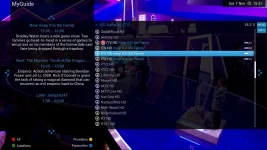
On screenshot you can see that ITV HD is a bit brighter (all tuners busy and at this can select only ITV HD channels) than other channels, but on TV unable clear see which channels available.
Need make some changes in user interface. Inactive channels must be grey or other color.
when tuner (tuners) busy (program recording, PiP and etc) usually we can watch/record another program from same transponder and other programs, which unable select at this moment shown in different colour (old Vix images channels, which can select shown in white, channels which can't select shown in grey.
New image Vix HD both channel types show in very similar colour and unable clear see which channels available at this moment.
On screenshot you can see that ITV HD is a bit brighter (all tuners busy and at this can select only ITV HD channels) than other channels, but on TV unable clear see which channels available.
Need make some changes in user interface. Inactive channels must be grey or other color.
Last edited:


