Superb quality and spec AB-Com PULSe 4K SE. Crazy offer! Only £99! FREE UK DELIVERY! 4K UHD, Enigma 2, Multiboot 4 images & more!...
Superb quality and spec AB-Com PULSe 4K Rev II Twin Satellite tuner only £149! FREE UK DELIVERY! 4K UHD, Enigma 2, SATA HDD facility, Multiboot 4 images & more!...

[Mut@nt] HD51 OpenVix icons/banners beyond screen bounds

Xiaomi

Forum Supporter
Donated Member
Joined
May 7, 2018
Messages
150
Reaction score
0
Points
0
Location
N.I.
I'm having some problems with the positioning of the OpenVix icons/banners for a long time now and I've decided to raise a post on it.

So, I've got the Simple_Ten_Eighty image and the volume display is cropped about 2/3 off the left hand side of the screen - meaning that it can be hard to see. Also, the banner at the top can be cropped at times depending on what I am doing.

Is there anything I can do to recentralise these - especially the volume display?


Thanks.
 
Probably switching off overscan (might be called something else depending on the make) on your tv will fix it.
 
On LG tv’s it’s usually called ‘Just Scan’ in the Picture Mode.


Sent from my iPhone using Tapatalk
 
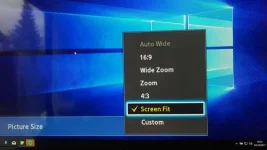
Some tv gives an option like in the attached pic "Screen Fit"
 

Attachments

  • fix-overscan-on-tv-pc-monitor-screen-fit.webp
    fix-overscan-on-tv-pc-monitor-screen-fit.webp
    22.4 KB · Views: 12
Look though all your TV menus.
If it's called 'Overscan' or 'cropping' you want it off.
If it's called 'Just scan' you want it on.
 
Thanks everyone for the replies.
The TV was an LG so the 'Just scan' option was set to 'auto'. I changed it to 'On' and the volume control display is now fully inside screen bounds.
 
Whilst fixing some issues with my setup I've noticed that this is only fixed for HD channels and not SD channels.
Is there a further step required?
 
You need to turn the Auto Resolution feature off in ViX Video settings.


Sent from my iPhone using Tapatalk
 
Thanks - that has worked now - and also seems to have improved the SD picture clarity too.
 
Bump. I am having a similar problem. but much worse. Every now and again I only see the top left portion of the OpenVIX output; it fills the screen and everything looks zoomed in. I have screen resolution set manually to 1080p, and refresh set to 50. It's an LG TV and the Aspect Ratio is set to "Original" and "Just Scan" is turned on.

When it happens I can't see all of the menus, it's really annoying. The only way to restore it is either a full reboot, or go into the Chromium OS YouTube plugin and then exit it. Then it's all back to normal.

I don't think the telly is the cause. Have tried turning it off and on again, but the display is still zoomed. I think the issue happens when the telly is off/standby and OpenVix (a VU+ 4K Duo box) is turned on first. Wondering if it's to do with HDMI/CEC resolution negotiation or something.

Does anyone know how to stop this happening?

Thanks in advance.
 
My mistake, I thought that being on was overscan being on. Thank you for the correction .
 

OpenViX Feeds Status

Back
Top