Superb quality and spec AB-Com PULSe 4K SE. Crazy offer! Only £99! FREE UK DELIVERY! 4K UHD, Enigma 2, Multiboot 4 images & more!...
Superb quality and spec AB-Com PULSe 4K Rev II Twin Satellite tuner only £149! FREE UK DELIVERY! 4K UHD, Enigma 2, SATA HDD facility, Multiboot 4 images & more!...

[SF8008] Oscam files from feeds

bellejt

Forum Supporter
Donated Member
Joined
Dec 24, 2013
Messages
2,253
Reaction score
53
Points
48
Age
65
on an other forum there is a discussion about oscam downloaded from the feeds: where do you install the config files ? Anyone who can give a clear answer where they go so we can respond there to someone who knows it perhaps better :)
Latest tutorial dates from 2018 (the one i found online )
 
Last edited:
so that has changed over the years.Mine where/are always in etc/tuxbox/config
 
the bin file goes in /usr/softcams
the other files go in /etc/tuxbox/config if you are using softcammanager,
bit if using scriptmanager then goes in
/etc/tuxbox/config/oscam.xxxx where the xxx is the oscam e.g. oscam-latest config files go in /etc/tuxbox/config/oscam-latest
 
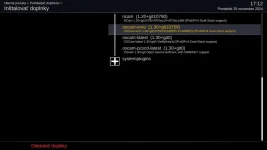
The only difference (apart from the location of the configuration files) is that oscam-pcscd-latest does not create a SoftCam script and is therefore only available via SoftCam manager

PS: If you use SoftCam manager you have to manually add the configuration files to /etc/tuxbox/config/ , otherwise you will see a warning that it cannot be run without configuration files
The installation does not create them, or rather places them in /etc/tuxbox/config/name_oscam/
 

Attachments

  • screenshot_20241125171221.webp
    screenshot_20241125171221.webp
    17.9 KB · Views: 9
Last edited:

OpenViX Feeds Status

Back
Top