Superb quality and spec AB-Com PULSe 4K SE. Crazy offer! Only £129! FREE UK DELIVERY! 4K UHD, Enigma 2, Multiboot 4 images & more!...
Superb quality and spec AB-Com PULSe 4K Rev II Twin Satellite tuner only £179! FREE UK DELIVERY! 4K UHD, Enigma 2, SATA HDD facility, Multiboot 4 images & more!...

[ABM-MISC] Please read before raising ABM support questions

Status
Not open for further replies.

Huevos

Administrator
Staff member
Joined
Jun 20, 2010
Messages
15,680
Reaction score
502
Points
113
Location
38.5N, 0.5W
All ABM support questions must be accompanied by a debug log of the scan.

Debug logging is enabled as follows:
Menu -> Setup -> System -> Logs -> Enable debug logs = yes, and then GUI Restart.
 
If you use IPTV, please ensure that there are no sensitive items in the logs
If you are uing Wi-Fi, check your log for password and remove if you dont want it in public domain.


After you have enabled debug logs and restarted, run ABM so the settings/issues can be captured.

The log can be set to record the local time instead of boot time. It is correct to 10000th of a second. Best to set that instead of boot time. Boot time is useless to for almost everyone.

Default location for debug logs is /home/root/logs/ Transfer to your PC and then attach them to your post. Do not just paste the content into the thread.

Attach the most recent logs after you run ABM. No new/separate logs are created. The Enigma2 system logs will contain ABM detail.
Filename will be something like: Enigma2_debug_2017-09-01_03-53-45.log

Guide to attaching files, should you need it.
http://www.world-of-satellite.com/showthread.php?44054-How-to-take-screen-shots-How-to-attach-files

If you use IPTV, please edit out any sensitive details before uploading your logs


Last edited:
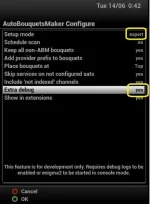
In some instances, we may need extra debug. Do not enable this option unless asked to.

In ABM's configure menu, change from "simple" to "expert"
Then change the setting for "Extra debug" to yes.
 

Attachments

  • ABM extra debug.webp
    ABM extra debug.webp
    21.6 KB · Views: 82
Last edited:
Please also check the commit logs for ABM, just in case the issue you are reporting has already been dealt with.

https://github.com/oe-alliance/AutoBouquetsMaker/commits/master

Secondly, it will be worth your while updating the provider file in the ABM menus then running ABM again.

On OpenVix
Menu > Setup > Tuners & scanning > AutoBouquetsMaker > Update provider files

On other images
Menu > Setup > Service Searching or Reception > AutoBouquetsMaker > Update provider files

View attachment 58780


If you get an error about version incompatibility, best to update to a newer image. If you cannot/do not want to, newer versions of ABM are uploaded in the following thread
https://www.world-of-satellite.com/showthread.php?56797-ABM-standlalone-installation
 
Last edited:
Just to remind users with IPTV:
Before uploading crash/debug logs, please read it with a text editor such as notepad++. If there are IPTV user details, please remove them before uploading to forum. This applies to all images
 
Status
Not open for further replies.

OpenViX Feeds Status

Back
Top