Superb quality and spec AB-Com PULSe 4K SE. Crazy offer! Only £129! FREE UK DELIVERY! 4K UHD, Enigma 2, Multiboot 4 images & more!...
Superb quality and spec AB-Com PULSe 4K Rev II Twin Satellite tuner only £179! FREE UK DELIVERY! 4K UHD, Enigma 2, SATA HDD facility, Multiboot 4 images & more!...

Plugin LCD4linux

gintarasarm

Member
Joined
Feb 29, 2024
Messages
46
Reaction score
3
Points
8
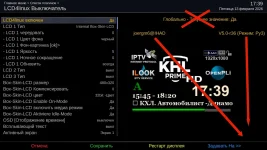
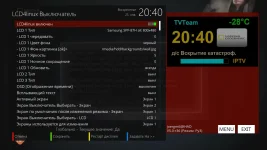
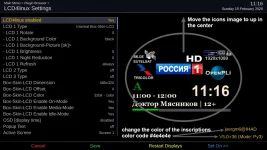
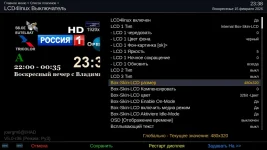
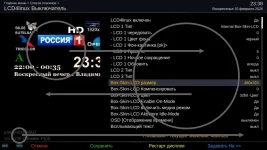
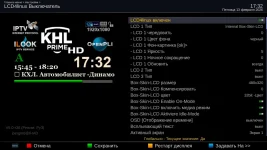
Hi Guys, is it possible to Fix LCD4linux plugin graphics when open it? so that when open it, the image looks the same as on OpenPli Scarthgap? It's very difficult to determine the quality when make icons for a channels. If possible, please fix it so that the graphics look the same as on OpenPli Scarthgap (attaching screenshots). The text should be in the same places, grayed out at the bottom so it's as unobtrusive as possible, and the image itself should be moved up.
Thanks in advance for your reply!
333OpenPli.webp
 

Attachments

  • 335OpenVix.webp
    335OpenVix.webp
    78.9 KB · Views: 24

Huevos and abu baniaz,​

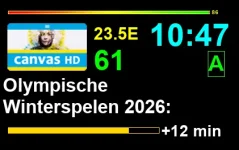
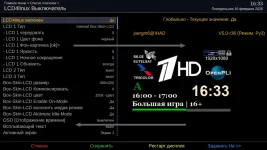
Thank you both so much for your answers... I have another question: how was it possible to create such beautiful and user-friendly graphics on OpenPli, as I showed in the screenshot (I can't even remember which of the OpenPli developers created such beautiful and user-friendly graphics), which a little differs from OpenATV image? Basically, the graphics on the OpenATV image look roughly as I'm asking you to do, and the text isn't highlighted in yellow, which takes away all the attention from the icon image, and there's no text above the image that says "LCD is on" (I've attached a screenshot from OpenATV)... As for @Mr.Servo, as I know, he's currently working on other projects right now.
Thank you both again for your answers.
777.webp
 
Last edited:
The plugin is shared across the OE-A images. If you install it on ATV, you are installing the same plugin as on ViX, provided you are on the same branch. PLI are not part of the OE-A team, their version of the plugin has a separate repository.

If the plugin looks different on ATV compared to ViX, then mrservo is right, it's a skin issue. You have not said which skin you use on VIX and which on ATV. You have not even said which receiver you are using.Most of ViX and PLI users do not use linux4lcd as it generally causes slow downs. Only the

Best you report issues on GitHub on that link Huevos posted. Post clear, distinct and comparative examples for each issue you want resolved. Don't muddle all the issues into one long paragraph with very little punctuation.
 
It is not a "skin issue". He just doesn't like the placement of certain widgets.
 
depends on witch box that you choose the screentype of the LCD to get a good picture.Mine is intern box skin LCD example
1771148877597.webp
 

abu baniaz,​

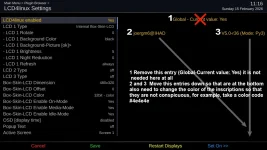
Thank you very much for your answer. Receiver Vu+Duo4KSE, OpenVix 6.8.003, I made two screenshots (please review both screenshots) and a description. I think that now it will be really clear to you. Thank you very much in advance for your help and for your recommendations...If you have any questions, please write, I will definitely answer!

Huevos,​

Special thanks to you too for your help!
1.webp2.webp
 
It is not a "skin issue". He just doesn't like the placement of certain widgets.

Huevos,​

Problem it's the thing is that I make the channel icons by myself and here in the LCD Linux plugin it's done so that you pay attention not to the channel icons but to the inscriptions, especially the yellow ones. It's very difficult for me to make beautiful icons when one inscription shouldn't be there at all and the others are too bright and in the wrong place. That's the thing
 
I make my LCD4 on the PC . You directly see the change by clicking on it left upper
 

abu baniaz,​

Thank you very much for your answer. Receiver Vu+Duo4KSE, OpenVix 6.8.003, I made two screenshots (please review both screenshots) and a description. I think that now it will be really clear to you. Thank you very much in advance for your help and for your recommendations...If you have any questions, please write, I will definitely answer!

Huevos,​

Special thanks to you too for your help!
View attachment 68455View attachment 68456
This screen appears to have come from Magic-FHD and not adjusted for S1080. I have made some changes so it is consistent with the rest of the skin. If you want to try the changes they are here: https://github.com/OpenViX/skins/commit/0c9db4366a9f83326e4a0a5a4442224d4efe1136
 
This screen appears to have come from Magic-FHD and not adjusted for S1080. I have made some changes so it is consistent with the rest of the skin. If you want to try the changes they are here: https://github.com/OpenViX/skins/commit/0c9db4366a9f83326e4a0a5a4442224d4efe1136

Huevos,​

Thank you very much for the information and for your answer, I will definitely try to see what it looks like and I'll let you know, I don’t promise that it will be tomorrow, but in a few days I will definitely write to you, Thank you again for your help!
 

Huevos,​

You look please at the screenshot, You swapped the left and right sides of the image, but you forgot swap the window sizes. Because where the L4L plugin settings are described, the window size should be smaller than where the channel icons are drawn... You need to swap the windows because the full image of the channel icons doesn't fit, and then everything will be just fine.
Thank you so much for your good job and for helping me so honestly!!!
1.webp
 
Last edited:

Huevos,​

OK if that is the standard list then need to swap them as shown in the screenshot...and then everything will be even very good and beautiful
111.webp
 
Last edited:
The list is in the correct place as you will see if you look at other screens.

The problem is the plugin is not resizing its output correctly to fit the widget.
 

Huevos,​

But initially, skin_plugins looked like this (as I'm showing in the screenshot now) I saved the old skin_plugins, and when you made the correction, you swapped the images, and it turned out that the icons don't fit (I marked with arrows how you changed them)... that's why I wrote need to return the image back, that is swap the sides
445.webp
 
Last edited:
Look at any other setup screen. The list is identical. The problem is the plugin does not respect the widget size.
 

Huevos,​

Thank you very much for your advice for you good job... if you manage to fix everything please let me know I will try the LCD4linux plugin again. Thank you very much again for your job!
 
@Huevos , I wrote comments to Mr Servo on the github website about the LCD4linux plugin problems on image OpenViX if it's not too much trouble for you take a look please I write to him in the right place or should I have chosen another place? Thank you in advance for your answer
 

OpenViX Feeds Status

Back
Top