Superb quality and spec AB-Com PULSe 4K SE. Crazy offer! Only £99! FREE UK DELIVERY! 4K UHD, Enigma 2, Multiboot 4 images & more!...
Superb quality and spec AB-Com PULSe 4K Rev II Twin Satellite tuner only £149! FREE UK DELIVERY! 4K UHD, Enigma 2, SATA HDD facility, Multiboot 4 images & more!...

Possibly malfunctioning h7s

Its hard to know what the problem is when you haven't provided a single log. Indeed the first test is to run the receiver in a very basic state on FTA TV - no additional plugins or softcams. Disconnect the hard drive and remove any USB device. If it is still freezing then it would more likely be a hardware problem rather than a memory problem.

I am open to doing that when this week is up. I want to finish this week first, but then I can remove the hdd and any usb sticks, only things connected, hdmi, power and sat feed cables. Am I ok to delete all plugins in the plugin screen? So effectively running with none at all.

There has been no softcam on here for a long time unless one is lingering somewhere.
 
Don't start deleting stuff. It may be a problem with your current setup so we need to eliminate that. Install a fresh image in one of the other multiboot slots leaving your current setup intact and just set it up for FTA TV from scratch - dont restore any settings.
 
Whats the best way to do that, if I use the usb boot image, will that pick a unused slot or let me pick, or should I be using the image manager like I did before?
 
Use the image manager to download the latest 5.4 image and flash it - it will ask you which slot you want to use.

The purpose of all this is to see if the box is stable (ie the hardware is ok). If it runs fine for a few days then the box should be fine and you can start adding stuff back in stages to see what actually causes your problem.
 
I've joined this thread as I'm seeing a similar issue, the RAM is almost full and on boot the box wants to only use swap on /dev/mmcblk0p7. I do have several apps and plugins loaded and I understand that I should really have a box with more RAM but am trying to make the best out of what I have.

I've generated swapfiles on both the USB and HDD of varying sizes from 128Mbit to 1Gbit and tried various entries in fstab. On boot, the system generates a new entry in fstab for a swap on /dev/mmcblk0p7 and uses that by default.

Is there a way of stopping the system generating a new entry for the swap in fstab or giving the /media/usb/swapfile a higher priority and is it worth increasing the swappiness? Be gentle, I'm a Linux novice
 
I've joined this thread as I'm seeing a similar issue, the RAM is almost full and on boot the box wants to only use swap on /dev/mmcblk0p7. I do have several apps and plugins loaded and I understand that I should really have a box with more RAM but am trying to make the best out of what I have.

I've generated swapfiles on both the USB and HDD of varying sizes from 128Mbit to 1Gbit and tried various entries in fstab. On boot, the system generates a new entry in fstab for a swap on /dev/mmcblk0p7 and uses that by default.

Is there a way of stopping the system generating a new entry for the swap in fstab or giving the /media/usb/swapfile a higher priority and is it worth increasing the swappiness? Be gentle, I'm a Linux novice
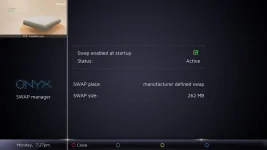
What does swapmanager show in vix plugin…… if they are named swap###### should find them
 
It shows manufacturer defined and won't let me change it

swap.webp
 
@Lincsat ... can you plugin the attachment ( /usr/lib/enigma2/python/Plugins/SystemPlugins/ViX ) and attach debug log --- might also give you some additional options!! BUT !! do not try deleting mmc swap!
It could be mmc swap is last in list and that's why its picked.... so need to see debug output.
 

Attachments

I had found how to prioritise a swap and implemented that by changing the fstab entry to
Code:
/media/usb/swapfile swap swap pri=0 0 0

It is now using the USB swap at boot but still creating the MMC swap and adding that to the swap pool. It's too early to tell if the box is performing any better.

Code:
root@zgemmah7:~# cat /proc/swaps
Filename                                Type            Size    Used    Priority
/dev/mmcblk0p7                          partition       262140  0       -1
/media/usb/swapfile                     file            1048572 28      0
root@zgemmah7:~# free
               total        used        free      shared  buff/cache   available
Mem:         1027736      915388       33492         204       78856       79556
Swap:        1310712          28     1310684
root@zgemmah7:~#

using new swapmanager, I have attached the log. The GUI is still showing the same as previously
 

Attachments

Last edited:
I had found how to prioritise a swap and implemented that by changing the fstab entry to
Code:
/media/usb/swapfile swap swap pri=0 0 0

It is now using the USB swap at boot but still creating the MMC swap and adding that to the swap pool. It's too early to tell if the box is performing any better.

Code:
root@zgemmah7:~# cat /proc/swaps
Filename                                Type            Size    Used    Priority
/dev/mmcblk0p7                          partition       262140  0       -1
/media/usb/swapfile                     file            1048572 28      0
root@zgemmah7:~# free
               total        used        free      shared  buff/cache   available
Mem:         1027736      915388       33492         204       78856       79556
Swap:        1310712          28     1310684
root@zgemmah7:~#

using new swapmanager, I have attached the log. The GUI is still showing the same as previously
this has been surprisingly a pain the ****, caused by all the error msgs thrown up by the eMMC partitions.
trying to delete the h7 swap partition (built in the image build) should only disable it...........
So please try this!! .... Again post debug log and results
 

Attachments

OK, that's about the same mate.

Code:
16:01:56.6122 [SwapManager][StartSwap] Found a SWAP partition:
16:01:56.6169 [SwapManager][StartSwap] Found a SWAP file on  /media/usb/swapfile
16:01:56.6178 [SwapManager] SWAP file is already active on  /media/usb/swapfile

I'm guessing the swap partition is the MMC swap, both swaps are active as before.

The swap GUI looks the same, again it won't allow me to deactivate or change what it shows from the manufacturer defined
 

Attachments

OK, that's about the same mate.

Code:
16:01:56.6122 [SwapManager][StartSwap] Found a SWAP partition:
16:01:56.6169 [SwapManager][StartSwap] Found a SWAP file on  /media/usb/swapfile
16:01:56.6178 [SwapManager] SWAP file is already active on  /media/usb/swapfile

I'm guessing the swap partition is the MMC swap, both swaps are active as before.

The swap GUI looks the same, again it won't allow me to deactivate or change what it shows from the manufacturer defined
No - thats better! Now shows both (just not in display) - I need to be able to display both .. or something.
However I think you will now find only the swap file active
 
No - thats better! Now shows both (just not in display) - I need to be able to display both .. or something.
However I think you will now find only the swap file active

Both swaps are active mate, without the mod to make the USB a higher priority, it's still using the MMC first

Code:
root@zgemmah7:~# cat /proc/swaps
Filename                                Type            Size    Used    Priority
/dev/mmcblk0p7                          partition       262140  5020    -1
/media/usb/swapfile                     file            1048572 0       -2
 
Both swaps are active mate, without the mod to make the USB a higher priority, it's still using the MMC first

Code:
root@zgemmah7:~# cat /proc/swaps
Filename                                Type            Size    Used    Priority
/dev/mmcblk0p7                          partition       262140  5020    -1
/media/usb/swapfile                     file            1048572 0       -2

OK need to play with this on my gbue4k which has a swap partition also
 
@Lincsat

So ground rules!
If there is a image built swap partition , it will show as active at startup. Priority = -1 (default)
If you then create (blue button)a swap file (I have allocations up to 1024MB at the moment), it will now show up in the swap file list ----- > then activate (green) button and it will be swapped on as priority 10.
Obviously if you already have setup a swap file, it should appear in the display, and you can deactivate or delete.
Delete will then show the factory swap, if present - which cannot be deleted.

Try it - may crash, if so crash logs please!.
 

Attachments

That appears to be working pretty much as expected. The swap is the cumulative of the machine swap and any generated swap file but as you mentioned, it prioritises the generated swap.
 

OpenViX Feeds Status

Back
Top