

Hi Guys
I have just bought a new box from our sponsers to replace my aging ET9200. Absolutely nothing wrong with the box, and great service by the way!
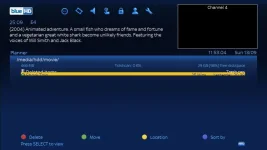
I have installed the Blue-HD Skin and have noticed looking at the Recordings menu that the rows are overlapping:
The 'old' me would know how to correct this immediately, but I am somewhat of a lapsed user and am embarrassed to admit that I no longer have any idea
Any help would be gratefully appreciated.
Regards
shaft
I have just bought a new box from our sponsers to replace my aging ET9200. Absolutely nothing wrong with the box, and great service by the way!
I have installed the Blue-HD Skin and have noticed looking at the Recordings menu that the rows are overlapping:
The 'old' me would know how to correct this immediately, but I am somewhat of a lapsed user and am embarrassed to admit that I no longer have any idea
Any help would be gratefully appreciated.
Regards
shaft


