Hi,
I purchased a DUO2 from WOS about 4-5 weeks ago. I've been running this box in tandem with my Humax Foxsat hdr until I have managed to set it up as I want it.
There are a couple of things which after searching I'm unable to find an answer.
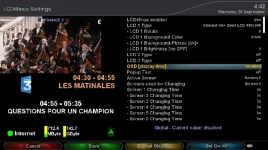
The first is probable a simple answer, in a number of the Metrix menus there is an option to press the "menu button" or the "info button". Which button is the "info button"? I have the latest remote, I've looked at the help files on the box and searched the forum. I'm sure I'm just being a bit thick but I can't work out which button it is.
The second issue is when I stop a previously recorded program, the box occasionally freezes and the Vix spinner appears. This sometimes takes 20 -30 seconds to clear and then everything is fine. Although this isn't a massive problem it is quite annoying.
I have two NFS shares set up both pointing to my NAS, I was wondering if this may be causing the issue.
Also, where are the log files stored? I use SSH Putty & WINSCP to transfer files and look for the logs.
My box is a VU+ DUO2 with two twin DVB-s twin tuners & a 2TB WD20ears 3.5 hdd.
The Vix image version is 3.0, Build 729.
Many thanks
I purchased a DUO2 from WOS about 4-5 weeks ago. I've been running this box in tandem with my Humax Foxsat hdr until I have managed to set it up as I want it.
There are a couple of things which after searching I'm unable to find an answer.
The first is probable a simple answer, in a number of the Metrix menus there is an option to press the "menu button" or the "info button". Which button is the "info button"? I have the latest remote, I've looked at the help files on the box and searched the forum. I'm sure I'm just being a bit thick but I can't work out which button it is.
The second issue is when I stop a previously recorded program, the box occasionally freezes and the Vix spinner appears. This sometimes takes 20 -30 seconds to clear and then everything is fine. Although this isn't a massive problem it is quite annoying.
I have two NFS shares set up both pointing to my NAS, I was wondering if this may be causing the issue.
Also, where are the log files stored? I use SSH Putty & WINSCP to transfer files and look for the logs.
My box is a VU+ DUO2 with two twin DVB-s twin tuners & a 2TB WD20ears 3.5 hdd.
The Vix image version is 3.0, Build 729.
Many thanks