Superb quality and spec AB-Com PULSe 4K SE. Crazy offer! Only £99! FREE UK DELIVERY! 4K UHD, Enigma 2, Multiboot 4 images & more!...
Superb quality and spec AB-Com PULSe 4K Rev II Twin Satellite tuner only £149! FREE UK DELIVERY! 4K UHD, Enigma 2, SATA HDD facility, Multiboot 4 images & more!...

Red-HD V1

  • Thread starter Thread starter rossi2000
  • Start date Start date
Hi rossi,

Great skin and keep up the good work with both this and the blue hd one.

Can I ask, as a personal preference, is it possible to change the following:-

2ndinfobar.jpg (as based on your 1st post) have the name of the channel where the title of the programme is. Move the time of the programme to where the name of the channel was originally and finally move name of the programme down to where the time of the programme was originally.

Please see attached image I have just quickly amended.
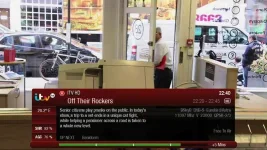
2ndinfobar_amended.webp

Infobar.jpg (as based on your 1st post) same movement as above.

Quicksingleepg.jpg (as based on your 1st post) same movement as 2ndinfobar above.

Quickmulti.jpg (as based on your 1st post) same movement as 2ndinfobar above.

If it's ok with you for me to try this myself I would be grateful if you could provide the name of the file(s) I would need to look at to change around.

Many thanks.
 
hi mate

ye sure do what you like mate :)

inside the Red-Hd are the skin xmls.

most of is in the templates where i created each template with a header which should be simple for you to work out.

InfobarProgramNowName
InfobarProgramNowStartTime

things like that.
 
some bootlogos made for this skin only made them quick but if people please use and like. You have to extract the zip files ive put them in
any ideas or ones people want me to p.m me with picture and il reply back thanks

virgin 1.webp
Code:
Download above logo here > [ATTACH]37792._xfImport[/ATTACH]

virgin 2.webp
Code:
Download above logo here > [ATTACH]37794._xfImport[/ATTACH]

virgin 3.webp
Code:
Download above logo here > [ATTACH]37796._xfImport[/ATTACH]
 
Hi rossi,

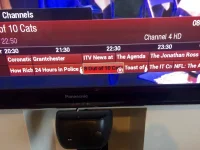
Just seen this on the RED HD skin, its ot an issue but thought you might want to know.
Sorry didnt have time to take a screen shot, only a phone pic.
Its the grey/white semi-circles either side of 8 out of 10 cats.

CheersPhoto 07-11-2014 08 34 07.webp

Cheers
 
They are supposed to be there and have been for over 18 months as a feature to signify that you have a recording set on the program in the middle, kind of like a set of brackets.
 
Sorry only just noticed, only been using the skin a week or so.
I thought I would only get the "R" to denote an upcoming recording.
Thanks.
 
Hey Rossi, might be a non issue but could you check something?

When I cage the skin from red hd to another .......the yes no confirmation dialog does not highlight the yes or no answer selection.

Cheers.
 
Does the skin still work with Apollo 78, don't see it in the skin menu anymore?
 
some bootlogos made for this skin only made them quick but if people please use and like. You have to extract the zip files ive put them in
any ideas or ones people want me to p.m me with picture and il reply back thanks

View attachment 37791
Code:
Download above logo here > [ATTACH]37792[/ATTACH]

View attachment 37793
Code:
Download above logo here > [ATTACH]37794[/ATTACH]

View attachment 37795
Code:
Download above logo here > [ATTACH]37796[/ATTACH]

These look great - where do you need to put the files to get them to work?
 
Hey Rossi, might be a non issue but could you check something?

When I cage the skin from red hd to another .......the yes no confirmation dialog does not highlight the yes or no answer selection.

Cheers.

yup
dont know why this happens, tried fixing a while ago
it doenst happen everytime from my tests
 
/etc/enigma2

Thanks.

I don't see the skin on the feeds anymore, however have manually uploaded it onto the box.

Box is running the latest apollo (80) and I am seeing large fonts on a few menu screens. any help appreciated.
 

Attachments

  • IMG_3147.webp
    IMG_3147.webp
    53.4 KB · Views: 56
imish, like rossi said, have you installed the apollohd software, which I'm guessing you have done as it's not compatible with the HD version.
 
/etc/enigma2

this worked - is there a way to change the RED HD Logo - Top Left on the channel menu?

I like the new ones however for me this skin of yours is the best, easy to read, navigate, all round a great simple user experience.
 
imish, like rossi said, have you installed the apollohd software, which I'm guessing you have done as it's not compatible with the HD version.

I am running Apollo 080 - I am not sure what apollohd is.

EDIT - yes, I am running the new apolloHD code.
 
Last edited:
I am running Apollo 080 - I am not sure what apollohd is.

EDIT - yes, I am running the new apolloHD code.

That's why it's not compatible. You can try the new youvix red skin which is lovely? If not you will need to install the non hd version of Apollo and your red hd skin will be A Ok again. But I would give youvix red a go buddy. :thumbsup:
 
EDIT - yes, I am running the new apolloHD code.

Thats why it's not working properly then, the HD images only support the 1080 skins, other skins simply are not setup for this image and will not work properly without considerable modification.
 
Thats why it's not working properly then, the HD images only support the 1080 skins, other skins simply are not setup for this image and will not work properly without considerable modification.

thats a shame as the skin is 95% there, there are a couple of minor gremlins that I have been able to identify (from a UI perspective).
 
yes but those other bits are throughout the image and cannot be fixed with skin settings at this time.
 

OpenViX Feeds Status

Back
Top