Superb quality and spec AB-Com PULSe 4K SE. Crazy offer! Only £99! FREE UK DELIVERY! 4K UHD, Enigma 2, Multiboot 4 images & more!...
Superb quality and spec AB-Com PULSe 4K Rev II Twin Satellite tuner only £149! FREE UK DELIVERY! 4K UHD, Enigma 2, SATA HDD facility, Multiboot 4 images & more!...

Running text on VFD display of Duo2 (workaround for ViX)

ubisIst

Skinner
Joined
Oct 23, 2011
Messages
71
Reaction score
1
Points
0
Here is my workaround to scroll text content on VFD display of Duo2.

As Infobar content you will see ChannelName followed by Eventname (on the same line).

1. backup somewhere your actual skin_display.xml
2. copy my 'RunningText.py' /usr/lib/enigma2/python/Components/Renderer
3. copy 'g16ServiceNameEvent.py' to /usr/lib/enigma2/python/Components/Converter
4. copy one of my 'skin_display.xml' to /usr/share/enigma2/display
5. restart Enigma and enjoy :)


The difference between 'normal' and 'extralarge' is only one: im 'extralarge' (my prefered) Infobar has the maximal possible fontsize.

(Tested on Duo2 + ViX)
 

Attachments

RollerCharLCD & RollerCharLCDLong are already in the image; those should be used.

For example
Code:
<widget source="desc" render="RollerCharLCD" position="0,21" size="143,20" font="VFD;18" noWrap="1" />

If you use those, we could add your VFD skins to the feeds. That way they are easily available for everyone.

PS: To be able to add them to the feeds a photo (as preview) is also needed.
PPS: What is that g16ServiceNameEvent.py doing more than the image already can?
 
Last edited:
Thanks for answering :)

RollerCharLCD & RollerCharLCDLong are already in the image; those should be used. If you use those, we could add your VFD skins to the feeds. That way they are easily available for everyone.
RunningText.py is a pixel scroller / RollerCharLCD is a char scroller. Pixel-scrolling ist quite smoother than char-scrolling. RunningText.py have a lot of simply configurable parameters and you can use the same renderer for LCD/VFD and GUI.

PPS: What is that g16ServiceNameEvent.py doing more than the image already can?
g16ServiceNameEvent.py allows you to scroll the content of two lines in one line at the same time. In this case ChannelName will be followed by Eventname (on the same line) so you simply save space with it.

PS: To be able to add them to the feeds a photo (as preview) is also needed.
Preview photos is the simplest problem for me :)
 
thanks, will test them,

BTW for VFD skin packs to be detected in display skin selector, just create a folder name in '/usr/share/enigma2/display' and place the 'skin_display.xml' file in that folder the skin selector will detect the new skins

ie

Code:
/usr/share/enigma2/display/test2/skin_display.xml
 
...BTW for VFD skin packs to be detected in display skin selector, just create a folder name in '/usr/share/enigma2/display' and place the 'skin_display.xml' file in that folder the skin selector will detect the new skins

/usr/share/enigma2/display/test2/skin_display.xm
This was the ultimate hint for me :thumbsup:

I can now switch perfectly between different VFD-skins :cool:
 
ubisIst_VDFskins_for_Duo2_ViX

Here are my three Duo2 VFD-skins for ViX :)

The main difference between the Default VFD-skin and my skins is Scrolling text in most all screens and bigger fontsizes.

Their description:

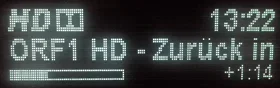
'ubisIst_normal' - the Infobar is same as 'Default' but the content you will see is ChannelName followed by Eventname (scrolled on the same line)

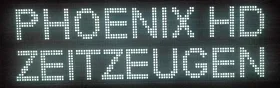
'ubisIst_extlalarge' - just one line on Infobar. You will see ChannelName followed by Eventname (scrolled on the same line) but the text has the maximal possible fontsize.

'ubisIst_rotator' - the Infobar have two lines:
-the top line will scroll 'ChannelName' only 2 times
-the bottom line will scroll and switch between 'EventName' and 'EventDescription'.


How to install:
1. copy the content of 'ubisIst_VFDskins_for_Duo2_ViX.zip' (three folders) to /usr/share/enigma2/display
2. copy 'RunningText.py' to /usr/lib/enigma2/python/Components/Renderer
3. copy 'g16ServiceNameEvent.py' to /usr/lib/enigma2/python/Components/Converter
4. copy 'ConverterRotator.py' to /usr/lib/enigma2/python/Components/Converter
5. restart Enigma and choose one of my VFD-skins in display skin selector :)

Enjoy and report problems.

(tested only on Duo2)
 

Attachments

Here are my three Duo2 VFD-skins for ViX :)

The main difference between the Default VFD-skin and my skins is Scrolling text in most all screens and bigger fontsizes.

Their description:

'ubisIst_normal' - the Infobar is same as 'Default' but the content you will see is ChannelName followed by Eventname (scrolled on the same line)

'ubisIst_extlalarge' - just one line on Infobar. You will see ChannelName followed by Eventname (scrolled on the same line) but the text has the maximal possible fontsize.

'ubisIst_rotator' - the Infobar have two lines:
-the top line will scroll 'ChannelName' only 2 times
-the bottom line will scroll and switch between 'EventName' and 'EventDescription'.


How to install:
1. copy the content of 'ubisIst_VFDskins_for_Duo2_ViX.zip' (three folders) to /usr/share/enigma2/display
2. copy 'RunningText.py' to /usr/lib/enigma2/python/Components/Renderer
3. copy 'g16ServiceNameEvent.py' to /usr/lib/enigma2/python/Components/Converter
4. copy 'ConverterRotator.py' to /usr/lib/enigma2/python/Components/Converter
5. restart Enigma and choose one of my VFD-skins in display skin selector :)

Enjoy and report problems.

(tested only on Duo2)


ServiveName convertor will have 'NameAndEvent' support in next build so no need for g16Service...... convertor.
RunningText renderer has been added to image

what is 'ConverterRotator.py' ?
 
ConverterRotator allows you to switch any X time the content of a line with different information (from the same family) - in this case between 'EventName' and 'EventDescription'.

Here and Here
 
ConverterRotator allows you to switch any X time the content of a line with different information (from the same family) - in this case between 'EventName' and 'EventDescription'.

Here and Here


ok thanks, does ' RunningText.py' have a git ?
 
I don't know about a RunningText git - but is from the same autor of ConverterRotator: vlamo
 
ServiveName convertor will have 'NameAndEvent' support in next build so no need for g16Service...... convertor.
RunningText renderer has been added to image...
Thanks for adding (in build 718) RunningText and ConverterRotator to image and enabling 'NameAndEvent' in ServiceName. All works perfectly :cool:
So I removed obsolete things from skins and description.
In this post the new (12.08.1013) version.

-------------------------------------------------

Here are my three Duo2 VFD-skins for ViX :)

The main difference between the Default VFD-skin and my skins is Scrolling text in most all screens and bigger fontsizes.

Their description:

'ubisIst_normal' - the Infobar is same as 'Default' but the content you will see is ChannelName followed by Eventname (scrolled on the same line)

'ubisIst_extlalarge' - just one line on Infobar. You will see ChannelName followed by Eventname (scrolled on the same line) but the text has the maximal possible fontsize.

'ubisIst_rotator' - the Infobar have two lines:
-the top line will scroll 'ChannelName' only 2 times
-the bottom line will scroll and switch between 'EventName' and 'EventDescription'.


How to install:
1. copy, overwriting previous vers. the content of 'ubisIst_VFDskins_for_Duo2_ViX*.zip' (three folders) to /usr/share/enigma2/display
2. restart Enigma and choose one of my VFD-skins in display skin selector:)


Enjoy and report problems.

(tested only on Duo2)
 

Attachments

@ViX users
Please don't install my VFD-skins from this thread. This skins are now available for download from ViX feeds.
Just download over >Install-Plugins>Display and activate them in display skin selector: >Setup>System>Display>Skin-Setup :)


@ViX Team
Thanks for adding this VFD-skins to the Vix download feeds :thumbsup:
 
can anyone tell me when the maintenace for the plugins will be done ive not been able to get on them for over a day
 
can anyone tell me when the maintenace for the plugins will be done ive not been able to get on them for over a day

I had this today on an Ultimo. I did a full shutdown (not just a restart) and the problem was solved - maybe worth a try.
 
Do mate, because the feeds are fine for me for duo, ultimos and duo2.
 
My only other suggestion is to try this from a telnet session:

init 4 && opkg update && opkg upgrade && init 6

Copy and paste that, hit enter.return and have a look at the telnet window - it should tell you if there is a problem updating anything.
 
My only other suggestion is to try this from a telnet session:

init 4 && opkg update && opkg upgrade && init 6

Copy and paste that, hit enter.return and have a look at the telnet window - it should tell you if there is a problem updating anything.

i just get failed to download world of sat feeds
 

OpenViX Feeds Status

Back
Top