

Superb quality and spec AB-Com PULSe 4K SE. Crazy offer! Only £129! FREE UK DELIVERY! 4K UHD, Enigma 2, Multiboot 4 images & more!...
Superb quality and spec AB-Com PULSe 4K Rev II Twin Satellite tuner only £179! FREE UK DELIVERY! 4K UHD, Enigma 2, SATA HDD facility, Multiboot 4 images & more!...
You are using an out of date browser. It may not display this or other websites correctly.
You should upgrade or use an alternative browser.
You should upgrade or use an alternative browser.
Skinning concept
- Thread starter 2stein
- Start date

2stein
ViX Beta Tester
not yet... will do tomorrow.
2stein
ViX Beta Tester
i installed the .008 image and did a quick display skin test. looks fine. thanks.
2stein
ViX Beta Tester
looks like an AutoTimer Overview screen is missing for 390 display. display is completely empty. maybe a plugin problem?
regular and cron timer screens are available.
regular and cron timer screens are available.
Yes it will be a plugin issue. Going to look into it.
So we can try to workaround it for all third party plugins that don't inherit ScreenSummary into their summary classes. Please try this: https://github.com/OpenViX/enigma2/commit/326efe1628e832a4f29c7f76909cf2f9af424b9elooks like an AutoTimer Overview screen is missing for 390 display. display is completely empty. maybe a plugin problem?
regular and cron timer screens are available.
2stein
ViX Beta Tester
doesnt work here :-( screen is still blank.So we can try to workaround it for all third party plugins that don't inherit ScreenSummary into their summary classes. Please try this: https://github.com/OpenViX/enigma2/commit/326efe1628e832a4f29c7f76909cf2f9af424b9e
Works here so we need to debug what is wrong.
2stein
ViX Beta Tester
checked if the patch is installed correctly:Works here so we need to debug what is wrong.
Code:
root@dm900:/usr/lib/enigma2/python/Screens# ls -la Screen.*
-rwxr--r--    1 root     root         13225 Feb 16 23:21 Screen.py
-rw-r--r--    1 root     root         21457 Feb 16 23:21 Screen.pyc
-rw-r--r--    1 root     root         21320 Feb 15 18:04 Screen.pyc.org
root@dm900:/usr/lib/enigma2/python/Screens# grep Summary Screen.py
                skin_id = DISPLAY_SKIN_ID if isinstance(self, ScreenSummary) or self.__class__.__name__.endswith("Summary") else GUI_SKIN_ID
        def createSummary(self):
        def addSummary(self, summary):
        def removeSummary(self, summary):
class ScreenSummary(Screen):
                self.skinName = [f"{x}Summary" for x in names]
                if className != "ScreenSummary" and className not in self.skinName:  # e.g. if a module uses Screens.Setup.SetupSummary the skin needs to be available directly
                self.skinName.append("ScreenSummary")
                self.skin = parent.__dict__.get("skinSummary", self.skin)  # If parent has a "skinSummary" defined, use that as default.
root@dm900:/usr/lib/enigma2/python/Screens#2stein
ViX Beta Tester
and here is a log...
Code:
11:32:38.2657 [InfoBarGenerics] Key: 352 (Make) KeyID='KEY_OK' Binding='('OK',)'.
11:32:38.2658 [ActionMap] Keymap 'OkCancelActions' -> Action = 'ok'.
11:32:38.2951 [Skin] Processing screen 'AutoTimerOverview', position=(0, 0), size=(1920 x 1080) for module 'AutoTimerOverview'.
11:32:38.3110 [Skin] Processing screen 'AutoTimerOverviewSummary', position=(0, 0), size=(396 x 240) for module 'AutoTimerOverviewSummary'.
11:32:38.3137 [Screen] Warning: Skin is missing element 'Image' in <class 'Plugins.Extensions.AutoTimer.AutoTimerOverview.AutoTimerOverviewSummary'>.
11:32:38.3163 LOGO PosX: 1724
11:32:38.3176 [ePNG] loadSVG /usr/share/enigma2/logos/brandlogo.svg 84x34 from 22x9
11:32:38.4478 [eInputDeviceInit] 0 160 (352) 1
11:32:38.4479 [eRCDeviceInputDev] emit: 0
11:32:38.4482 [InfoBarGenerics] Key: 352 (Break) KeyID='KEY_OK' Binding='('OK',)'.
root@dm900:~/logs#2stein
ViX Beta Tester
ah, found the culprit... screen shows with TenEighty but not with DarkOS skin.
Ok, that will be dealt with one way or another.ah, found the culprit... screen shows with TenEighty but not with DarkOS skin.
So that DarkOS contains that summary screen, probably by accident. Once removed the AutoTimerOverviewSummary from the display skin will show.ah, found the culprit... screen shows with TenEighty but not with DarkOS skin.
2stein
ViX Beta Tester

2stein
ViX Beta Tester
ok, thanks. i will look at the skin component then... sorry, but i should right away look at components.
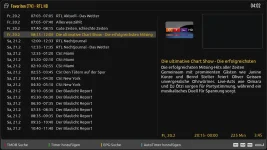
Displays fine in English.ok, thanks. i will look at the skin component then... sorry, but i should right away look at components.
Attachments
2stein
ViX Beta Tester
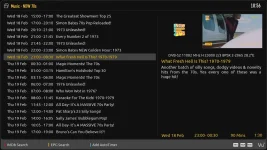
i found the culprit: in my settings i found config.usage.time.xxxxx entries that were set to 12 hour format. i have no idea where those came from. it used to be 24 hour format on older images.
gintarasarm
Member
- Joined
- Feb 29, 2024
- Messages
- 46
- Reaction score
- 3
- Points
- 8
Maybe I'm off topic, but as for DimitarCC, I can only say one thing if you're really interested in my opinion, I can say one thing: if DimitarCC makes a skin, he makes this skin from the heart because he's an expert in this field, I can say he's a professor...DimitarCC, this is a compliment to you!
gintarasarm
Member
- Joined
- Feb 29, 2024
- Messages
- 46
- Reaction score
- 3
- Points
- 8
To be honest, I'm better than DimitarCC I haven't seen who makes the better skins...You are great and I respect you very much!!!
Similar threads
- Replies
- 0
- Views
- 548
- Replies
- 21
- Views
- 1K


- Replies
- 0
- Views
- 385
- Replies
- 7
- Views
- 508
