Superb quality and spec AB-Com PULSe 4K SE. Crazy offer! Only £99! FREE UK DELIVERY! 4K UHD, Enigma 2, Multiboot 4 images & more!...
Superb quality and spec AB-Com PULSe 4K Rev II Twin Satellite tuner only £149! FREE UK DELIVERY! 4K UHD, Enigma 2, SATA HDD facility, Multiboot 4 images & more!...

Some ideas to improve the Graphical EPG screen

So you are not using the channel numbers of the bouquet in use, but the one in top of the list?
That doesn't seems logic. You can have a lot of bouquets (different providers) with the same channel numbers.
Or I misunderstood you.
If I understand correctly what matt is referring to then that is channel numbers of the current bouquet may not be the actual real-life channel numbers due to how the bouquets are created. For example, when I go to my Movies bouquet now, channel numbers aren't 301+ but actually 1374+. Unless I go into all channels bouquet (generally first one) and scroll all they way down then movies will begin at 301 then. In other words the correct channel numbers are only listed in a users all channels bouquet.

Therefore, if a user doesn't have their "all channels" bouquet as their first bouquet (or maybe doesn't have it at all) then including channel numbers would be misleading as in my case movies would be channel 1374 onwards which is incorrect.

This is only how I interpreted it.

For info, I use Sky UK (SD) and enable "all channels" bouquet as well as "sectional bouquet".
 
If I understand correctly what matt is referring to then that is channel numbers of the current bouquet may not be the actual real-life channel numbers due to how the bouquets are created. For example, when I go to my Movies bouquet now, channel numbers aren't 301+ but actually 1374+. Unless I go into all channels bouquet (generally first one) and scroll all they way down then movies will begin at 301 then. In other words the correct channel numbers are only listed in a users all channels bouquet.

Therefore, if a user doesn't have their "all channels" bouquet as their first bouquet (or maybe doesn't have it at all) then including channel numbers would be misleading as in my case movies would be channel 1374 onwards which is incorrect.

This is only how I interpreted it.

For info, I use Sky UK (SD) and enable "all channels" bouquet as well as "sectional bouquet".

Spot on. The tweak needs to know what the original channel numbers are so unless you have a bouquet with all of the channels with the correct numbers then it wont work. For example. I use ABM to generate Sky SD channels. So I get bouquets such as "All Channels", "Movies", "Sports" etc. The numbering of the channels in the first bouquet (All Channels) is how I like it - in Sky order. But the sectional bouquets have numbers in the 1000s. For example BBC One is 101 in the first bouquet but in the entertainment bouquet it is say 1001 (dont remember exactly). My tweak makes the numbers consistent so that all of the channels in the other sectional bouquets have the original numbers from the All Channels bouquet.

I realise there may be issues because not everyone has their bouquets set up this way. Which is why I decided to leave it out so that things dont get messy.
 
I know you guys are waiting for the .py files, but has anyone managed to test it?
 
My tweak makes the numbers consistent so that all of the channels in the other sectional bouquets have the original numbers from the All Channels bouquet.

I realise there may be issues because not everyone has their bouquets set up this way. Which is why I decided to leave it out so that things dont get messy.

Old gen boxes can be slow on bringing up an all channels EPG screen, so some folks have a reason not to generate it.
Is there a reason to make the numbers consistent across other generated bouquets as those channel numbers also work?
In your example, BBC1 on 101 & on 1001 would also work as number inputs.

And, yes. Please upload the py when you get a chance.
 
Old gen boxes can be slow on bringing up an all channels EPG screen, so some folks have a reason not to generate it.
Is there a reason to make the numbers consistent across other generated bouquets as those channel numbers also work?
In your example, BBC1 on 101 & on 1001 would also work as number inputs.

And, yes. Please upload the py when you get a chance.

For me personally, it was down to user experience. I came over from a Sky HD box where the channels were numbered same regardless of the sections they were in so I was looking to replicate that experience somewhat. I felt if the numbers were consistent then a user wont know any alternative numbers, so in the event they entered the 1001, its no big deal, but the chances of them entering 1001 will be very slim if the bouquets had consistent numbering.
 
For me personally, it was down to user experience. I came over from a Sky HD box where the channels were numbered same regardless of the sections they were in so I was looking to replicate that experience somewhat. I felt if the numbers were consistent then a user wont know any alternative numbers, so in the event they entered the 1001, its no big deal, but the chances of them entering 1001 will be very slim if the bouquets had consistent numbering.

Maybe worth uploading the py with number input too so others can help achieve the desired result when all channels bouquet isn't generated.
Saying that, a SKY box is extremely limited compared to an E2 box, so little point in trying to mimic their functionality.
 
Last edited:
Spot on. The tweak needs to know what the original channel numbers are so unless you have a bouquet with all of the channels with the correct numbers then it wont work.
There is some definitive channel number information around somewhere, as if you press the number keys whilst watching a channel you can get to that numeric channel (and the channel you will get to with the keys so far pressed is displayed on screen).
 
Hi Matt, I have tried it using the MetrixHD skin.

Firstly a big thank you for the change to the channel +/- buttons, this is something I've been after for a long while. I had a quick look in the skin file for the code to add the options box for the red button. If you could copy and paste it here or pm me, I'll have a look and possibly add it in to the skin.
 
Hi Matt, I have tried it using the MetrixHD skin.

Firstly a big thank you for the change to the channel +/- buttons, this is something I've been after for a long while. I had a quick look in the skin file for the code to add the options box for the red button. If you could copy and paste it here or pm me, I'll have a look and possibly add it in to the skin.

In the skin xml file I uploaded:

Widget on line number 328 is for the displaying the channel numbers and name (when searching by number). This will need to be styled and positioned according to your skin.

Widget on line number 329 is for the bouquet list. Again this can be styled and positioned accordingly.

Lastly, the screen element between and including lines 623 to 626 is for the option dialog. This will get positioned next to the selected event so you dont need to bother with positioning. But you may want to style it according to your skin.

If there's anything else you need to know then let me know :)
 
Here is the updated archive that contains the .py file:

Ive left comments in certain areas of the code to help others understand the code better.

Mods - can I get the attachment in post 75 replaced with the one from this post to avoid confusion?

EDIT: 05/03/2015. There is a newer file further along the thread
 

Attachments

Last edited by a moderator:
I find best way is to add dates and times to filenames in order to avoid confusion.
 
thanks matt

now we can discuss what to implement into vix.
im not sure on the outcome, it may not even get added as we all want different things.
 
Can it not somehow be user configured via the menu's?
I might finally be able to stop using cooltvguide.
That would be time consuming and probably not worth it as there will be loads of different possible combinations as different people may prefer different button mappings. All of these combinations will need to be coded so I can't see that happening to be honest.

If there is a particular button that you want changed to another function then I am more than happy to provide assistance
 
I make following comments with the intention to be constructive. I don't use the Blue HD skin, so some comments may not be applicable to changes.

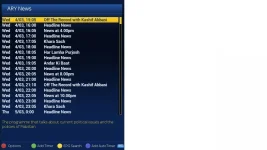
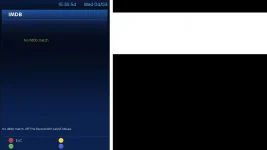
Inforbar EPG
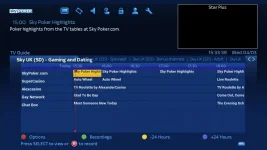
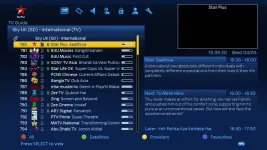
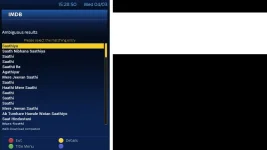
Red button is labelled as options. But when you enter it, it gives IMDB
attachment.php
attachment.php


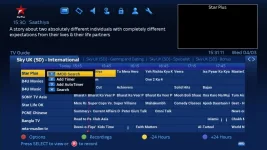
Same applies to this EPG screen. I think it is called Single EPG
attachment.php
attachment.php


Options
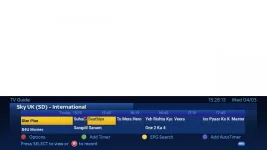
It would be good to add the options to the coloured buttons instead of numbers.

Initially I had thought that the add timer options should be first. May still be a good idea, but those can be called by the record button, so may not be a good idea.

attachment.php


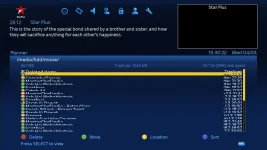
Recordings
Ovelapping/text too big? (May not be change related)
attachment.php


Bouquets overlapping
The bouquet text ovelaps
attachment.php


Scroll bouquets

Its nice that in the above picture, you can scroll between bouquets with < and >. Perhaps the same can be done in this screen too?
attachment.php


Minus24 hours.
Personallly, I think jumping to next page is a better option.

Also worth pointing out
When I discussed something else with Andy, he said that although an option may be a good idea in a particular screen, one of the things he wanted was for there to be consistency among the epg screens. So whichever EPG screen you were in, the options/buttons were the same.

Apologies for pointing this out in this post, but you do not need to have the main bouquet for offcial numbering to work in ABM. Only applies to first provider if you have multiple providers.
Numbering is also affected by the alternate numbering option

Keep up the good work. It is very refreshing to see someone come to the forum and quickly want to contribute in a manner like you have.
 

Attachments

  • infobarepg_red1.webp
    infobarepg_red1.webp
    15.6 KB · Views: 94
  • infobarepg_red2.webp
    infobarepg_red2.webp
    14.6 KB · Views: 96
  • single epg red options1.webp
    single epg red options1.webp
    29.5 KB · Views: 94
  • single epg red options2.webp
    single epg red options2.webp
    5.7 KB · Views: 95
  • options.webp
    options.webp
    42.3 KB · Views: 105
  • graph epg_recordings.webp
    graph epg_recordings.webp
    31.9 KB · Views: 93
  • bouquets ovelapping.webp
    bouquets ovelapping.webp
    28.5 KB · Views: 93
  • bouquets scroll.webp
    bouquets scroll.webp
    47.3 KB · Views: 92
some of the inconsistencies are due to the code only being applied to the graphical-epg

the options dialog should be made to append any tv/movie related plugins for eg: tvdb
 
Inforbar EPG
Red button is labelled as options. But when you enter it, it gives IMDB

Same applies to this EPG screen. I think it is called Single EPG

Thanks - Think this slipped out of my mind as it was something I made note of when I was testing myself. So will get it sorted.

Options
It would be good to add the options to the coloured buttons instead of numbers.

Thanks - lets see what the general opinion is. Also, if there are more than 4 options then we wont have enough colours which is why I went with numbers.

Initially I had thought that the add timer options should be first. May still be a good idea, but those can be called by the record button, so may not be a good idea.

This is why I did not add the timer options first as the record button function can show the add timer and autotimer options.

Recordings
Ovelapping/text too big? (May not be change related)

This is to do with the skin settings. Press menu when you are on the recordings screen and change number of rows to 10.

Bouquets overlapping
The bouquet text ovelaps

Scroll bouquets

Its nice that in the above picture, you can scroll between bouquets with < and >. Perhaps the same can be done in this screen too?

It overlaps as the name of your chosen bouquet is quite long. When testing on my box, my names were generally shorter. It is not a problem leaving more space for the name of the chosen bouquet so I will update that.

In terms of adding it to the other screen, that is also possible. Lets see what the opinion of others is.

Minus24 hours.
Personallly, I think jumping to next page is a better option.

Again, lets see what others suggest.

Also worth pointing out
When I discussed something else with Andy, he said that although an option may be a good idea in a particular screen, one of the things he wanted was for there to be consistency among the epg screens. So whichever EPG screen you were in, the options/buttons were the same.

This is possible. But I think the majority of people on here just wanted their Graphical EPG screen to incorporate the new features.
 
Last edited by a moderator:
some of the inconsistencies are due to the code only being applied to the graphical-epg

the options dialog should be made to append any tv/movie related plugins for eg: tvdb

That can be added. The only problem would be how to determine what plugin is tv/movie related
 
Thanks - lets see what the general opinion is. Also, if there are more than 5 options then we wont have enough colours which is why I went with numbers.
On Commando imagefro DM500, you can assign to colurs and overspill goes to numbers.


This is to do with the skin settings. Press menu when you are on the recordings screen and change number of rows to 10.
Rossi, is it possible to make this = skin setting as a deafult. If skin does not have a default value use the normal deafult. User still able to edit.
 

OpenViX Feeds Status

Back
Top