Superb quality and spec AB-Com PULSe 4K SE. Crazy offer! Only £99! FREE UK DELIVERY! 4K UHD, Enigma 2, Multiboot 4 images & more!...
Superb quality and spec AB-Com PULSe 4K Rev II Twin Satellite tuner only £149! FREE UK DELIVERY! 4K UHD, Enigma 2, SATA HDD facility, Multiboot 4 images & more!...

[VU+ Solo2] Standby box crashes image

  • Thread starter Thread starter Barnoe
  • Start date Start date
B

Barnoe

Guest
OK so i will try and keep it short....

I had a box i thought was a Vu+ Solo2 and it crashed so much i was about to bin it, but decided to read up and learn how to fix the problem.
long story short.... i gave up!

And bought a real genuine Vu+ Solo2..... first time using it with the image installed by WOS it does exactly the same as the clone!!!
as you can imagine... i am not happy :(

What happens is, box works fine..... then i put it on standby.... next time i switch TV on the box is ON and in a error loop
with this being the error on screen
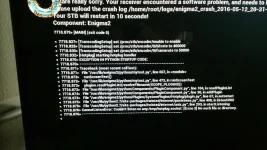
boxerror.webp

Only thing i can do is flick the switch on the back and reboot..... it boots but now has no channels working.
and i cant TFP to box no longer either...
So i reflash and the whole thing repeats :/

Someone help :(
 
Its a brand new box i picked it up from the neighbours a few hours ago.
So no, nothing to back up.

I bought it from the World of Satellite shop Tuesday night and it came with the latest Vix image pre installed
along with a Hard drive installed by them too.

only thing i did was turn it on, install Cccam 2.3 and HD Blue skin.... thats it :/
 
Can you use another softcam or ideally don't use any and see if problem still there
 
Last edited:
Im waiting for the new 8g USB stick that also came with the box from WOS to format..... regretting not choosing quick format now :/
its taking ages lol

Then i can put an image on and flash it for the first time.

I tried without the skin on my old box, it still crashed.
Ive never used any other cam than Cccam, so wouldnt know how to work others.
i can try without installing any softcams at all though.
 
Well wtf..
@birdman
I checked my Router, a BT home hub 5.... and yep the box was on DMZ????
Ive turned it off, but how did that happen when i didnt change anything?

Anyway... thats another possible solution.

@Abu

No not sharing with anyone.... well i hope not!

Still waiting on the stick!!!
 
I reflashed with the latest Vix image.
Didnt install anything just used Autoboutique maker for a channel listing
watched free view channels and left it running..
all ok
I changed EPG storage to HDD and set that up and downloaded EPG
Still ok.
I installed HD Blue skin and left running... changed channels a few times etc
still ok
Lastly before bed, ive installed Cccam and run that
Still all ok as i go to bed.
Fingers crossed it was just the DMZ thing in my router.
I will check it first thing in the morning... Box is on standby

One other thing....
On previous flashes after set up and on a channel when you pss OK and it brings up the channel info along the bottom
it had the recording icon flashing and on the far right a green arrow logo pointing down??
Its not doing that now.... but what is that?
 
The recording icon is displayed when a recording is taking place or streaming out. You can try and stream from your phone/tablet to double check.

I presume the other was for update indication.
 
Just tie thing up and update things.

My box has been stable since disabling DMZ as i speak i see my channels still working.

On previous flashes the recording icon was flashing all the time even though i wasnt recording anything?
so i presume it was streaming out then.... maybe another reason the box crashed.

So this can be marked as solved :D
Thanks everyone :beer_toast:
 

OpenViX Feeds Status

Back
Top