Superb quality and spec AB-Com PULSe 4K SE. Crazy offer! Only £129! FREE UK DELIVERY! 4K UHD, Enigma 2, Multiboot 4 images & more!...
Superb quality and spec AB-Com PULSe 4K Rev II Twin Satellite tuner only £179! FREE UK DELIVERY! 4K UHD, Enigma 2, SATA HDD facility, Multiboot 4 images & more!...

[TM-TWIN-OE] Subtitle Background

  • Thread starter Thread starter bmwcare
  • Start date Start date
I sorted this issue... In a roundabout way!

Installed a TM500 Super with iQ image
With this STB when you select the Irish channels:
Teletext>888

And the subtitles you get have a black background just like Saorview boxes do here...

The only issue for her is that she has to press 'exit' before she can change channels unlike the TWIN-OE but that's not a problem as she can read the text ok now.

Thanks to all
 
Just checked RTE1 on my Uno running vix. Text 888 brings up the subs with black background.
 
Just checked RTE1 on my Uno running vix. Text 888 brings up the subs with black background.
That is exactly what I suggested:
........

PS: When using TT-subs the background option is already there. Don't use the subtitle selection, but use TT page xxx instead.
No need for any other image; ViX displays TT as well (of course).
 
Figured out why suggestion would not work with the TWIN-OE :
Faulty remote control...
So I put back in the TWIN using ViX image and she prefers the older simpler Enigma1 iQ version so I'm swapping it back again...

Sometimes you just can't win...
 
Hello Everybody and @Rob van der Does,
It's time to program this feature. I did try all Image from OpenVix, BlackHole, ATV, OpenPli...I cant remember alots...
all feature can't set background subtitle while tv watching. I hope someone can help me here.

we all deaf depend subtitle, same you need audio.
bad subtitle = bad sound for hearing people.
 
I tried to create a user-skin for that purpose, but it wasn't working indeed. Also tried the 'elabel' with a transparant background, but apparently subtitles are a bit hard to change (due to the specific z-position).
Now I can suggest two things:
1- Play around with the existing subtitle settings. Enlarge the fontsize and the borderwidth via the GUI.
2- If that's not sufficient you can try using different font types by adding a paragraph like
Code:
        <subtitles>
		<sub name="Subtitle_TTX" font="menulist;60" borderColor="#000000" borderWidth="3" />
		<sub name="Subtitle_Regular" font="menulist;60" foregroundColor="#ffffff" borderColor="#000000" borderWidth="3" />
		<sub name="Subtitle_Bold" font="menulist;60" foregroundColor="#ffffff" borderColor="#000000" borderWidth="3" />
		<sub name="Subtitle_Italic" font="menulist;60" foregroundColor="#ffffff" borderColor="#000000" borderWidth="3" />
		<sub name="Subtitle_MAX" font="menulist;60" foregroundColor="#ffffff" borderColor="#000000" borderWidth="3" />
	</subtitles>
to the skin (or to the user skin to preserve the changes).
Of course you have to make sure the values are supported by the skin you are using.

Sorry for having you set on the wrong foot.


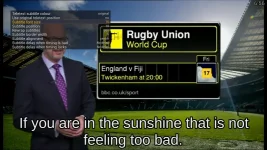
To show an example of what is possible with the actual options:
SubTitleLargeBorder.webp SubTitleLargeBorder2.webp

But of course you have to decide what is acceptable for your eyes.
 
Last edited:

OpenViX Feeds Status

Back
Top