Superb quality and spec AB-Com PULSe 4K SE. Crazy offer! Only £99! FREE UK DELIVERY! 4K UHD, Enigma 2, Multiboot 4 images & more!...
Superb quality and spec AB-Com PULSe 4K Rev II Twin Satellite tuner only £149! FREE UK DELIVERY! 4K UHD, Enigma 2, SATA HDD facility, Multiboot 4 images & more!...

Sundtek Sat USB tuner setup issues

dsayers

ViX Beta Tester
Joined
Mar 19, 2016
Messages
1,871
Reaction score
20
Points
38
Hi im trying to setup a Sundtek SkyTV Ultimate 6 DVB-S/S2 tuner on my VU+ Uno4k on OpenViX 5.0.027 and im not sure what the issue is.

I have plugged in the tuner, powered on box and installed Sundtek control centre gone though the setup here http://www.world-of-satellite.com/s...trol-Center&highlight=power+Sundtek+usb+tuner box doesn't restart so I restarted but no tuner showing in tuner config. I went through the setup again and when pressing blue I get DVB-C Tuner start but it should be DVB-S2 and no restart.

Sundtek.webp

No DVB-S2 tuner shows in tuner config so im not sure what else to do.
 
Last edited:
usually with usb tuners one might need the driver from plugins and reboot box then tuner should become visible.
 
did you install the drivers via the desktop program? i used this one, not sure is it the same driver... bear in mind i have the cable usb tuner

View attachment Sundtek USB DVB Driver.zip

opps sorry just noticed yours is the skyTv ultimate, mine was just the standard one bought from the sponsors on here
 
...the Sundtek control centre plugin is used to download the latest drivers.
 
I Installed the Sundtek plugin that installed drivers so it should be using latest. @jawz where do I FTP those drivers to?
 
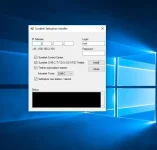
you dont, its a desktop program, run it on your pc and then connect to your receiver through the program, an it installs the drivers etc
 
screenshot of how the program looks

Untitled-1.webp

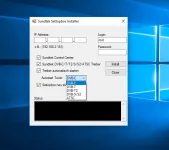
and would appear it doesn't matter if it's cable or sat tuner

Untitled-2.webp
 
Last edited:
have you got your cable plugged into the tuner. On mine there is a little white light on one of the sides, but if you have no cable plugged into it, i noticed it wasn't lit.
 
have you got your cable plugged into the tuner. On mine there is a little white light on one of the sides, but if you have no cable plugged into it, i noticed it wasn't lit.

Thanks I haven't seen any light. Power supply is plugged in, I have work soon so ill have to have a play tomorrow
 
PM'd you.
I had to completely power off the box and power on with the tuner plugged in.
Install drivers and then deep standby and completely power off again.
The tuner wouldn't appear in the control centre by just restarting the box.

Power on and then go back into the control centre and enable tuner 1 and press the blue button to save and start.
E2 will restart and the tuner should now appear in tuner config.
 
PM'd you.
I had to completely power off the box and power on with the tuner plugged in.
Install drivers and then deep standby and completely power off again.
The tuner wouldn't appear in the control centre by just restarting the box.

Power on and then go back into the control centre and enable tuner 1 and press the blue button to save and start.
E2 will restart and the tuner should now appear in tuner config.

Thanks I have work soon ill have a play with it tomorrow.
 
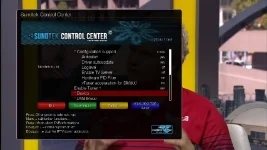
Thanks for the suggestions I tried willow's method and still the same no tuner showing when selecting tuner 1 etc and no stick found message on the left.

tuner.webp

Then I tried the method provided by sundtek and still the same. I have installed and uninstalled and it makes no difference I will test it on another box later then image.

Debug log attached if anyone can make sense of it
 

Attachments

Last edited:
Ok tried another box and image and still the same, I am trying the Sundtek chat and logged in the above link but not sure how to start a conversation or who to talk to. Ill raise a support ticket with WoS to see what they can advice as im thinking there is no power going into the tuner and no sign of a light as per jawz instructions but he said he has a different model so im not sure if there is anyway to tell if it has power.
 
Last edited:
I don't use my usb tuner full time, only bought it so i could get some recording for the Irish provider. I just plugged mine in and used the desktop program to install the drivers and all working fine.

I plugged the tuner into the usb port on front of my receiver and then plugged the coax cable into the tuner. I then rebooted the receiver and went to my laptop and used the program to install the drivers, the desktop program reboots the receiver too, so once it restarts all was working as it should.

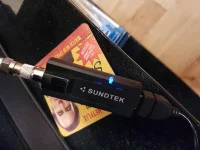
Here is my tuner, which you will see the light which i was talking about.
20170927_160501.webp
 
@dsayers are you changing any of the settings within the sundtek control center? As i didn't have to change anything within this menu. Even in the tuner config menu i didn't even have to enable it, once it rebooted it was already enabled and good to go
 
I have managed to contact Sundtek they are looking at replacing it we tried it in windows and its not being discovered so there is a fault somewhere.
 

OpenViX Feeds Status

Back
Top