Superb quality and spec AB-Com PULSe 4K SE. Crazy offer! Only £99! FREE UK DELIVERY! 4K UHD, Enigma 2, Multiboot 4 images & more!...
Superb quality and spec AB-Com PULSe 4K Rev II Twin Satellite tuner only £149! FREE UK DELIVERY! 4K UHD, Enigma 2, SATA HDD facility, Multiboot 4 images & more!...

Testers required for OpenViX Python 3 images

Status
Not open for further replies.
Gordon, I really don't what you are talking about. Each thread does one process. In my case 32 threads (you can see them in the console). And also in my case the are never more than 8 compiles running at any one time.

There are two different numbers you can configure:
BB_NUMBER_THREADS and the number in PARALLEL_MAKE.

I assume BB_NUMBER_THREADS is the number of simultaneous bitbakes that run in parallel, that certainly fits with what I see on my console, up to four bitbakes going on.

Now if each of those bitbakes happens to do a make (or a ninja or maybe other things too) each of those can potentially start up to the number given in PARALLEL_MAKE of threads doing parts of the make.
For instance the one make might be simultaneously compiling several modules from the same package in parallel.
 
Last edited:
Dev build 5.4.014.009 crashing on startup (loop) on my GB Quad Plus. I know this is normal dev build, but may be related to changes in py3 code. Crashlog attached. Relevant snip below:

Code:
<    78.8121> 00:29:58.6697 [TranscodingSetup] set /proc/stb/encoder/enable to enable
<    78.8138> 00:29:58.6714 [TranscodingSetup] set /proc/stb/encoder/0/bitrate to -1
<    78.8154> 00:29:58.6729 [TranscodingSetup] set /proc/stb/encoder/0/framerate to -1
<    78.8178> 00:29:58.6753 [LED-GIGA] sessionstart
<    78.8244> 00:29:58.6820 [ABM-Scheduler][Scheduleautostart] reason(0), session None
<    78.8943> 00:29:58.7518 [StartEnigma] EXCEPTION IN PYTHON STARTUP CODE:
<    78.8945> 00:29:58.7521 ------------------------------------------------------------
<    78.8947> 00:29:58.7522 Traceback (most recent call last):
<    78.8949> 00:29:58.7524   File "/usr/lib/enigma2/python/StartEnigma.py", line 740, in <module>
<    78.8965> 00:29:58.7540     runScreenTest()
<    78.8967> 00:29:58.7542   File "/usr/lib/enigma2/python/StartEnigma.py", line 539, in runScreenTest
<    78.8971> 00:29:58.7546     nav = Navigation(config.misc.isNextRecordTimerAfterEventActionAuto.value, config.misc.isNextPowerTimerAfterEventActionAuto.value)
<    78.8973> 00:29:58.7548   File "/usr/lib/enigma2/python/Navigation.py", line 41, in __init__
<    78.8977> 00:29:58.7552   File "/usr/lib/enigma2/python/RecordTimer.py", line 979, in __init__
<    78.8981> 00:29:58.7557   File "/usr/lib/enigma2/python/Plugins/SystemPlugins/vps/Modifications.py", line 99, in new_RecordTimer_loadTimer
<    78.8985> 00:29:58.7561   File "/usr/lib/enigma2/python/RecordTimer.py", line 1074, in loadTimer
<    78.8989> 00:29:58.7564   File "/usr/lib/enigma2/python/RecordTimer.py", line 1236, in record
<    78.8994> 00:29:58.7569   File "/usr/lib/enigma2/python/Components/TimerSanityCheck.py", line 30, in check
<    78.8998> 00:29:58.7573   File "/usr/lib/enigma2/python/Components/TimerSanityCheck.py", line 199, in checkTimerlist
<    78.9003> 00:29:58.7578   File "/usr/lib/enigma2/python/Components/config.py", line 2022, in __getattr__
<    78.9007> 00:29:58.7582 AttributeError: use_ci_assignment
<    78.9012> 00:29:58.7587 ------------------------------------------------------------
<    78.9038> 00:29:58.7613 [MAIN] (exit code 5)
 

Attachments

Last edited:
No joy, the VU+ front screen goes dim and shows the date and time. TV picture turns off. Then the VU+ screen goes full brightness and back to the Picon and TV shows channel again. I tried it several times. Hopefully you'll be able to see that in the log.

View attachment 62460

You are seeing issues because of this: 84.1123> [eHdmiCEC] write failed: Resource temporarily unavailable - so not sure why it cannot talk to the TV (is there an AV receiver in between?)
Also it looks as if it is not decoding the command data correctly - which Languages are you setup with?

Anyway another attachment with more debug Would like the debug logs posted!
 

Attachments

Dev build 5.4.014.009 crashing on startup (loop) on my GB Quad Plus. I know this is normal dev build, but may be related to changes in py3 code. Crashlog attached. Relevant snip below:

Code:
<    78.8121> 00:29:58.6697 [TranscodingSetup] set /proc/stb/encoder/enable to enable
<    78.8138> 00:29:58.6714 [TranscodingSetup] set /proc/stb/encoder/0/bitrate to -1
<    78.8154> 00:29:58.6729 [TranscodingSetup] set /proc/stb/encoder/0/framerate to -1
<    78.8178> 00:29:58.6753 [LED-GIGA] sessionstart
<    78.8244> 00:29:58.6820 [ABM-Scheduler][Scheduleautostart] reason(0), session None
<    78.8943> 00:29:58.7518 [StartEnigma] EXCEPTION IN PYTHON STARTUP CODE:
<    78.8945> 00:29:58.7521 ------------------------------------------------------------
<    78.8947> 00:29:58.7522 Traceback (most recent call last):
<    78.8949> 00:29:58.7524   File "/usr/lib/enigma2/python/StartEnigma.py", line 740, in <module>
<    78.8965> 00:29:58.7540     runScreenTest()
<    78.8967> 00:29:58.7542   File "/usr/lib/enigma2/python/StartEnigma.py", line 539, in runScreenTest
<    78.8971> 00:29:58.7546     nav = Navigation(config.misc.isNextRecordTimerAfterEventActionAuto.value, config.misc.isNextPowerTimerAfterEventActionAuto.value)
<    78.8973> 00:29:58.7548   File "/usr/lib/enigma2/python/Navigation.py", line 41, in __init__
<    78.8977> 00:29:58.7552   File "/usr/lib/enigma2/python/RecordTimer.py", line 979, in __init__
<    78.8981> 00:29:58.7557   File "/usr/lib/enigma2/python/Plugins/SystemPlugins/vps/Modifications.py", line 99, in new_RecordTimer_loadTimer
<    78.8985> 00:29:58.7561   File "/usr/lib/enigma2/python/RecordTimer.py", line 1074, in loadTimer
<    78.8989> 00:29:58.7564   File "/usr/lib/enigma2/python/RecordTimer.py", line 1236, in record
<    78.8994> 00:29:58.7569   File "/usr/lib/enigma2/python/Components/TimerSanityCheck.py", line 30, in check
<    78.8998> 00:29:58.7573   File "/usr/lib/enigma2/python/Components/TimerSanityCheck.py", line 199, in checkTimerlist
<    78.9003> 00:29:58.7578   File "/usr/lib/enigma2/python/Components/config.py", line 2022, in __getattr__
<    78.9007> 00:29:58.7582 AttributeError: use_ci_assignment
<    78.9012> 00:29:58.7587 ------------------------------------------------------------
<    78.9038> 00:29:58.7613 [MAIN] (exit code 5)

Any feedback for this crash report? I can see that another dev build for 5.4 has been done.
 
Last edited:
Any feedback for this crash report? I can see that another dev build for 5.4 has been done.

Maybe fixed yesterday?

Code:
https://github.com/OpenViX/enigma2/commit/a4626503a4eb0933dbb123251d9a2c18f129cad3
 
Maybe fixed yesterday?

Code:
https://github.com/OpenViX/enigma2/commit/a4626503a4eb0933dbb123251d9a2c18f129cad3

@norhap has spotted a typo @ line 1317...

Code:
 cconfig.usage.frontend_priority.setChoices(list(nims), "-1") 
 ^
 
You are seeing issues because of this: 84.1123> [eHdmiCEC] write failed: Resource temporarily unavailable - so not sure why it cannot talk to the TV (is there an AV receiver in between?)
Also it looks as if it is not decoding the command data correctly - which Languages are you setup with?

Anyway another attachment with more debug Would like the debug logs posted!

Please find debug log below.

Here is some info that might help you:

I'm using the TV button on the remote to switch to standby. Always worked on the 5.4 images.

You should see in the log, I tried going into standby 3 times using the TV button but each time the VU+ turned back on again.

The final time I pressed the STB button and it did go into standby. I then pressed STB button and VU+ came on as did the TV.

So I assume it it something to do with the way the VU+ responds to the standby request from the TV.

I have a Bowers and Wilkins soundbar. VU+ is connected to that (HDMI) and the ARC HDMI to the TV.

The early 5.5 Py3 images worked OK as did your previous file which I replaced. But the last few 5.5. Py3 images don't.

View attachment Enigma2_debug_2021-08-04_10-16-48.log
 
Many thanks … I think!

I have a Sonos soundbar and Oled tv. The sat receiver is connected directly to the TV and the Arc Hdmi to the sound bar.
When the TV & sat receiver go into standby so does the Sonos
I don‘t know the Bowers & Wilkins (but will have a look!) but cannot you setup this way??

Will look at log!

Edit cannot find Bowers & Wilkins with any hdmi or Arc inputs - can you specify the model/device
 
Last edited:
Many thanks … I think!

I have a Sonos soundbar and Oled tv. The sat receiver is connected directly to the TV and the Arc Hdmi to the sound bar.
When the TV & sat receiver go into standby so does the Sonos
I don‘t know the Bowers & Wilkins (but will have a look!) but cannot you setup this way??

Will look at log!

Edit cannot find Bowers & Wilkins with any hdmi or Arc inputs - can you specify the model/device


This is the model: View attachment Panorama2_Manual.pdf

This is how I have it set up

Screenshot 2021-08-04 130038.webp
 
Last edited:
@thecaretaker ... thanks
the issue is that you get the resource not available msg - so the Standby request does not get through.
you also see some responses which appear to be related to previous requests - as if the B&W is late responding.
So can you do following:
1. try with the software above in post #563, leave the B&W as is.
connect the sat receiver directly to the TV and try standby etc- post debug log.
2. re attach sat receiver to B&W
 

Attachments

Last edited:
@thecaretaker ... thanks
the issue is that you get the resource not available msg - so the Standby request does not get through.
you also see some responses which appear to be related to previous requests - as if the B&W is late responding.
So can you do following:
1. try with the software above in post #563, leave the B&W as is.
connect the sat receiver directly to the TV and try standby etc- post debug log.
2. re attach sat receiver to B&W

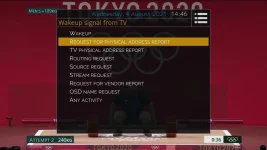
I feel such a fool twol... Aften almost pulling the TV off the wall, I couldn't get it to work at all connected directly to the TV. I gave up and put everything back. I then had a play with the options "Wakeup signal from TV"

I had it set to 'TV PHYSICAL ADDRESS REPORT' which works on 5.4 images. But playing with it, changing it to 'REQUEST FOR PHYSICAL ADDRESS REPORT' it both goes into standby fully and then wakes up when TV is turned on. This is without changing the HdmiCec.py file.

1_0_19_1B31_802_2_11A0000_0_0_0_20210804144601.webp

Thanks for your help. I do feel a fool not trying the different options out. I put you to so much work too :o

So, I'm sorted m8. Thanks!
 
I feel such a fool twol... Aften almost pulling the TV off the wall, I couldn't get it to work at all connected directly to the TV. I gave up and put everything back. I then had a play with the options "Wakeup signal from TV"

I had it set to 'TV PHYSICAL ADDRESS REPORT' which works on 5.4 images. But playing with it, changing it to 'REQUEST FOR PHYSICAL ADDRESS REPORT' it both goes into standby fully and then wakes up when TV is turned on. This is without changing the HdmiCec.py file.

View attachment 62469

Thanks for your help. I do feel a fool not trying the different options out. I put you to so much work too :o

So, I'm sorted m8. Thanks!
That explains the initial CEC requests....... but wow so many options - never seen that before - normally you are lucky to get enable/disable & Arc options
Anyway that's OK, pleased it works .....now know more about HdmiCec than I wanted, but also learned a lot more python3 in the process - so a learning process!
 
I see github no longer shows "last updated" anymore for repositories, or is it just me?

Code:
https://github.com/OpenViX

https://github.com/oe-alliance

EDIT: still works if you're not logged in.
 
Last edited:
I see github no longer shows "last updated" anymore for repositories, or is it just me?

Code:
https://github.com/OpenViX

https://github.com/oe-alliance

EDIT: still works if you're not logged in.
Weird.

Click on repositories near the top to get to:
Code:
https://github.com/orgs/OpenViX/repositories

https://github.com/orgs/oe-alliance/repositories
 
Is anyone having issues with the VPS plugin? It has been working perfectly for me for months, but several timers failed to record recently. When VPS starts monitoring the running status the normal log entry would be:

Code:
<  4278.6534> 17:18:01.2864 [RecordTimer] [VPS] start monitoring running-status
<  4278.6536> 17:18:01.2866 [eConsoleAppContainer] Starting /bin/sh
<  4278.6545> 17:18:01.2876 [VPS-Plugin] next execution in 30 sec
<  4278.7404> 17:18:01.3734 [eDVBDemux] open demux /dev/dvb/adapter0/demux0
<  4278.7405> 17:18:01.3735 [eDVBSectionReader] DMX_SET_FILTER pid=259
<  4278.9117> 17:18:01.5447 [eDVBDemux] open demux /dev/dvb/adapter0/demux0
<  4278.9119> 17:18:01.5449 [eDVBSectionReader] DMX_SET_FILTER pid=264
<  4279.0749> 17:18:01.7080 [eDVBDemux] open demux /dev/dvb/adapter0/demux0
<  4279.0752> 17:18:01.7082 [eDVBSectionReader] DMX_SET_FILTER pid=262
<  4279.2131> 17:18:01.8461 [eDVBServiceRecord] now running: †Flog It!‡ (1800 seconds)
<  4279.2132> 17:18:01.8462 [eDVBDemux] open demux /dev/dvb/adapter0/demux0
<  4279.2133> 17:18:01.8463 [eDVBSectionReader] DMX_SET_FILTER pid=18
[COLOR="#FF0000"]<  4279.2146> 17:18:01.8476 [RecordTimer] [VPS] RUNNING_STATUS 1 FOLLOWING[/COLOR]
<  4279.2151> 17:18:01.8481 [RecordTimer] [VPS] enable autoincrease

(This is from my GB Quad which is running DEV 5.4.014.008)

My AX61 HD is running Dev 5.5.014.008 and VPS seems to be failing to get a running status properly on satellite. The status coming up in the log is "EVENT_ENDED", even though the scheduled event has not begun yet. This has been happening for the past 10 days or so, but I can't give an exact timeframe as I don't record that much on the AX61. I don't recall any recent changes to VPS and I think that DEV 5.4 is pretty up-to-date with any commits made on the 5.5 py3 changes. The attached log snip shows a timer waiting to record "Room to Improve" on CH5 HD at 11.15am.

Code:
<  1871.4830> 11:14:24.2430 [RecordTimer] [VPS] start monitoring running-status
<  1871.4832> 11:14:24.2432 [eConsoleAppContainer] Starting /bin/sh
<  1871.4838> 11:14:24.2438 [VPS-Plugin] next execution in 30 sec
<  1871.5844> 11:14:24.3444 [eDVBDemux] open demux /dev/dvb/adapter0/demux1
<  1871.5846> 11:14:24.3446 [eDVBSectionReader] DMX_SET_FILTER pid=261
<  1871.7904> 11:14:24.5504 [eDVBDemux] open demux /dev/dvb/adapter0/demux1
<  1871.7905> 11:14:24.5506 [eDVBSectionReader] DMX_SET_FILTER pid=256
< [COLOR="#FFFF00"] 1871.9707> 11:14:24.7308 [eDVBServiceRecord] now running: †Jeremy Vine‡ (7200 seconds)[/COLOR]
<  1871.9708> 11:14:24.7309 [eDVBDemux] open demux /dev/dvb/adapter0/demux1
<  1871.9709> 11:14:24.7309 [eDVBSectionReader] DMX_SET_FILTER pid=18
[COLOR="#FF0000"]<  1871.9715> 11:14:24.7315 [RecordTimer] [VPS] EVENT_ENDED[/COLOR]
<  1871.9716> 11:14:24.7316 [eConsoleAppContainer] user kill(SIGKILL)
<  1871.9717> 11:14:24.7317 [RecordTimer] [VPS] stop monitoring
<  1871.9717> 11:14:24.7318 [eDVBServiceRecord] stop recording!
<  1871.9718> 11:14:24.7318 [eDVBServiceRecord] (was not recording)
<  1871.9721> 11:14:24.7321 [eDVBCAService] free slot 0 demux 1 for service 1:0:19:1E46:809:2:11A0000:0:0:0:
<  1871.9721> 11:14:24.7321 [eDVBCAService] free service 1:0:19:1E46:809:2:11A0000:0:0:0:
<  1871.9728> 11:14:24.7328 [eDVBResourceManager] start release channel timer
<  1871.9729> 11:14:24.7329 [RecordTimer] [VPS] stop RecordService (simulation)
<  1871.9731> 11:14:24.7331 [RecordTimer] [VPS] stop monitoring (process terminated)
<  1872.6690> 11:14:25.4291 [eEPGChannelData] start reading events(1627899265)
<  1872.6692> 11:14:25.4292 [eDVBSectionReader] DMX_SET_FILTER pid=3842
<  1872.6695> 11:14:25.4295 [eDVBSectionReader] DMX_SET_FILTER pid=3003
<  1872.6696> 11:14:25.4296 [eDVBSectionReader] DMX_SET_FILTER pid=18
<  1872.6698> 11:14:25.4298 [eDVBSectionReader] DMX_SET_FILTER pid=18
<  1872.6700> 11:14:25.4300 [eDVBSectionReader] DMX_SET_FILTER pid=18
<  1872.6702> 11:14:25.4302 [huffman] read.. '/usr/share/enigma2/otv_011a0000_0002_0809.dict'

<snip>

<  1933.5838> 11:15:26.3438 [eDVBDemux] open demux /dev/dvb/adapter0/demux1
<  1933.5838> 11:15:26.3438 [eDVBSectionReader] DMX_SET_FILTER pid=0
<  1933.5843> 11:15:26.3443 [eDVBDemux] open demux /dev/dvb/adapter0/demux1
<  1933.5843> 11:15:26.3443 [eDVBSectionReader] DMX_SET_FILTER pid=267
<  1933.5844> 11:15:26.3444 [eDVBDemux] open demux /dev/dvb/adapter0/demux1
<  1933.5845> 11:15:26.3445 [eDVBSectionReader] DMX_SET_FILTER pid=17
<  1933.7820> 11:15:26.5420 [eDVBFrontend0] set dynamic current limiting
<  1933.7843> 11:15:26.5443 [eDVBServiceRecord] RECORD service event 5
<  1933.7844> 11:15:26.5444 [eDVBServiceRecord] Recording to ...
<  1933.7844> 11:15:26.5444 [eDVBServiceRecord] can't open recording file: No such file or directory
<  1933.7850> 11:15:26.5450 [eDVBCIInterfaces] gotPMT
<  1933.7850> 11:15:26.5450 [eDVBCAService] don't build/send the same CA PMT twice
<  1933.7851> 11:15:26.5451 [eDVBDemux] open demux /dev/dvb/adapter0/demux1
<  1933.7852> 11:15:26.5452 [eDVBSectionReader] DMX_SET_FILTER pid=257
<  1933.7904> 11:15:26.5504 [eDVBDemux] open demux /dev/dvb/adapter0/demux1
<  1933.7905> 11:15:26.5505 [eDVBSectionReader] DMX_SET_FILTER pid=258
<  1933.9884> 11:15:26.7484 [eDVBDemux] open demux /dev/dvb/adapter0/demux1
<  1933.9885> 11:15:26.7485 [eDVBSectionReader] DMX_SET_FILTER pid=259
<  1934.1875> 11:15:26.9475 [eDVBDemux] open demux /dev/dvb/adapter0/demux1
<  1934.1877> 11:15:26.9477 [eDVBSectionReader] DMX_SET_FILTER pid=260
<  1934.2362> 11:15:26.9963 [RecordTimer] [VPS] start monitoring running-status
<  1934.2364> 11:15:26.9964 [eConsoleAppContainer] Starting /bin/sh
<  1934.2374> 11:15:26.9975 [VPS-Plugin] next execution in 30 sec
<  1934.3855> 11:15:27.1455 [eDVBDemux] open demux /dev/dvb/adapter0/demux1
<  1934.3857> 11:15:27.1457 [eDVBSectionReader] DMX_SET_FILTER pid=261
<  1934.5915> 11:15:27.3515 [eDVBDemux] open demux /dev/dvb/adapter0/demux1
<  1934.5917> 11:15:27.3517 [eDVBSectionReader] DMX_SET_FILTER pid=256
[COLOR="#FFFF00"]<  1934.6318> 11:15:27.3918 [eDVBServiceRecord] now running: †New: Room To Improve‡ (3900 seconds)[/COLOR]
<  1934.6319> 11:15:27.3919 [eDVBDemux] open demux /dev/dvb/adapter0/demux1
<  1934.6322> 11:15:27.3923 [eDVBSectionReader] DMX_SET_FILTER pid=18
[COLOR="#FF0000"]<  1934.6329> 11:15:27.3929 [RecordTimer] [VPS] EVENT_ENDED[/COLOR]
<  1934.6330> 11:15:27.3930 [eConsoleAppContainer] user kill(SIGKILL)
<  1934.6332> 11:15:27.3932 [RecordTimer] [VPS] stop monitoring
<  1934.6332> 11:15:27.3933 [eDVBServiceRecord] stop recording!
<  1934.6333> 11:15:27.3933 [eDVBServiceRecord] (was not recording)
<  1934.6336> 11:15:27.3937 [eDVBCAService] free slot 0 demux 1 for service 1:0:19:1E46:809:2:11A0000:0:0:0:
<  1934.6337> 11:15:27.3937 [eDVBCAService] free service 1:0:19:1E46:809:2:11A0000:0:0:0:
<  1934.6347> 11:15:27.3947 [eDVBResourceManager] start release channel timer
<  1934.6349> 11:15:27.3949 [RecordTimer] [VPS] stop RecordService (simulation)
<  1934.6351> 11:15:27.3951 [RecordTimer] [VPS] stop monitoring (process terminated)
<  1935.4126> 11:15:28.1726 [eEPGChannelData] start reading events(1627899328)
<  1935.4127> 11:15:28.1727 [eDVBSectionReader] DMX_SET_FILTER pid=3842
<  1935.4129> 11:15:28.1729 [eDVBSectionReader] DMX_SET_FILTER pid=3003
<  1935.4131> 11:15:28.1731 [eDVBSectionReader] DMX_SET_FILTER pid=18
<  1935.4132> 11:15:28.1732 [eDVBSectionReader] DMX_SET_FILTER pid=18
<  1935.4134> 11:15:28.1734 [eDVBSectionReader] DMX_SET_FILTER pid=18

The event change from "Jeremy Vine" to "Room To Improve" is shown in the log, but the running-status is consistently shown as "EVENT_ENDED" in VPS and the programme is not recorded consequently. Strangely, VPS is working fine on the Irish terrestrial service Saorview on the same box. ..

I finally identified my issue with VPS not working on my AX61. It seems to be due to the fact that I enabled the Freesat EPG reader in order to see the SKY/Freesat radio channels EPG schedule.

What is happening is that, with Freesat EPG enabled, the Event ID being extracted from the Freesat EPG data does not match the Event ID from either the OpenTV EPG or the running now/next EIT data which the VPS plugin uses to detect the running status of the programme set in the timers.xml file. So, if I set a timer recording and the Freesat reader has overwritten the EPG entry from the OpenTV EPG loaded 5 minutes after boot-up (or on a subsequent run), then VPS gets an invalid Event Id which will not match the actual Event ID in the EIT now/next when the programme actually starts, so VPS fails to record the programme unless it's in "safe mode".

Here's the same timer.xml entry for Catchphrase on ITV2+1 earlier today. First entry is a timer set from the actual EIT now/next with the box tuned to the transponder. Second entry is from the OpenTV(Sky) EPG with the box tuned to a different transponder. The Event ID (called eit in the file) matches properly. Third entry is from the Freesat EPG. The Event ID doesn't match. I cleared the EPG cache each time. I wonder if the Event ID from the Freesat reader is wrong because the reader hasn't been patched with Lraizer's code which was applied to the OpenTV reader? Just a thought. Note that the timer info extracted from the now/next EIT EPG entry also has some spurious Unicode/UTF in the tags field after the EIT event ID.

Code:
from EIT (no Freesat/Sky EPG loaded)

<timer begin="1628342580" end="1628345580" serviceref="1:0:1:27B5:805:2:11A0000:0:0:0:" repeated="0" rename_repeat="1" name="Catchphrase" description="Stephen Mulhern hosts another edition of the popular game show. Basil, Emma and Michael compete to guess the familiar phrases hidden in animated clues. S5 Ep8" afterevent="auto" justplay="0" always_zap="0" pipzap="0" conflict_detection="1" descramble="1" record_ecm="0" isAutoTimer="0" [COLOR="#FF0000"]eit="436" [/COLOR]tags="†Catchphrase‡"/>

from EPG (SKY)

<timer begin="1628342580" end="1628345580" serviceref="1:0:1:27B5:805:2:11A0000:0:0:0:" repeated="0" rename_repeat="1" name="Catchphrase" description="Stephen Mulhern hosts another edition of the popular game show. Basil, Emma and Michael compete to guess the familiar phrases hidden in animated clues. S5 Ep8" afterevent="auto" justplay="0" always_zap="0" pipzap="0" conflict_detection="1" descramble="1" record_ecm="0" isAutoTimer="0"[COLOR="#FF0000"] eit="436" [/COLOR]tags="Catchphrase"/>

from EPG (Freesat)

<timer begin="1628342580" end="1628345580" serviceref="1:0:1:27B5:805:2:11A0000:0:0:0:" repeated="0" rename_repeat="1" name="Catchphrase" description="Stephen Mulhern hosts another edition of the popular game show. Basil, Emma and Michael compete to guess the familiar phrases hidden in animated clues. [S] S5 Ep8" afterevent="auto" justplay="0" always_zap="0" pipzap="0" conflict_detection="1" descramble="1" record_ecm="0" isAutoTimer="0"[COLOR="#FF0000"] eit="16743"[/COLOR] tags="Catchphrase"/>
 
No idea which patch you mean. I don't recall a patch that changed eit.

No obvious pattern with the numbers.
Code:
0000 0001 1011 0100 = 436
0100 0001 0110 0111 = 16743
 
It'd be nice if we could enable reading the Freesat EPG but only for Radio, then you could use it alongside the Sky EPG without these weird issues.
(I think there is another issue with using both EPGs, besides the one Joe_90 saw, in that some program names have weird invisible control characters in them in one EPG but not in the other. ('\u0086' and '\u0087'))
 
Status
Not open for further replies.

OpenViX Feeds Status

Back
Top