Superb quality and spec AB-Com PULSe 4K SE. Crazy offer! Only £99! FREE UK DELIVERY! 4K UHD, Enigma 2, Multiboot 4 images & more!...
Superb quality and spec AB-Com PULSe 4K Rev II Twin Satellite tuner only £149! FREE UK DELIVERY! 4K UHD, Enigma 2, SATA HDD facility, Multiboot 4 images & more!...

[VU+ Ultimo4K] Trashcan

Fuzzy

Forum Supporter
Donated Member
Joined
Mar 14, 2014
Messages
188
Reaction score
1
Points
18
What type of support thread are you creating?
Possible bug
What OpenViX Image build number are you using?
6.7.010
Have you tried re-flashing WITHOUT settings restore?
YES
Have you tried re-flashing WITH a settings restore?
YES
Hi
I have mentioned this in the 6.7 release discussion thread but will try again.

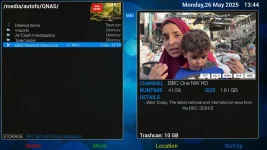
From build 6.7.008, the trashcan size in movie list has disappeared if using nas. It is there when using media/hdd/movie/ as default movie location but not when using media/autofs/nas/ It was there (using nas) up until build 6.7.007

Thanks
 
I uploaded a screenshot of 6.7.007 showing the trashcan size in the movie list in the 6.7 discussion thread. i have gone back to build 007 and I am looking at the trashcan size now. I have been using a qnap nas, mounted as /media/autofs/qnas/ for about 6 months (mounted nfs) and the trashcan size has always been in the movie list up until build 008 From 008 on, the trashcan size is only there if I select the hdd as the location.

I have 3 Vu+ boxes (Ultimo 4k, Uno 4k and Zero 4k) and they all behave the same way regards the trashcan size. I have tried a different skin as well but it made no difference.

If what you are saying is correct, then I have no idea how it worked in the first place.

Thanks, appreciate the reply :)
 
All I can say is, for me, the trashcan size stopped being reported when using nas in movielist from build 6.7.008.

Screenshot taken today using build 6.7.007 clearly shows the trashcan in movielist.
 

Attachments

  • 1_0_0_0_0_0_0_0_0_0_20250526134441.webp
    1_0_0_0_0_0_0_0_0_0_20250526134441.webp
    84.8 KB · Views: 8

OpenViX Feeds Status

Back
Top