Superb quality and spec AB-Com PULSe 4K SE. Crazy offer! Only £99! FREE UK DELIVERY! 4K UHD, Enigma 2, Multiboot 4 images & more!...
Superb quality and spec AB-Com PULSe 4K Rev II Twin Satellite tuner only £149! FREE UK DELIVERY! 4K UHD, Enigma 2, SATA HDD facility, Multiboot 4 images & more!...

UKCvS AutoBouquets E2 by LraiZer BETA.

so can you confirm that you can watch 19.2E using the 201303010205 version and it will auto zap to the default 28.2E service and scan for bouquets?
Confirmed: the 201303010205 version on the same box and tuned to the same station works well.

And I re-confirm the behaviour of your trial version I reported yesterday. To add to that: it does zap to the Sky-DBV-service during the process.
 
newbie alert here will this work on a blade 7000hd

no as the blade is a closed OS, you need a receiver with a Enigma2 based operating system to use this plugin.
 
Appologies if this is a noob question but where is the best place to get the channel numbers for swapping in custom_swap.txt . I had started using the ones listed in autobouquets.log but this is causing some issues with incorrectly swapped channels (and for some reason it seems to keep putting BBC three as 111 no matter what I put as the swap for it, among other similar issues with other channels). Also, when trying to rearrange my bouquets using the move mode on my vu duo itself, I can arrange them fine but as soon as I do another scan the order is lost. In case it helps, my settings are as follows:
Other Extra Channels: No
HD First: Yes
Channel Numbers: Yes
NIT Scan Yes
PLI Placeholders No
Child Friendly No
Default Bouquets No
Custom Channel Swap Yes
Scan FTA Only No
Enable Script Checks No
Bouquet Display Style Default
 
Tried some more to get the custom order to work. All settings are turned off now except for NIT scan and custom channel swap. custom.txt is empty except for swapping 2 channels, I then tried swapping 2 other channels using move mode. When running autobouquets, it just sets bouquets back to default. It's restoring deleted bouquets too, even though Default Bouquets is set to no. Not sure what it is I'm doing wrong.

Edit: After using the autobouquets-e2_201303010205_notepad_mod , the issue seems to be fixed. Custom order is saving again now.
 
Last edited:
latest test version, unfinished work in progress. use at own risk of losing your bouquets ;)
backup your /var/etc/enigma2/ and /usr/lib/enigma2/python/Plugins/Extensions/AutoBouquets/ folders to a safe place on your PC.

copy AutoBouquets folder to /usr/lib/enigma2/python/Plugins/Extensions/
chmod 755 autobouquetsreader and autobouquets_e2.sh files

changelog:
added code for free to air only scanning, this should also now work.
added 180 second default timeout while reading demux loop.
fixed dvbsnoop not found error msg, changed to detect autobouquetsreader instead.
fixed BSOD when no current service at initialization and script terminates with error, now returns the default service.
attempted to fix initialization error checking and lockout, untested as i only have a static 28.2e setup.
level1 debug code has been left in this version, this will generated a /tmp/autobouquets_debug.txt file.
 

Attachments

Last edited:
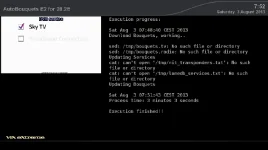
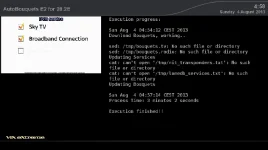
Did the same test as before (i.e. tuned to a non-28.2E service, including a NIT-scan); failed again.
On start of the scan the box tunes neatly to the desired DBV-service, but that's all. Also on completion the box doesn't return to the service it was on before the scan.
The screen says to be updating the bouquets (and indeed the log shows them to be reloaded), but no updates at all.

Do I test something the wrong way?
 

Attachments

i dont see any errors for autobouquets in your log, is permanent timeshift starting just after the zap stopping the dvb reader from opening the demux0?
last test version had some debug code defined, what is in the generated /tmp/autobouquets_debug.txt log file? does this log file say default demux is being opened for reading ok?
you can change the dvb reader defaults at top of autobouquets_e2.sh
################
DVB_FRONTEND="0"
DVB_ADAPTER="0"
DVB_DEMUX="0"
################
 
I've noticed that while normal timers show up in the epg for autobouquets generated folders, those generated through autotimers do not show, although they still record. It seems this is an issue with serviceref, autotimers added are, for example, "1:0:19:1B1D:802:2:11A0000:0:0:0:" while a normal timer added is "1:0:19:1B1D:802:2:11A0000:0:0:0::BBC One HD". I tried adding a timer on a non-AB folder and it is created as "1:0:19:1B1D:802:2:11A0000:0:0:0:" so it seems it should be without the ":channel name" on the end? Is there any way of fixing this? Only a minor bug I suppose since it still records successfully but it would be nice to be able to see what is set to record on the epg. The following show timers from an AB folder, first a normal timer which shows in epg, second an autotimer generated one which doesn't show in epg.

Code:
<timer begin="1375639020" end="1375641300" serviceref="1:0:19:1B1D:802:2:11A0000:0:0:0::BBC One HD" repeated="0" name="Doctor Who Live: The Next Doctor" description="Zoe Ball hosts a live celebration in which the next actor to land Doctor Who&apos;s lead role is revealed, in the company of former cast members and celebrity fans. [HD] [S]" afterevent="auto" eit="36050" tags="" disabled="0" justplay="0" always_zap="0" descramble="1" record_ecm="0" isAutoTimer="0">
</timer>
<timer begin="1375646220" end="1375650300" serviceref="1:0:19:1B1D:802:2:11A0000:0:0:0:" repeated="0" name="The White Queen" description="8/10. Dramatic adaptation of Philippa Gregory&apos;s novels set during the Wars of the Roses. After years of peace an untimely death once again engulfs Elizabeth in a fight for the throne. [HD] [AD,S]" afterevent="auto" eit="62454" tags="" disabled="0" justplay="0" always_zap="0" descramble="1" record_ecm="0" isAutoTimer="1">
<log code="500" time="1375575028">[AutoTimer] Try to add new timer based on AutoTimer The White Queen.</log>
</timer>
 
Last edited:
i dont see any errors for autobouquets in your log, is permanent timeshift starting just after the zap stopping the dvb reader from opening the demux0?
last test version had some debug code defined, what is in the generated /tmp/autobouquets_debug.txt log file? does this log file say default demux is being opened for reading ok?
you can change the dvb reader defaults at top of autobouquets_e2.sh
################
DVB_FRONTEND="0"
DVB_ADAPTER="0"
DVB_DEMUX="0"
################

Sorry: I forgot about the log in /tmp

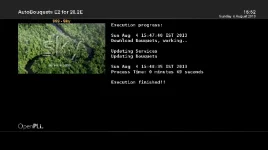
So done again. As you see on the background picture the box tunes to the correct station fine. But again: no bouquets have been made; only my own first bouquet has gone.
 

Attachments

Rob, are you using a multi tuner receiver? If so, can you test by disabling all other tuners except tuner 1?
 
log says it seems to be opening for reading ok, but for some reason no data is being read. if you are currently viewing an active channel on 28.2e with the first tuner on a multi turner box, you should be able to execute the autobouquetsreader binary and it should generate a bouquet set in /tmp using the built-in defaults?

telnet command while viewing active 28.2e service:
Code:
/usr/lib/enigma2/python/Plugins/Extensions/AutoBouquets/autobouquetsreader > /tmp/autobouquets_debug.txt

at the moment i cant seem to be able to replicate any of your current issues during testing with my static 28.2e dish with my single tuner box. all the initialization stuff, stream reading, and bouquet generation process are working every time. it may be i will have to revert to user having to be currently viewing an active 28.2e service until i install a motor to be able to test the issues you seem to be experiencing using a multi sat setup.
 
Executed the command while watching ITV2HD; no bouquets are generated (not in /temp nor in etc/enigma2).


BTW: The motor won't have anything to do with this: 28.2 is on a normal DiSEqC 1.0 switch
 

Attachments

Last edited:
Well, I don't get that.
What has been changed for the worse? As the latest version in post 1 works fine?


BTW: the name of the plugin needs to be changed to ....mips32el.ipk; I had to change it to be able to add it to the feeds.
 
that is the current puzzle, nothing has changed from the stable version that users should use for everyday use in first post to the latest experimental test version in recent posts. both versions are using the same script and python GUI code again now. the only difference is the experimental version is using the AutoBouquetsMaker dvbscanner library as a starting point code base for reading the data instead of using 3rd party dvbsnoop to read the data. just need to figure out why the dvbscanner library based code is not reading yet dvbsnoop is reading on other boxes, as they are they both reading fine on mine.
 
latest EXPERIMENTAL version, unfinished work in progress. use at own risk of losing your bouquets
backup your /var/etc/enigma2/ and /usr/lib/enigma2/python/Plugins/Extensions/AutoBouquets/ folders to a safe place on your PC.

copy AutoBouquets folder to /usr/lib/enigma2/python/Plugins/Extensions/
chmod 755 autobouquetsreader and autobouquets_e2.sh files

changelog:

changed timeout while reading demux loop from 180 to 120 seconds as this should be long enough?
reworked and optimized read timings on the demux to potentially fix some of the issues reported by Rob van der Does
 

Attachments

Has the supplement.txt file been implemented in this experimental version yet? I'd prefer to have this functionality implemented before testing.

Thanks
Chaser.
 
I'd prefer to have the experimental branch tested as working with supplement.txt implemented also, but thanks for your interest anyway. use stable versions in post #1, they will give you what you require. the experimental alpha debug versions are only for users that like to get involved with testing/feedback as a hobby rather than use their boxes to just watch tv.
 

OpenViX Feeds Status

Back
Top