Superb quality and spec AB-Com PULSe 4K SE. Crazy offer! Only £99! FREE UK DELIVERY! 4K UHD, Enigma 2, Multiboot 4 images & more!...
Superb quality and spec AB-Com PULSe 4K Rev II Twin Satellite tuner only £149! FREE UK DELIVERY! 4K UHD, Enigma 2, SATA HDD facility, Multiboot 4 images & more!...

UKCvS AutoBouquets E2 by LraiZer BETA.

When you are editing it what program are you using? Notepad? Or notepad++?

Sent from my GT-I9195 using Tapatalk

Notepad.

But it is just a text file so shouldn't matter, should it?
When I removed 102=142 using Notepad it did that ok, but it won't let me add another swap
 
Notepad.

But it is just a text file so shouldn't matter, should it?
When I removed 102=142 using Notepad it did that ok, but it won't let me add another swap

Yes it does matter, you need to use notepad++, it is free to download!

Sent from my GT-I9195 using Tapatalk
 
Yes it does matter, you need to use notepad++, it is free to download!

Sent from my GT-I9195 using Tapatalk
Thank you, I used it and saw the difference, it is not just a normal text file, it looks different inside notepad++
Thank you
 
Last edited by a moderator:
Custom Swap

I have been using this plugin for a longtime, I have now upgraded to Helios and now every time I do an online software update the custom swap text file reverts back to the default text file, meaning I have to set it up again for myself, I don't ever remember having to do this before on Zeus or Vix 3.0.
 
I've always manually transferred the plugin, so have never noticed. I suppose custom_sort_3.txt and supplement.txt would be affected too.

Can you try the following temporary work around: put enigma to sleep with an init 4 command. Ftp to the settings file located in /etc/enigma2/ Using a linux comaptible editor like Notepad++, find the section with backup locations, add the following backup locations, make sure that it matches the format of other sections.
Code:
/usr/lib/enigma2/python/Plugins/Extensions/AutoBouquets/custom_swap.txt

The section should look like this afterwards
Code:
config.backupmanager.backupdirs=['/etc/enigma2/', '/etc/fstab', '/etc/hostname', '/etc/network/interfaces', '/etc/passwd', '/etc/shadow', '/etc/etc/shadow', '/etc/resolv.conf', '/etc/ushare.conf', '/etc/inadyn.conf', '/etc/tuxbox/config/', '/etc/wpa_supplicant.conf', '/usr/softcams/', '/etc/auto.network', '/usr/crossepg/providers', '/usr/keys', '/usr/crossepg/crossepg.config','/usr/lib/enigma2/python/Plugins/Extensions/AutoBouquets/custom_swap.txt']

After editing, restart the receiver. I must stress, use a linux comaptibel editor. Windows notepad is not linux compatible. Notepad++ is free.

Lraizer has been away for a while, some of the default swaps need removing as well adding the unavailable HD channels. I'll have a word with someone whether teh whole directory can be added as a backup locaion saving people having to do it manually.
 
Can you try the following temporary work around: put enigma to sleep with an init 4 command. Ftp to the settings file located in /etc/enigma2/ Using a linux comaptible editor like Notepad++, find the section with backup locations, add the following backup locations, make sure that it matches the format of other sections.

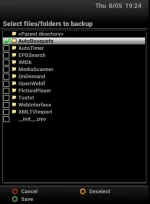
You can also add custom files & locations to be backed up using Backup Manager.
When in Backup Manager, press menu, then yellow to choose any extras you want included in backups.
 
Scrap what I said and use Judge's recommendation.
 

Attachments

  • backup locations.webp
    backup locations.webp
    14.7 KB · Views: 52
I use the 20th Oct 2013 version of AutoBouquets. I have Scan FTA only = yes. I also have supplement.txt as below:

117:5090:1:c6cc:820:11a0000:BSkyB:NDS:London Live
135:1758:1:2ee0:7f8:11a0000:BSkyB:FTA:4Music
158:3216:1:d017:909:11a0000:BSkyB:FTA:Sony TV +1

Unfortunately crossepg does not recognise the above 3 channels and does not populate their epg. If I switch to Scan free to air only=no, running autobouquets and run crossepg, crossepg populates these channels epg listings.

Is there something missing in my supplement setup?
 
Yes. I can view them with local card, If that's what you mean. The epg does not populate. I just get now and next in FTA mode.

Here is my full supplement.txt file in case it makes a difference:
Code:
447:3735::::::NDS:
630:5089::::::NDS:
1043:4055:::::::STV HD
60:6325:::::::STV+1
101:2076:19:1b1d:802:11a0000:BSkyB:FTA:BBC One HD
102:2075:19:1b1c:802:11a0000:BSkyB:FTA:BBC Two HD
103:6504:19:5208:812:11a0000:BSkyB:FTA:ITV HD
104:4075:19:52d0:814:11a0000:BSkyB:FTA:Channel 4 HD
115:2077:19:1b27:802:11a0000:BSkyB:FTA:BBC Three HD
116:2086:19:22e3:80d:11a0000:BSkyB:FTA:BBC Four HD
117:5090:1:c6cc:820:11a0000:BSkyB:NDS:London Live
132:1670:1:2077:7fa:11a0000:BSkyB:FTA:Channel 4 +1
133:1839:1:1e28:809:11a0000:BSkyB:FTA:Channel 5+1
135:1758:1:2ee0:7f8:11a0000:BSkyB:FTA:4Music
141:2081:19:1b1f:802:11a0000:BSkyB:FTA:BBC One NI HD
142:2017:1:287a:800:11a0000:BSkyB:FTA:BBC Two NI
144:2202:1:178f:7ef:11a0000:BSkyB:FTA:Challenge
145:4332:1:178a:7ef:11a0000:BSkyB:FTA:Challenge+1
158:3216:1:d017:909:11a0000:BSkyB:FTA:Sony TV +1
164:6110:1:2788:805:11A0000:BSkyB:FTA:ITV Border
168:2511:1:1b61:7da:11a0000:BSkyB:FTA:VIVA
177:3027:1:1e1f:809:11a0000:BSkyB:FTA:5 USA +1
178:6510:19:512c:80f:11a0000:BSkyB:FTA:UTV HD
181:6274:1:271f:801:11a0000:BSkyB:FTA:ITV4+1
191:6758:1:d020:909:11a0000:BSkyB:FTA:Irish TV
200:6020:1:2724:801:11a0000:BSkyB:FTA:ITV Wales
206:2082:19:22c5:80d:11a0000:BSkyB:FTA:BBC One ScotHD
210:4055:19:2f62:7f4:11a0000:BSkyB:FTA:STV HD
211:6325:1:27f1:806:11a0000:BSkyB:FTA:STV+1
219:2061:1:286f:800:11a0000:BSkyB:FTA:BBC Three
230:2018:1:18ac:7fd:11a0000:BSkyB:FTA:BBC Four
251:3590:1:d00c:909:11a0000:BSkyB:FTA:Food Network
282:5165:1:d395:81c:11a0000:BSkyB:FTA:FAB TV
324:3771:1:c7af:821:11a0000:BSkyB:FTA:Sony Movies+1
328:3541:1:d35e:81c:11a0000:BSkyB:FTA:more>movies
329:3220:1:c7b0:821:11a0000:BSkyB:FTA:m>movies+1
357:2511:1:1b61:7da:11a0000:BSkyB:FTA:VIVA
358:4541:1:cb2a:907:11a0000:BSkyB:FTA:NOW Music
360:1758:1:2ee0:7f8:11a0000:BSkyB:FTA:4Music
378:5708:1:cba7:8fe:11a0000:BSkyB:FTA:B4U Music
428:2051:1:18f6:7fd:11a0000:BSkyB:FTA:BBC SPORT
429:3732:1:cc01:8ff:11a0000:BSkyB:FTA:LiverpoolFCTV
437:3641:1:cfee:909:11a0000:BSkyB:FTA:Greyhound Racing TV
447:3735:1:c495:819:11a0000:BSkyB:FTA:MOTORS TV UK
448:3001:1:d37c:81c:11a0000:BSkyB:FTA:Show Jumping TV
503:2085:19:22d9:80d:11a0000:BSkyB:FTA:BBC NEWS HD
507:3147:19:cf9b:908:11a0000:BSkyB:FTA:NHK World HD
520:3147:19:cf9b:908:11a0000:BSkyB:FTA:NHK World HD
521:5314:19:cf9c:908:11a0000:BSkyB:FTA:RT DOC HD
630:2051:1:18f6:7fd:11a0000:BSkyB:FTA:BBCi
Added code
 
Last edited by a moderator:
Yes. I can view them with local card, If that's what you mean
Was only interested in whetehr teh chanenls opend in those postions. i,.e data was valid.

I'll see if I can have a look at the issue you raised tomorrow if I get a chance. Please post a screenshot of your settings page so I can duplicate your exact setup. Please replace the 117 entry with this one. I may be mistaken, but the out of region channel should be added automatically
Code:
117:5090:::::::

A bit off topic.... Supplement is an "overrider" function. Why are you overriding so many values? Depending on reason, you do not need to fill in every aspect of the line. You will need to maintain the file every time there transponder changes, you will need to look at the csv file created. (Preferrably with default settings first)

Custom sort or even swap may be the better option.
 
Last edited:
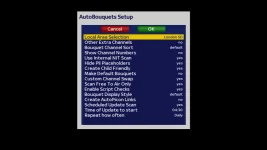
AutoBouquets settings attached. I tried your code, but it did not add London Live.

I use supplemental txt to add channels that are not auto added when settings are use FTA only = yes.
I also want to name and add out of region channels and put some channels in two bouquets, some with different channel names. I use Channel Swap. I will have a look at Channel Sort.

Thanks for your time.
 

Attachments

  • 1_0_1_1E28_809_2_11A0000_0_0_0.webp
    1_0_1_1E28_809_2_11A0000_0_0_0.webp
    21.1 KB · Views: 77
Today I have lost Sky1 HD & a few other Sky HD channels, I've tried rescanning with E2 but no change. I lost Crime HD about 1 month ago & it has never come back, not too fused so I ignored it, but now Sk1 HD is gone I need to find the issue. All blank channels display usual SNR info...

Is this something obvious, can someone advise me on where to start please?
 
New sky encryption. Eventually all Hd will be gone

Sent from my SM-N9005 using Tapatalk
 
Today I have lost Sky1 HD & a few other Sky HD channels, I've tried rescanning with E2 but no change. I lost Crime HD about 1 month ago & it has never come back, not too fused so I ignored it, but now Sk1 HD is gone I need to find the issue. All blank channels display usual SNR info...

Is this something obvious, can someone advise me on where to start please?

Have a look at this thread.
 
I guess all hd channels will be gone soon enough, only had my box a few weeks but them the breaks I guess. I suppose I can just cancel my hd sub as I love being able to stream my channels to the tablets and raspberry pi and other addons

Anyway as it's all a bit new to me I was wondering if there's an easy way to get fta hd Channels integrated into the sd auto ones so 101 would be bbc hd ect but all the others are Sd variants or would any edits made be wiped after an update

Thanks:thumbsup:
 
I guess all hd channels will be gone soon enough, only had my box a few weeks but them the breaks I guess. I suppose I can just cancel my hd sub as I love being able to stream my channels to the tablets and raspberry pi and other addons

Anyway as it's all a bit new to me I was wondering if there's an easy way to get fta hd Channels integrated into the sd auto ones so 101 would be bbc hd ect but all the others are Sd variants or would any edits made be wiped after an update

Thanks:thumbsup:

Have a look at this post, might do what you want for now?
 

OpenViX Feeds Status

Back
Top