Superb quality and spec AB-Com PULSe 4K SE. Crazy offer! Only £99! FREE UK DELIVERY! 4K UHD, Enigma 2, Multiboot 4 images & more!...
Superb quality and spec AB-Com PULSe 4K Rev II Twin Satellite tuner only £149! FREE UK DELIVERY! 4K UHD, Enigma 2, SATA HDD facility, Multiboot 4 images & more!...

UKCvS AutoBouquets E2 by LraiZer BETA.

There were a few changes by myself. These have been added to chaneglog on post 1. Lraizer may reject these if/when he adapts it again.

If you install the plugin from the OE feeds and the plugin does not work, the following files need to be chmod 755. Roght click on them and change properties
autobouquetsreader
autobouquets_e2.sh
autopicon_convert.sh

They are located in the plugin directory:
/usr/lib/enigma2/python/Plugins/Extensions/AutoBouquets /AutoBouquets /
 
Hi Guys,

Would appreciate some help again.

I am using Autobouquet E2, Vhannibal Motor Settings and on Apollo 23

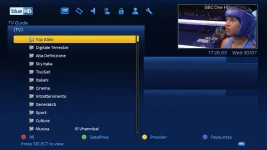
Previously when I pressed the 'up button' on my remote and then pressed the blue button for favourites, I would get this screen:

1_0_1_1B59_7DA_2_11A0000_0_0_0.webp

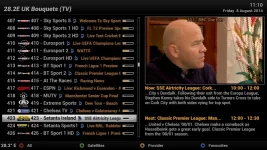
But I have done something wrong and now get this screen:

1_0_19_1B1D_802_2_11A0000_0_0_0.webp

What can I do to fix this please/get it back to the way it was in the first ic.

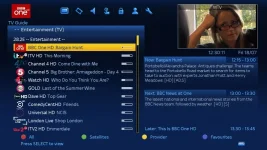
My autobouquets setup looks like this:

a_0_19_2588_7FB_2_11A0000_0_0_0.webp

If you need any further info. please ask cause I really need to fix this.

Thanks a lot.
 
Did you use dreambox edit to send vhannibal to box if so run ABM again.

Sent from my SM-N9005 using Tapatalk
 
Did you use dreambox edit to send vhannibal to box if so run ABM again.

Sent from my SM-N9005 using Tapatalk

Hi,

No, I installed Vhannibal Motor settings from the feeds/plugin menu.

Also I am not using ABM at all; I am using Autobouquet E2

Regards
 
Hi,

No, I installed Vhannibal Motor settings from the feeds/plugin menu.

Also I am not using ABM at all; I am using Autobouquet E2

Regards

Very much doubt this will have anything to do with channel lists installed, more likely default settings changed.
 
Swap or Scan only "free to Air" not working in OpenATV image. It completes its run successfully but does not remove pay channels or swap. Im using the default swaps and supplemental txt. that was inserted in early july. This is setup:

 
That's the correct/default screen.
Up/Down opens on channel list in current bouquet, then blue gives you list of bouquets to choose from.

Thanks Judge,

Got it sorted.

Is there a way to delete satellites or bouquets that I do not want.

Eg, I can not get sat. Turksat 42e. So can I delete this sat. or failing that, can I delete the bouquets under it i.e. Trt, D-Smart?

Thanks
 
Is there a way to delete satellites or bouquets that I do not want.

Eg, I can not get sat. Turksat 42e. So can I delete this sat. or failing that, can I delete the bouquets under it i.e. Trt, D-Smart?

Presume you're using an app like DBE to upload so? or using the wrong settings downloads?
What sats do you need access to?
If using an app like DBE, delete them before uploading to the box.
 
Presume you're using an app like DBE to upload so? or using the wrong settings downloads?
What sats do you need access to?
If using an app like DBE, delete them before uploading to the box.

I have DBE but I am not using it to upload.

I just dowloaded/installed Autobouquet E2 and Vhannibal Motor settings straight from the feeds/plugin menu.

Due to line of sight issues, my dish cannot pick up sats after 28.2 e.g. 33e, 35e, 39e, 42e

So I do not need any of these sats or the info/bouquets from these sats listed in the data that I am receiving from Autobouquet E2.

Thus I am wondering can I customise the info. that Autobouquet E2 is giving me.

Hope this makes sense.

Regards
 
Autobouquet E2 is giving you the correct info though, settings pack you installed isn't.
Maybe use DBE to download current settings to a PC, remove those settings you don't need & then upload to box.
Or find a more complete pack for the settings you can receive.
 
Autobouquet E2 is giving you the correct info though, settings pack you installed isn't.
Maybe use DBE to download current settings to a PC, remove those settings you don't need & then upload to box.
Or find a more complete pack for the settings you can receive.

Yes Autobouquet E2 is giving me the correct info, settings pack you installed isn't.

Your idea of downloading to PC and uploading again is good. I thought though if I did that, Autobouquet E2 would just repopulate the data that gets deleted the next time it updates?

So I was wondering if there is a way to delete bouquets/sats from within Autobouquet E2 itself so that when it updates the data would not get repopulated, but it seems that it can not be done.

Thanks for all your help though, much appreciated.

Regards
 
Yes Autobouquet E2 is giving me the correct info, settings pack you installed isn't.
I didn't install any settings pack? :confused:
Your idea of downloading to PC and uploading again is good. I thought though if I did that, Autobouquet E2 would just repopulate the data that gets deleted the next time it updates?
ABM will update bouquets depending on settings used.
So I was wondering if there is a way to delete bouquets/sats from within Autobouquet E2 itself so that when it updates the data would not get repopulated, but it seems that it can not be done.
Press the menu button on your remote in any screen to see what can be done.
Still confused as to what you actually want though :confused:
 
Lraizer's plugin only caters for 28.2. It is possible to make AB 28.2 not create certain bouquets. Let's leave that aspect alone for now. If you don't want it to make 28.2 bouquets at all, don't use the plugin.

Please tackle using DBedit to remove unwanted satellites from your downloaded settings first. Including 28.2 bouquets too.
 
Please tackle using DBedit to remove unwanted satellites from your downloaded settings first. Including 28.2 bouquets too.
And if you do so, de-install the settings (via the plugin browser) before uploading them via DBE. Otherwise your settings will be overwritten again during an image update.
 
Using this script, you can use plugin just for 28.2 picons. Issue with some channels for ROI region may still exist.

Usage, replace exiting one located in /usr/lib/enigma2/python/Plugins/Extensions/AutoBouquets/ Check it sill has 755 properties.

Changes made:
Line 326, 352 and 353 commented out.


Hopefully Sky changes and birthday will bring out an official version.
 

Attachments

Can someone guide me how I would drop Setanta into the Sky UK Bouquet using this plugin?

Or if not could you tell me how I would put the ROI Sport Bouquet under the UK Sport Bouquet?
 
You do not get two sports bouquets, only one. Have you tried the plugin? My previous post is incorrect, no need for any editing.
 

Attachments

  • Setanta.webp
    Setanta.webp
    65.5 KB · Views: 19
You do not get two sports bouquets, only one. Have you tried the plugin? My previous post is incorrect, no need for any editing.

I haven't as of yet. Always used the inbuilt one to ViX.

I will install it later and give it a go. Hopefully this will be the answer to my problem.
 
anyone know why i keep getting autobouqets_c2.sh not found?

I have done the CHMOD 755 and changed net id to my area a0 64 but still get that error?

I have checked and the relevant files are there
 

OpenViX Feeds Status

Back
Top