Superb quality and spec AB-Com PULSe 4K SE. Crazy offer! Only £99! FREE UK DELIVERY! 4K UHD, Enigma 2, Multiboot 4 images & more!...
Superb quality and spec AB-Com PULSe 4K Rev II Twin Satellite tuner only £149! FREE UK DELIVERY! 4K UHD, Enigma 2, SATA HDD facility, Multiboot 4 images & more!...

UKCvS AutoBouquets E2 by LraiZer BETA.

Ok I have just scanned autobouquets but I never get anything in the lifestyle and culture individual bouquet any help please.

Lifestyle and Culture is no longer available, which has also been said in another thread you have posted in. What bit don't you get?
 
Ok I have just scanned autobouquets but I never get anything in the lifestyle and culture individual bouquet any help please.
I asked that in post 1936 and Andy replied on how to remove it.

Remember to continue reading posts after that because you have turn off auto create bouquets feature otherwise it re-creates that empty bouquet again.

For info, I also rename the first bouquet to "All Channels"
 
I have HDMI-CEC setup with my box and noticed peculiar thing of TV turning itself on then off.

I looked into it further and observed the time and did further testing and found it's this plugin that is turning my TV on for a minute whilst it updates the bouquets before turning it off again.

Is there anyway to prevent this apart from disabling HDMI-CEC?

Vix's built-in ABM doesn't turn TV on whilst it updates the bouquets so was wondering if there is anything that can be done to prevent this plugin from turning box on fully (which obviously turns TV on)?
 
is there a way to display my regional channels in bouquets instead of displaying hd first
sorry if this has already been coverd I haven't been on the forum for a while

thanks
 
In the bouquet chanenl sort menu, change it from "HD first". Please note you will end up having the big bouquet first which will affect the displayed numbers. Number presses will still work.

HD swap is on by default, disable that if you do not want it.
 
I have HDMI-CEC setup with my box and noticed peculiar thing of TV turning itself on then off.

I looked into it further and observed the time and did further testing and found it's this plugin that is turning my TV on for a minute whilst it updates the bouquets before turning it off again.

Is there anyway to prevent this apart from disabling HDMI-CEC?

Vix's built-in ABM doesn't turn TV on whilst it updates the bouquets so was wondering if there is anything that can be done to prevent this plugin from turning box on fully (which obviously turns TV on)?
Does anyone else have this problem other than me when having hdmi-cec setup with TV?
 
Does anyone else have this problem other than me when having hdmi-cec setup with TV?

I do have this problem as well and it's very anoying, However this is the wrong place for it.

Sent from my SM-G900F using Tapatalk
 
I do have this problem as well and it's very anoying, However this is the wrong place for it as i don't beleive it is only the plugin.

Sent from my SM-G900F using Tapatalk


Sent from my SM-G900F using Tapatalk
 
Pretty sure subject was raised on ukcvs, not sure what solution (if any)was.

The whole process takes less than 50 seconds. It does not change channels or interfere with recordings. Is scheduling process during the daywhen TV is on not an option?
 
Thanks for replies as thought it was just me.

It takes up entire screen near enough so running it when box is likely to be in use may be more of an issue.

The built-in ABM doesn't do it so was kind of hoping it was a simple thing to sort! Obviously not.

I have two options I can think of:

1. Live with it but ensure TV volume is turned down low before going to bed so I don't hear TV on for the minute.
2. Go back to OpenVix's ABM and live without official channel numbering within G-EPG (which was main reason why I moved to AB 28.2).

I may forget about turning volume down before bed so will have to take option 2 :)
 
It does not take entire screen, it is a little box on top left. Invoke it from blue button to see it.
 
It does not take entire screen, it is a little box on top left. Invoke it from blue button to see it.
Is that when done manually?

When I did a test run to find out what was causing TV to switch on, during automatic update it took full screen nearly before switching box/TV off.
 
Which manually are you asking about? Via blue button or from plugin menu?

The plugin shows different notification depending on whether STB was in standby or not.

Edit: Screenshot
 

Attachments

  • ab 28.2 notification.webp
    ab 28.2 notification.webp
    64.5 KB · Views: 27
Last edited:
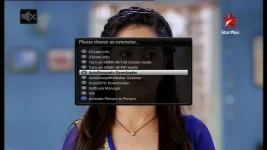
From plugin menu (blue button brings up choice of options and not one of them is this plugin). Like I said the bigger screen is used when AB 28.2 does it's automatic/scheduled update as when I was testing what was causing it, that's how I noticed it was AB 28.2.

I'll be honest, I've never seen this plugin use that smaller screen which is a lot less intrusive than the larger nearly full size screen.
 
I asked which manual method you were referring to, you did not provide an answer. It's there for me.
 

Attachments

  • extensions.webp
    extensions.webp
    27.4 KB · Views: 32
Thanks for replies as thought it was just me.

It takes up entire screen near enough so running it when box is likely to be in use may be more of an issue.

The built-in ABM doesn't do it so was kind of hoping it was a simple thing to sort! Obviously not.

I have two options I can think of:

1. Live with it but ensure TV volume is turned down low before going to bed so I don't hear TV on for the minute.
2. Go back to OpenVix's ABM and live without official channel numbering within G-EPG (which was main reason why I moved to AB 28.2).

I may forget about turning volume down before bed so will have to take option 2 :)

I have same issue.
Only solution is I turn tv standby switch off during work nights
 
I asked which manual method you were referring to, you did not provide an answer. It's there for me.
I have never used manual method and I don't have option from the blue button. It's probably a settings thing which I will look at.

Am I correct in thinking that the automatic/scheduled update does utilise the larger screen rather than that smaller screen you posted as it did for me when I tested it?
 
The built-in ABM doesn't do it so was kind of hoping it was a simple thing to sort! Obviously not.

Thats because andy spent a significant amount of time (MONTHS) coding it to use a free tuner, remember prior to andys improvement all channel scans like this and the EPG for that matter had to take over the active tuner to perform their scan, just another in a long line of improvements andy brought to Enigma2 which people tend to forget about.
 
I have never used manual method and I don't have option from the blue button. It's probably a settings thing which I will look at.

Am I correct in thinking that the automatic/scheduled update does utilise the larger screen rather than that smaller screen you posted as it did for me when I tested it?
Sorry, my mistake. Even scheduled uses the bigger screen. Sorry.

There are no settings involved to put AB 28.2 in the extensions list. It is just there.
 

OpenViX Feeds Status

Back
Top