Superb quality and spec AB-Com PULSe 4K SE. Crazy offer! Only £99! FREE UK DELIVERY! 4K UHD, Enigma 2, Multiboot 4 images & more!...
Superb quality and spec AB-Com PULSe 4K Rev II Twin Satellite tuner only £149! FREE UK DELIVERY! 4K UHD, Enigma 2, SATA HDD facility, Multiboot 4 images & more!...

Unicable Settings and Tuning Issues

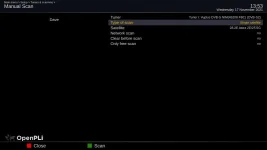
No it should not create duplicates. Use "Predefined transponder" and network "yes".
 
Once you confirm all 4 tuners receive the same number of services, you can forget manual scan and just use ABM (which you are already using). ABM scans/reads the data table, adds services to your receiver and also creates bouquets.

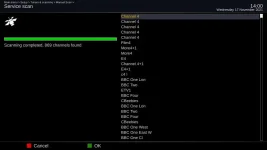
The purpose of scanning on all 4 tuners is to prove everything is working fine. Under normal usage, there isn't a need to scan on all tuners. Please refer to screenshot for my advice which I have given to help you. You don't have to follow it. Using the attached options you should get 850+ services. If you use different options, you may get something else.
 

Attachments

  • single satellite result.webp
    single satellite result.webp
    15.8 KB · Views: 14
  • single satellite.webp
    single satellite.webp
    10.4 KB · Views: 12
All done. 866 channels on each tuner. I had a stream going to my phone C and D both initially came back with errors but when I closed the stream down they both tuned OK.

ABM has refreshed and appear to be working OK.

What is the next step?


Sent from my iPhone using Tapatalk
 
Hopefully that is your tuner configuration done. When you get your LNB with more SCR, you will have to hook it up exactly as you have done with this one, set all the tuners so they have an SCR associated to them. Hopefully you should be comfortable with unicable now. Wiring as well as tuner configuration. You should be able to plan your house modernisation based on that understanding.

That should be your tuner configuration completed.

With regards to scanning:
As you are using ABM, just use that. You do not need to perform a manual scan or automatic scan. Hopefully you have scheduled it to run regaulalry. Once a week should be fine. If you hit an issue, you can manually run ABM.
Video guide to ABM is here
https://www.world-of-satellite.com/...utobouquetsMaker-for-FreeSat-UK-using-OpenViX

Optional temporary changes for you to consider.

As you have universal ports unused, you could hook up one of them and use it. That will obviously involve a wire from dish to receiver. (You won't need it in the future when you get your new LNB).

Hook up universal LNB to tuner/socket B. No splitters, must be direct from LNB to Receiver
In tuner configuration, set B as: Simple, single , 28.2

As you have now freed an SCR on the LNB.
Set tuner E as unicable. SCR will be 2 (the one freed up from B). Connected = yes, E will be connected to A (the one with unicable wire)


Next Step:
EPG is separate to bouquets. Have you sorted the acquisition of EPG? There are several ways. One is as per this thread.
https://www.world-of-satellite.com/showthread.php?63896-Setting-up-Sky-UK-epg-download

Please do not post non-tuner related questions in this thread. It will help others looking for solutions if threads are specific to titles.


Next Step 2
Add picons. See here: https://www.world-of-satellite.com/showthread.php?53119-Picons-How-to-add-picons-to-your-receiver
 
Last edited:
Thanks again Abu.

I appreciate your support and patience. I will work through these next steps and start a separate thread if I encounter difficulties.


Sent from my iPhone using Tapatalk
 
Hi Abu,

Thanks for the guide link. I had started from that thread when I posted this issue and see that more of a forum thread than a guide. I thought you would be developing a guide along the lines of (e.g.) an annex to the manual version 1.1 (which also probably could do with refreshing [and expanding]).

The forum threads are helpful for the examples and explanations they give but they do not always fully explain why things are done and a guide would do that. Is there a mechanism to draft a guide for peer review that is outside the public scrutiny of the forum? A wiki for example? If there is, I would like to try to generate something that would help others like me that are new to this technology and need a fuller understanding. Doing it publicly on the forum would possibly lead to confusion for new users as it is developed. I now understand your distinction between tuning and scanning and would limit my attempt to tuning only.

I can't promise anything fast (building takes priority!) but I would be prepared to devote some of my free time to doing it.

If you think the community would find this helpful, please let me know.
 
Hi Abu,

I would like to return to this issue wrt the development of my new home wiring. I thought unicable was meant to deliver the full band of signal to each output by simply splitting it at the splitter or switch. If this is the case, why was it necessary to link the unicable direct to the tuner?

It is important as I had planned to go from the LNB to all rooms on a single cable splitting off at each one as I reach them. For minimum cabling I planned my cabling path as:

:LNB to GTL/ETEL (Obligatory dedicated electrical cupboard for incoming electrical and communication connections for all new homes in France) split to device 1 (VBox):
:GTL/ETEL to kitchen split to device 2 (TV outlet with accompanying RJ45 connection, also obligatory in each room under French regulations):
: Kitchen to Master bedroom split to device 3 (Outlet):
:Master Bedroom to Study split to device 4 (Outlet):
:Study to Bedroom 2 split to device 5 (Outlet):
:Bedroom 2 to Lounge split to devices 6, 7 and 8 (Outlets for smart TV, satellite tuner [2]):
:Lounge to Courtyard split to device 9 (external smart TV for summer):
:Courtyard to Garage/Man-Cave terminating with device 10: (Outlet for ejected husband/testing purposes)

Are you saying that the tuner really needs a direct unicable feed prior to splitting? If so it sort of destroys the concept of unicable doesn't it?

What I do not understand is why the tuner would not work after the splitter (well it worked but only gave 10 channels) but the smart TV worked on the same split cable and brought down all the programmes.

As I asked earlier, is it the quality of the splitter that needs upgrading to enable this daisy chain or series connection layout to work or something else? Or should I be using a centralised, powered multi-switch with a star configuration (i.e., from the central GTL/ETEL to each device with a separate cable?

I appreciate you may not know the answer to all this but perhaps you can point me to someone that does?
 
My unicable goes directly into the loft and into an 8-way splitter.
It is then distributed on a single cable to each room.
If you need 2 feeds at the receiver end then you can put a 2-way splitter on the end of the feed. (for standard tuners).

I linked to the WoS unicable LNB/Splitter page in an earlier post.
I think Abu suggested running the cable direct to your receiver without a splitter to prove that the splitter wasn't faulty.

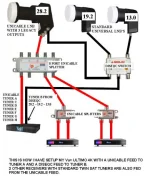
Unicable.webp
 
Your plan should work. You can split as you go along. You only need one wire to a socket on an FBC matrix.

With regards to your original setup. Draw a diagram. There may be confusion as to where each cable was going. Remember, you only have 4 SCR on your LNB. Decide how many you want to assign to the vbox and how many to the Gigablue.
 
You do not need two signal wires to an FBC matrix. Use one wire to the matrix and use the "connected" option.
 
„ Are you saying that the tuner really needs a direct unicable feed prior to splitting? If so it sort of destroys the concept of unicable doesn't it?“
No - it doesn,t, but the splitters and their impedance does matter.
My 27.5W LNB runs to a 2 way splitter - 1 path is to my lounge receiver (about 20 metres away), the other path goes to a 4 way splitter(about 12 metres away) - the output from the 4 way is significantly down (relative to the lounge receiver) and causes occasional loss of signal ( this is a new setup so I need to look at this setup and see if I can improve it!).
 
Abu et al,

Have done as suggested but as soon as I put the split line back onto the UHD UE 4K it fails.

Then I noticed that although tuner A and B had no signal, C and D did! Still would not tune properly. So the new splitter arrived this afternoon and I changed them over. SCR 1 came back but kept dropping off then coning back. So I removed tuner D and gave scr 4 from tuner D to tuner A and the three remaining scr are working fine.

I now suspect the splitter is fine but the LNB is the problem. The 24 way s due to arrive tonight so will try to fit it tiomorrow and see if that cures the problem. Seem to remember I bought a tuner tester in the dim past so will rifle through my stores to see if I can find it.
 
If you are connecting to one LNB why do you need a splitter?
 
Not sure that conclusion is right either as the cable when connected direct to the receiver worked properly so perhaps even these new splitters are not good enough quality? How can I tell?
Are there any tests I can run on them to check them out?
 
Huevos, in earlier posts I explained that I am wiring a new house using unicable. Plus I have several items that need attaching to the unicable circuit.
 
How many cables have you got connected to this receiver?
 
Hi all,

It seems it was the splitter causing the problems. It is an intermittent fault but I have watched it (using the signal monitor) runing at 12 dB happily then suddenly dropping to zero for anything from 1 to 30 seconds.

Have changed the splitter and retuned the Receiver and (uising one of the bands) the separate smart TV. The new LNB has been delayed but hopefully I will have eight bands on the Gigablue, four on the VBox and one on the smart TV before the end of the weekend.
 
Last edited:

OpenViX Feeds Status

Back
Top