Superb quality and spec AB-Com PULSe 4K SE. Crazy offer! Only £99! FREE UK DELIVERY! 4K UHD, Enigma 2, Multiboot 4 images & more!...
Superb quality and spec AB-Com PULSe 4K Rev II Twin Satellite tuner only £149! FREE UK DELIVERY! 4K UHD, Enigma 2, SATA HDD facility, Multiboot 4 images & more!...

Unicable tune fail error

I'm watching this thread with interest as i'm looking at idea of getting a FBC/Unicable setup but looks like it isn't as easy to setup compared to old/legacy shotgun twin cable :)

So this is what I've read so far regarding OP setup:-
OP has a Gigablue Quad 4k STB which comes with 1x twin FBC tuner (according to sponsor) in addition to any optional tuners.

Along with an Opticum Red Robust Unicable LNB with 2x legacy.

Feed from Unicable port on LNB to a splitter then to both inputs on twin FBC tuner. He has tried without splitter so feed from unicable LNB port direct to FBC tuner.
 
Two built-in DVB-S2X FBC tuners and then i have added a cable tuner in the spare slot no USB tuners are added.

So I have managed to get this running now, with the help and support of everyone.
MY NEXT HURDLE IS THE FOLLOWING

I have to wait approx 10 mins before channels bbc one, bbc two, itv, channel 4, and channel 5 all come on i get a service not found did not found in PAT error and a tune fail, switching between channels within the 10 mins
i can record multiple channels ok once all channels are running. if i put the STB into standby or do a cold boot i have to wait again the 10 mins or so

anybody got any ideas to over come this ???
 
Last edited:
deleted message added quote above
 
Last edited:
@thedoc11
I uploaded a video to demonstrate the issue I and others are experiencing here:
https://www.world-of-satellite.com/...LNB-Switch-Off&p=506453&viewfull=1#post506453

It may be possible that the power remains on from Tuner B, I have not tried it yet. I don't have any other receivers utilising the LNB, so it goes to sleep soon after my GB UE 4K stops using 28.2.

Yes totally agree i tried powering from tuner B and that doesn't work looks like a driver update is required to power the LNB continuously even if the stb is in standby, 10 mins from a cold start is way to long
 
When you are running with the LNB legacy outputs where do they go to??
 
When you are running with the LNB legacy outputs where do they go to??

If your talking about from the lnb, I put the shotgun cable and connect directly to the STB to tuners a and b
And change the tuner settings for tuner a and b to simple and the rest of the tuners c-h to automatic. And every channel and recordings work fine.
 
@thedoc11, you are wasting our time. This is the Unicable forum. Forget the legacy output. DO NOT USE. Connect the Unicable output of the LNB to the splitter. Connect 2 cables from the splitter to the 2 aerial sockets of the main DVB-S FBC tuner.
 
@thedoc11, you are wasting our time. This is the Unicable forum. Forget the legacy output. DO NOT USE. Connect the Unicable output of the LNB to the splitter. Connect 2 cables from the splitter to the 2 aerial sockets of the main DVB-S FBC tuner.
If you read my previous post you will see that the only reason i was using the legacy was so my wife can continue to record her programs, so I switch between the 2.

Ideally I would like to connect through the Unicable but as I am experiencing the issues as described above so I cannot switch over permanently to unicable as I would get drop outs on recordings when i place the box into standby.

I have come to the conclusion that the issue is the unicable part of the LNB is going to sleep and therefore i am experiencing a drop out after putting the box into standby or cold booting, its taking 10 mins or so for the LNB to power up, so it looks to me there is an issue with a driver on the Giggablue quad 4k
 
I thought GB sorted the problem of the LNB being powered down in standby.

What image version and build are you using?
 
I thought GB sorted the problem of the LNB being powered down in standby.

What image version and build are you using?

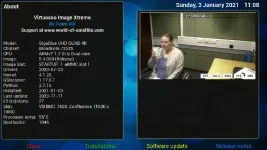
Attached screenshot don't thinks its been sorted its definitely not working
 

Attachments

  • info.webp
    info.webp
    35.1 KB · Views: 19
Last edited:
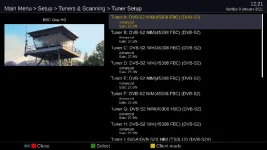
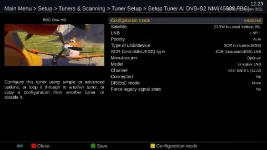
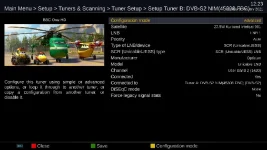
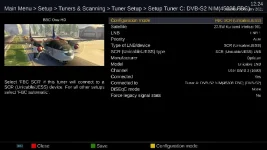
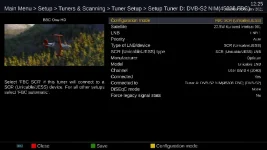
So this morning reset my GBUE4K so it just uses the Opticum - NO other connections to this LNB from ANY other receiver and no other LNB connection to the GBUE4K. There is absolutely no issue in droppping into deep standby or standby and then powering up - service access is almost immediate (there is a softcam involved). Tuners E -> H are like C & D.

settings for Unicable are:-
Code:
config.Nims.0.advanced.lnb.1.lof=unicable
config.Nims.0.advanced.lnb.1.scrList=1
config.Nims.0.advanced.lnb.1.unicableManufacturer=Opticum
config.Nims.0.advanced.lnb.1.unicableProduct=Unicable LNB
config.Nims.0.advanced.sat.3325.lnb=1
config.Nims.0.advanced.sats=3325
config.Nims.0.configMode=advanced
config.Nims.1.advanced.lnb.1.lof=unicable
config.Nims.1.advanced.lnb.1.scrList=2
config.Nims.1.advanced.lnb.1.unicableManufacturer=Opticum
config.Nims.1.advanced.lnb.1.unicableProduct=Unicable LNB
config.Nims.1.advanced.sat.3325.lnb=1
config.Nims.1.advanced.sats=3325
config.Nims.1.advanced.unicableconnected=True
config.Nims.1.advanced.unicableconnectedTo=0
config.Nims.1.configMode=advanced
config.Nims.2.advanced.lnb.1.lof=unicable
config.Nims.2.advanced.lnb.1.scrList=3
config.Nims.2.advanced.lnb.1.unicableManufacturer=Opticum
config.Nims.2.advanced.lnb.1.unicableProduct=Unicable LNB
config.Nims.2.advanced.sat.3325.lnb=1
config.Nims.2.advanced.sats=3325
config.Nims.2.advanced.unicableconnected=True
config.Nims.2.advanced.unicableconnectedTo=0
config.Nims.2.configMode=advanced
config.Nims.3.advanced.lnb.1.lof=unicable
config.Nims.3.advanced.lnb.1.scrList=4
config.Nims.3.advanced.lnb.1.unicableManufacturer=Opticum
config.Nims.3.advanced.lnb.1.unicableProduct=Unicable LNB
config.Nims.3.advanced.sat.3325.lnb=1
config.Nims.3.advanced.sats=3325
config.Nims.3.advanced.unicableconnected=True
config.Nims.3.advanced.unicableconnectedTo=0
config.Nims.3.configMode=advanced
config.Nims.4.advanced.lnb.1.lof=unicable
config.Nims.4.advanced.lnb.1.scrList=5
config.Nims.4.advanced.lnb.1.unicableManufacturer=Opticum
config.Nims.4.advanced.lnb.1.unicableProduct=Unicable LNB
config.Nims.4.advanced.sat.3325.lnb=1
config.Nims.4.advanced.sats=3325
config.Nims.4.advanced.unicableconnected=True
config.Nims.4.advanced.unicableconnectedTo=0
config.Nims.4.configMode=advanced
config.Nims.5.advanced.lnb.1.lof=unicable
config.Nims.5.advanced.lnb.1.scrList=6
config.Nims.5.advanced.lnb.1.unicableManufacturer=Opticum
config.Nims.5.advanced.lnb.1.unicableProduct=Unicable LNB
config.Nims.5.advanced.sat.3325.lnb=1
config.Nims.5.advanced.sats=3325
config.Nims.5.advanced.unicableconnected=True
config.Nims.5.advanced.unicableconnectedTo=0
config.Nims.5.configMode=advanced
config.Nims.6.advanced.lnb.1.lof=unicable
config.Nims.6.advanced.lnb.1.scrList=7
config.Nims.6.advanced.lnb.1.unicableManufacturer=Opticum
config.Nims.6.advanced.lnb.1.unicableProduct=Unicable LNB
config.Nims.6.advanced.sat.3325.lnb=1
config.Nims.6.advanced.sats=3325
config.Nims.6.advanced.unicableconnected=True
config.Nims.6.advanced.unicableconnectedTo=0
config.Nims.6.configMode=advanced
config.Nims.7.advanced.lnb.1.lof=unicable
config.Nims.7.advanced.lnb.1.scrList=8
config.Nims.7.advanced.lnb.1.unicableManufacturer=Opticum
config.Nims.7.advanced.lnb.1.unicableProduct=Unicable LNB
config.Nims.7.advanced.sat.3325.lnb=1
config.Nims.7.advanced.sats=3325
config.Nims.7.advanced.unicableconnected=True
config.Nims.7.advanced.unicableconnectedTo=0
config.Nims.7.configMode=advanced
config.Nims.8.configMode=nothing
config.Nims.9.configMode=nothing
config.Nims.9.diseqcA=3601
config.Nims.9.diseqcB=3601
config.Nims.9.diseqcC=3601
config.Nims.9.diseqcD=3601
 

Attachments

  • Tuner_Setup.webp
    Tuner_Setup.webp
    32.3 KB · Views: 9
  • Tuner_A.webp
    Tuner_A.webp
    30.4 KB · Views: 10
  • Tuner_B.webp
    Tuner_B.webp
    35.5 KB · Views: 8
  • Tuner_C.webp
    Tuner_C.webp
    33.1 KB · Views: 8
  • Tuner_D.webp
    Tuner_D.webp
    31.8 KB · Views: 6
I thought GB sorted the problem of the LNB being powered down in standby.

Probably not relevant, but SystemInfo.py has

Code:
SystemInfo["LnbPowerAlwaysOn"] = getBoxType() in ("vusolo4k", "vuduo4k", "vuduo4kse", "vuultimo4k", "vuuno4k", "vuuno4kse", "gbquad4k", "gbue4k")

Does that include the gbuhdquad4k or am I barking up the wrong tree? :)
 
So I would suggest connecting up as above BUT disable the C-Tuner (on both ports), so the ONLY inputs are from the Opticum (as above - everything else disabled I have a dvb-s2x plugin here but ran with it disabled for the test).... see what happens
 
Last edited:
Probably not relevant, but SystemInfo.py has

Code:
SystemInfo["LnbPowerAlwaysOn"] = getBoxType() in ("vusolo4k", "vuduo4k", "vuduo4kse", "vuultimo4k", "vuuno4k", "vuuno4kse", "gbquad4k", "gbue4k")

Does that include the gbuhdquad4k or am I barking up the wrong tree? :)

Boxtype is gbquad4k and gbue4k
 
So this morning reset my GBUE4K so it just uses the Opticum - NO other connections to this LNB from ANY other receiver and no other LNB connection to the GBUE4K. There is absolutely no issue in droppping into deep standby or standby and then powering up - service access is almost immediate (there is a softcam involved). Tuners E -> H are like C & D.

settings for Unicable are:-
Code:
config.Nims.0.advanced.lnb.1.lof=unicable
config.Nims.0.advanced.lnb.1.scrList=1
config.Nims.0.advanced.lnb.1.unicableManufacturer=Opticum
config.Nims.0.advanced.lnb.1.unicableProduct=Unicable LNB
config.Nims.0.advanced.sat.3325.lnb=1
config.Nims.0.advanced.sats=3325
config.Nims.0.configMode=advanced
config.Nims.1.advanced.lnb.1.lof=unicable
config.Nims.1.advanced.lnb.1.scrList=2
config.Nims.1.advanced.lnb.1.unicableManufacturer=Opticum
config.Nims.1.advanced.lnb.1.unicableProduct=Unicable LNB
config.Nims.1.advanced.sat.3325.lnb=1
config.Nims.1.advanced.sats=3325
config.Nims.1.advanced.unicableconnected=True
config.Nims.1.advanced.unicableconnectedTo=0
config.Nims.1.configMode=advanced
config.Nims.2.advanced.lnb.1.lof=unicable
config.Nims.2.advanced.lnb.1.scrList=3
config.Nims.2.advanced.lnb.1.unicableManufacturer=Opticum
config.Nims.2.advanced.lnb.1.unicableProduct=Unicable LNB
config.Nims.2.advanced.sat.3325.lnb=1
config.Nims.2.advanced.sats=3325
config.Nims.2.advanced.unicableconnected=True
config.Nims.2.advanced.unicableconnectedTo=0
config.Nims.2.configMode=advanced
config.Nims.3.advanced.lnb.1.lof=unicable
config.Nims.3.advanced.lnb.1.scrList=4
config.Nims.3.advanced.lnb.1.unicableManufacturer=Opticum
config.Nims.3.advanced.lnb.1.unicableProduct=Unicable LNB
config.Nims.3.advanced.sat.3325.lnb=1
config.Nims.3.advanced.sats=3325
config.Nims.3.advanced.unicableconnected=True
config.Nims.3.advanced.unicableconnectedTo=0
config.Nims.3.configMode=advanced
config.Nims.4.advanced.lnb.1.lof=unicable
config.Nims.4.advanced.lnb.1.scrList=5
config.Nims.4.advanced.lnb.1.unicableManufacturer=Opticum
config.Nims.4.advanced.lnb.1.unicableProduct=Unicable LNB
config.Nims.4.advanced.sat.3325.lnb=1
config.Nims.4.advanced.sats=3325
config.Nims.4.advanced.unicableconnected=True
config.Nims.4.advanced.unicableconnectedTo=0
config.Nims.4.configMode=advanced
config.Nims.5.advanced.lnb.1.lof=unicable
config.Nims.5.advanced.lnb.1.scrList=6
config.Nims.5.advanced.lnb.1.unicableManufacturer=Opticum
config.Nims.5.advanced.lnb.1.unicableProduct=Unicable LNB
config.Nims.5.advanced.sat.3325.lnb=1
config.Nims.5.advanced.sats=3325
config.Nims.5.advanced.unicableconnected=True
config.Nims.5.advanced.unicableconnectedTo=0
config.Nims.5.configMode=advanced
config.Nims.6.advanced.lnb.1.lof=unicable
config.Nims.6.advanced.lnb.1.scrList=7
config.Nims.6.advanced.lnb.1.unicableManufacturer=Opticum
config.Nims.6.advanced.lnb.1.unicableProduct=Unicable LNB
config.Nims.6.advanced.sat.3325.lnb=1
config.Nims.6.advanced.sats=3325
config.Nims.6.advanced.unicableconnected=True
config.Nims.6.advanced.unicableconnectedTo=0
config.Nims.6.configMode=advanced
config.Nims.7.advanced.lnb.1.lof=unicable
config.Nims.7.advanced.lnb.1.scrList=8
config.Nims.7.advanced.lnb.1.unicableManufacturer=Opticum
config.Nims.7.advanced.lnb.1.unicableProduct=Unicable LNB
config.Nims.7.advanced.sat.3325.lnb=1
config.Nims.7.advanced.sats=3325
config.Nims.7.advanced.unicableconnected=True
config.Nims.7.advanced.unicableconnectedTo=0
config.Nims.7.configMode=advanced
config.Nims.8.configMode=nothing
config.Nims.9.configMode=nothing
config.Nims.9.diseqcA=3601
config.Nims.9.diseqcB=3601
config.Nims.9.diseqcC=3601
config.Nims.9.diseqcD=3601

where are these setting if i was to ftp into the STB the tuner settings you have uploaded are identical to mine
 
@thedoc11 - what firmware is showing on the lcd display when it powers up (bottom numbers on display - 4 digits)
 
where are these setting if i was to ftp into the STB the tuner settings you have uploaded are identical to mine
settings file is in /etc/enigma2

unfortunately I am using different satellite NOT 28.2E so you need to change this reference in my settings to 28.2 (check what you currently have defined.
if you can do this then:
to change:
1) Putty and login to the receiver with userid/password, then type init 4 (space between) to stop box
2)Filezilla login and copy file to your PC
3) replace all the config.NIMS with mine
4) replace with 28.2!!!!
5 copy back AFTER renaming current settings file.
6) Putty enter init 6 (space between)

on my box you would replace 3325 with 282
 
Last edited:
NB. Use notepad++ if you're editing the file on a pc.
 

OpenViX Feeds Status

Back
Top