Superb quality and spec AB-Com PULSe 4K SE. Crazy offer! Only £129! FREE UK DELIVERY! 4K UHD, Enigma 2, Multiboot 4 images & more!...
Superb quality and spec AB-Com PULSe 4K Rev II Twin Satellite tuner only £179! FREE UK DELIVERY! 4K UHD, Enigma 2, SATA HDD facility, Multiboot 4 images & more!...

[ABM-MISC] Update custom bouquets?

At the moment we are working on provider Digi 1W.
Viasat 5E and CD-Nordic 1W are already finished and in the latest release of ABM.

Just spotted Viasat! :thumbsup:

I'll set Viasat to Sweden and i've got Nordic set to Denmark, that covers a lot, but still none of the channels I mentioned above are covered yet so id have to add them manually.

I still can't get rid of these two pesky "all channels" bouquets created at the end of my favourites file either. Not sure why they are there as i've got my providers scanned but bouquet creation is turned off for all of them so it only scans for my favourites.xml. Turning main off in my favourites.xml got rid of the 'All channels' at the top but these two extras are being added at the bottom - any ideas? Nearly there!
 
Turning main off in my favourites.xml got rid of the 'All channels' at the top but these two extras are being added at the bottom - any ideas? Nearly there!
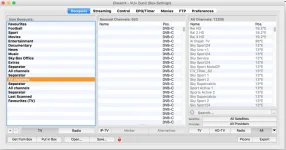
Could they be there as part of a previous run?
get rid of them all & run ABM again.
 
Could they be there as part of a previous run?
get rid of them all & run ABM again.

Yeah i've tried that, deleted all via ABM and i've deleted manually. Just done another run and now there are 3 of them are the bottom?! Two are empty the last one is randomly full of channels i've not even added to my favourites.xml
 
Yeah can't get rid of these "All channels" no matter what I do. Is it work posting my favourites.xml do you think?

I've hidden every bouquet from every provider I have ticked, i've put "no" to bouquet creation on every provider its possible, i've put main as "0" in the favourites and sections as "1" to get my custom bouquets.

The bouquets are created perfectly and all the channels are in place, i'm just stuck with these three extra bouquets of "All channels" as I said two are empty and the bottom one includes channels starting at Tvvlaanderen. I don't want any of them really but I could live with the bottom one. If I want to scan some channels not in my bouquets id just go to the satellite or providers list.
 
they are the bouquets from the other providers you are scanning. they don't have bouquets/sections.
 
they are the bouquets from the other providers you are scanning. they don't have bouquets/sections.

Well 1. Why are they empty then? 2. Why can't they be turned off like everything else. I don't want them there, especially not three lots of them.
 
Sorry, not a mind reader so dont know which ones you are referring to. Debug logs are requested so that who lack ability to read minds can assist others.

may be an idea to attach your favourite. xml too.

if you don't want then, don't scan them.

ABM is programmed not to create blank bouquets in bouquets. tv
 
Sorry, not a mind reader so dont know which ones you are referring to. Debug logs are requested so that who lack ability to read minds can assist others.

may be an idea to attach your favourite. xml too.

if you don't want then, don't scan them.

ABM is programmed not to create blank bouquets in bouquets. tv

I did suggest attaching the favourites.xml, so here it is - https://dl.dropboxusercontent.com/u/8676022/favourites.xml

I'll get the debug log done too later

I don't want them in the list, but I scan those where there is a channel referenced in the favourites.xml if I don't scan them the channel wont be added and kept up to date, so I have no choice - I might only have one or two channels from the providers.

I'm definitely getting 3 "All Channels" bouquets at the bottom of my list and the first two ARE empty. So something is a miss - at least the last one does include lots of channels.
 
Screenshot 2015-10-28 16.41.28.webp

Here also are the bouquets after creation as shown by iDreamX. Strangely here it just shows DVB-C channels in each of the 'All Channels' list (i have no DVB-C tuner) though on the actual box the last "All channels" does show DVB-S channels.
 
If they are by ABM, add the provider name in expert mode settings. That could reveal what they are. You can disable it later.
 
If they are by ABM, add the provider name in expert mode settings. That could reveal what they are. You can disable it later.

Good thinking :thumbsup:

Just turned that on, tried a rescan and got the error message "Can't find NIM"... :confused:
 
Last edited:

OpenViX Feeds Status

Back
Top