Superb quality and spec AB-Com PULSe 4K SE. Crazy offer! Only £129! FREE UK DELIVERY! 4K UHD, Enigma 2, Multiboot 4 images & more!...
Superb quality and spec AB-Com PULSe 4K Rev II Twin Satellite tuner only £179! FREE UK DELIVERY! 4K UHD, Enigma 2, SATA HDD facility, Multiboot 4 images & more!...

[VU+ Duo2] ViX 4.1 Kodi

  • Thread starter Thread starter lscolman
  • Start date Start date
If you want to access a nas on VU+ kodi plug in you have to first of all mount the nas on the box you wish to access from, this will normally be a mount by cifs... If you want to mount your nas as NFS on certain builds of kodi, ie android and I suspect vu+ you will need to add extra permissions to your nas via ssh, there is a full wiki page out there on this subject, I had to do it on mine.
Once your nas is mounted on your VU+ box, you then import your media via the local file browser in kodi (not the smb or NFS option).
 
hi

thanks for the reply.

The issue is not with regards to wanting to access my NAS from Kodi.

Issue is I am not able to get Kodi plugin working when my NAS is mounted, I get a black screen requiring a reboot. When I unmount it Kodi displays fine.

Any ideas?

edit: all working now, issue was because I had my NAS mounted as HDD replacement, sorted that and all working now
 
Last edited:
To add to this my nas was cifs mounted on my solo4k, for the life of me I have been trying to cifs mount it on my duo2 today, but you are right, it won't cifs mount on 2 vix re ievers at the same time, even disabling it on one doesn't solve it, just to add I can access the same smb files by 4 or 5 other devices at the same time, I have found myself moving all my files now into NFS shares.
 
I have a straight forward set up - dish - VU+duo2 box - tv
Since installing 4.1 I am finding there is a "stuttering" video with certain moving objects. It does not happen all of the time and I have yet to try and get a pattern as to when it happens. It is only the moving object that stutters and generally the rest of the picture is fine.
Has anyone else seen this?
 
Are we talking about vix kodi issue or image . You should really start a new thread if it's to do with image and not kodi.
 
I've now twice applied software update to build 002 and 003 I seem to recall, but when it reboots my build still shows 001?

Kodi shows as 16.1-RC2.

Has the upgrade worked and the build just not incremented to build number or possibly an issue with the software update?

This is on a Duo2.
 
I flashed my vu duo with 4.1.001. and a day later there was an update to 001 so I updated to that then today there was another update to 002 nut when I check info in menu it still shows as 001
 
I flashed my vu duo with 4.1.001. and a day later there was an update to 001 so I updated to that then today there was another update to 002 nut when I check info in menu it still shows as 001

Impossible, build 4.1.002 has never been uploaded. Build 4.1.003 is uploading now.
 
flashed 4.1.001.
then there was an update to 4.1.001.
and a couple of hours ago there was an update to 4.1.002
that's what was on my box
makes no difference to me if there is an update or mot but that's what it said on mine
 
flashed 4.1.001.
then there was an update to 4.1.001.
and a couple of hours ago there was an update to 4.1.002
that's what was on my box
makes no difference to me if there is an update or mot but that's what it said on mine

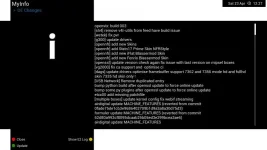
Post a screenshot, menu > information > about
 
I flashed my vu duo with 4.1.001. and a day later there was an update to 001 so I updated to that then today there was another update to 002 nut when I check info in menu it still shows as 001

I had the same this morning on my solo2, done it with the same results as others are listing :confused:
 
today icon on box flashing green that tells me there is an update
so I go and check update and it says 002 and a long list of things that will be updated
so I go ahead with update the box restarts and when I go to
menu > information > about still says 001

yes I have installed the picon.xyz feed
but what happens when there is an update to picons there is nothing listed in update info just a blank screen
 
Last edited:
Hi Guys,
Is there anyway to add the Kodi Launcher to the main menu on the Vix Image instead of going to plugins?
ive tried changing the plugin.py to this

def Plugins(**kwargs):
l = []
l.append(PluginDescriptor(where=PluginDescriptor.WHERE_SESSIONSTART, fnc=session_start_main))
l.append(PluginDescriptor(name=_("Kodi Launcher"), description=_("start kodi(formerly known as XBMC) mediacenter"), where=PluginDescriptor.WHERE_PLUGINMENU, fnc=plugin_start_xbmc))
return l

to

def Plugins(**kwargs):
l = []
l.append(PluginDescriptor(where=PluginDescriptor.WHERE_SESSIONSTART, fnc=session_start_main))
l.append(PluginDescriptor(name=_("Kodi"), description=_("start Kodi"), where=PluginDescriptor.WHERE_MENU, fnc=plugin_start_xbmc))
return l

but it just crashes my box when loading up the menu, can someone help with the edit or point me in the right direction.

Many Thanks
 

OpenViX Feeds Status

Back
Top