Superb quality and spec AB-Com PULSe 4K SE. Crazy offer! Only £99! FREE UK DELIVERY! 4K UHD, Enigma 2, Multiboot 4 images & more!...
Superb quality and spec AB-Com PULSe 4K Rev II Twin Satellite tuner only £149! FREE UK DELIVERY! 4K UHD, Enigma 2, SATA HDD facility, Multiboot 4 images & more!...

[VU+ Duo4K SE] ViX 6.3.003 bogs my box down

Micci

Member
Joined
Nov 21, 2011
Messages
49
Reaction score
0
Points
6
Tried to couch flash the version 6.3.003, but the TV picture freezes on every channel and the box becomes very sluggish. When I try to couch flash back to the previous version, the box stops at the backup manager at the very beginning and won’t start the flash at all.
Had to finally flash 6.3.002 from a USB stick.
 
Last edited:
No one else has this problem and it has been heavily tested on the Vu+ Duo4k SE. So if you want help you are going to need to provide us with debug logs. Most likely you had a background process running.
 
I'm afraid I don't know how to get any logs. And besides, I've already flashed back to .002. Another Duo 4K SE owner on a Finnish forum said 6.3.003 stopped his CI+ from working (His Ultimo 4K was working fine on 6.3.003, though). Admittedly my channels freezing looked just like the CI+ stopped working, but it did this on FTA channels as well.

After I flashed back to .002, I had to pull the CI+ module out and push it back in again before any scrambled channels started working.
 
Last edited:
I'm afraid I don't know how to get any logs. And besides, I've already flashed back to .002. Another Duo 4K SE owner on a Finnish forum said 6.3.003 stopped his CI+ from working (His Ultimo 4K was working fine on 6.3.003, though). Admittedly my channels freezing looked just like the CI+ stopped working, but it did this on FTA channels as well.

After I flashed back to .002, I had to pull the CI+ module out and push it back in again before any scrambled channels started working.

This is true. I first made coachflas with 003. Then fresh flash with usb-stick without restore. CI+ is not working.
I had ViX 5.4 016 with Openmultiboot and there CI+ was working.
In my Ultimo4K no problem with 003/CI+.
Obviously something wrong in VU+ Duo4K SE image 6.3 003.
 
Last edited:
This is the adapter
CIadapter.webp

Works fine now with 6.3 002 image.
 
Last edited:
Can you guys check FCC plugin is showing in tuner menu on Duo 4K SE
 
This is true. I first made coachflas with 003. Then fresh flash with usb-stick without restore. CI+ is not working.
I had ViX 5.4 016 with Openmultiboot and there CI+ was working.
In my Ultimo4K no problem with 003/CI+.
Obviously something wrong in VU+ Duo4K SE image 6.3 003.
So he says FTA channels freeze. Can you check this out. And check again with CI module removed.
 
Can you guys check FCC plugin is showing in tuner menu on Duo 4K SE

Do you mean Fast Channel Change? Yes, that menu item is there on my .002. Suppose it's also there on .003 if I flash it and then drop in my settings backup.
Never used it though. Didn't even know it was a plugin. I've never installed such a plugin.

Will have to do any testing some other time when the family doesn't need to watch TV.
 
Originally this was tested by Orlandox on Ultimo4k and says it works ok on finnish channels.
 
Tried now to remove the FCC plugin prior to flashing to 6.3.003, so the plugin wasn’t in my plugins list in the backup file. There were some strange screens with german text flashing by a couple of times while restoring the settings backup. These screens were there when I flashed .003 the last time as well. Otherwise the 1st bootup sequence seemed normal.

The TV channels started freezing as soon as the box booted up again. Yes, the FTA channels too. Removed the CI+ module, and the FTA channels started working fine (but of course I could not view any paid channels). Reinserted the CI+ module and the freezing resumed.
The Common Interface menu says ”no module found” while the channels are frozen. When it says ”Conax CA” the channels work fine.

The picture freezes every 10-20 seconds or so and stays frozen for 5 seconds and up. And while this happens, the text in the Common interface menu changes between ”no module found” and ”Conax CA”.

Flashed back to .002. The mrs needed to watch the news.
 
Last edited:
Just for info with 6.3.003 you can use vu+ multiboot

Activate it in standby/restart then image manager flash 6.3.003 into slot 1 then your backup into slot 2

This way you can easily boot images as and when needed
 
Originally this was tested by Orlandox on Ultimo4k and says it works ok on finnish channels.

It also works in my Ultimo4K but not in my Duo4K SE on finnish paytv channels when CI+ is needed. I have not yet tested it in my Uno4K SE.
 
It also works in my Ultimo4K but not in my Duo4K SE on finnish paytv channels when CI+ is needed. I have not yet tested it in my Uno4K SE.

Thats really interesting ..positive result on Uno4k would indicate issue with Duo4K drivers? - learned recently has issues with usb 3 connection.
 
Thats really interesting ..positive result on Uno4k would indicate issue with Duo4K drivers? - learned recently has issues with usb 3 connection.

I just made flash to Uno4K SE with settings and plugins restore.
Ci+ authentication was quite slow, but it works. So no problem with 6.3 003.
I think with Duo4K SE problem is, that it did not make proper CI+ authentication.
 
I've just done a complete new flash and setup on Duo 4K SE. Tested with two CI+ Cam types and two card types, no issues at all with CI+. My 4K Tivusat card even updated itself as new use in a while. Also tested with fast channel change on and off, no issues.
 
Are the people with the problem using some kind of "helper" plugin?

If so you need to set up from scratch without the plugin.
 
Hello,

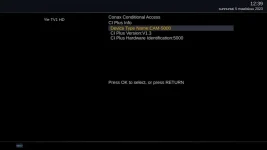
FCC working OK on my Ultimo4K, but with CI+ I have same problems than in post #10. I have reported that already before.
 
Ultimo4K refuses to go further than this if you want to see Conax information:
CI+.webp
 
Can you guys check if you have the same problem on OpenBH 5.2 or Vu factory image?

Just save current image in multiboot.
 

OpenViX Feeds Status

Back
Top