Superb quality and spec AB-Com PULSe 4K SE. Crazy offer! Only £129! FREE UK DELIVERY! 4K UHD, Enigma 2, Multiboot 4 images & more!...
Superb quality and spec AB-Com PULSe 4K Rev II Twin Satellite tuner only £179! FREE UK DELIVERY! 4K UHD, Enigma 2, SATA HDD facility, Multiboot 4 images & more!...

Vix EPG turn off blue lines

maddop

Forum Supporter
Donated Member
Joined
May 14, 2012
Messages
14
Reaction score
0
Points
0
Hi,

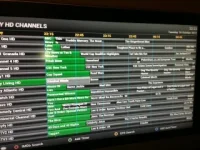
I'd like to turn off the blue lines in my EPG but cannot see an option to do so.
See image below.

Any ideas?

thanks.

photo.webp
 
There is no option to turn them off in the default skin.
Have you tried other skins to see if you can get the look you want?
 
Not yet... I was hoping I was missing something obvious.
I'll try other skins now. thanks for the quick reply.
 
Be-aware the only skins properly mapped for the ViX image are the ViX day and Night skins and the Magic skins from the image feeds. any other skin may or may not work correctly with the image.
 
thanks... I guessed as much, so only downloading the ones from the VIX plugin menu.
Ended up settling for the magic-hd.
 
also if you wished you could edit the skin.xml to remove the blue timelines. it is located in usr/share/enigma2/

sent from my Samsung Galaxy S3 using tapatalk 2
 
no probs glad you got it sorted. i tend to mix and match bits from different skins to my personal taste so editing skin files and skin.xml is well worth spending a bit of time getting to learn it as each persons preferences for how they like their gui to look is different. thanks for also sharing the edited file for others who may prefer this also :thumbup:

sent from my Samsung Galaxy S3 using tapatalk 2
 
That was a great tip... i've edited the skin.xml file in the directory /usr/share/enigma2/ViX_Night_HD

The file is available here is anyone wants it.

http://www.4shared.com/document/xOk51T_4/skin.html

Thanks for sharing, but be aware that any updates will overwrite that file, so will need to be re-done.
You can add the change to a user file with just that screen which won't get over written on update though, skin_user_ViX_Night_HD.xml if using the default skin.
 

OpenViX Feeds Status

Back
Top