Superb quality and spec AB-Com PULSe 4K SE. Crazy offer! Only £129! FREE UK DELIVERY! 4K UHD, Enigma 2, Multiboot 4 images & more!...
Superb quality and spec AB-Com PULSe 4K Rev II Twin Satellite tuner only £179! FREE UK DELIVERY! 4K UHD, Enigma 2, SATA HDD facility, Multiboot 4 images & more!...

Vix panel - skin "Default1080"

samlukin

New member
Joined
Feb 7, 2021
Messages
15
Reaction score
0
Points
1
Hi everyone

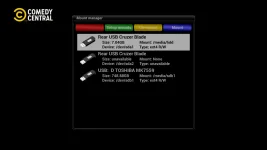
the Vix panel accessible from setup from main menu is not properly skinned, i mean backup manager - image manager - install local extension - mount manager - script runner - swap manager.

can you please fix it.

thx so much.

scn-bk.webpscn-im.webpscn-ipk.webpscn-mnt.webpscn-spt.webpscn-swp.webp
 
Default1080 is a test skin. It really is skin_default. Skin_default does not skin plugins. The default skins are fallback for emergencies. They are not for use as a primary skin.
 
thank you for everything you do, to be honest, I like the look and feel of the overall simplistic aspect, if you can show me what screens to fix, i can tinker a bit, i dont mind...using it.
 
We don't have plugins in the emergency skin. It is a rule. Try "E2-Dark-Os" or SimpleGray".
 
@Huevos , those aren`t plugins, they`re core openvix features, why aren`t they skinned, whatever the reason may be...i`m stumped to be honest...but i`m grateful you take the time to explain what i fail to see.
 
Vix core is a plugin and has embedded skins. If you use any other skin, not emergency skin it show fine. Or create your own user extension in /etc/enigma2
 
thx @Huevos....I totally forgot about /etc/enigma2 user extension...very interesting, but where do i find these embedded skins?
 
You don't needs the embedded skins if you are making your own. But anyway the are in the individual files of the vix plugin.
 

OpenViX Feeds Status

Back
Top