L

Superb quality and spec AB-Com PULSe 4K SE. Crazy offer! Only £99! FREE UK DELIVERY! 4K UHD, Enigma 2, Multiboot 4 images & more!...
Superb quality and spec AB-Com PULSe 4K Rev II Twin Satellite tuner only £149! FREE UK DELIVERY! 4K UHD, Enigma 2, SATA HDD facility, Multiboot 4 images & more!...
You are using an out of date browser. It may not display this or other websites correctly.
You should upgrade or use an alternative browser.
You should upgrade or use an alternative browser.
VIX Team Vu+ Duo Image - 05/09/2010 - Discussion
- Thread starter pooface
- Start date

- Status
- Not open for further replies.
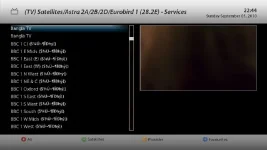

this is the my screenshots ...how can i change to the english please thanks...
That look like your epg download is corrupt or something.
Try the following: -
FTP to /media/hdd and delete any epg.dat files on your HDD.
Reboot.
Then try a manual download/update of your epg.

AHHHHHHHHHHH just when i start getting my head round your openpli based image you throw this one into the ring!
im gonna have to fiddle
u'll stick to it when u do

C
cozmo
Guest
i have the image running and stable very very happy with it and am gonna stay with it can anyone tell me is there a way of running scrips like keyupdater and so on also is there a cron manager where u set timmers and so on like u did on the de image i think thats what it was called in de image and i know about autotimmer and timmer setting before u say
thanks for all your geat work
Cozmo
thanks for all your geat work
Cozmo
F
fishlos
Guest
i have the image running and stable very very happy with it and am gonna stay with it can anyone tell me is there a way of running scrips like keyupdater and so on also is there a cron manager where u set timmers and so on like u did on the de image i think thats what it was called in de image and i know about autotimmer and timmer setting before u say
thanks for all your geat work
Cozmo
i don't know about the script manager, but your qution about corn is already been answered fully on this thread.
regards,
L
levi45
Guest
That look like your epg download is corrupt or something.
Try the following: -
FTP to /media/hdd and delete any epg.dat files on your HDD.
Reboot.
Then try a manual download/update of your epg.
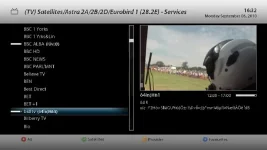
thank you for replay i done that but is still the same here my new screenshots
Attachments
ok guys
I have just reinstalled the VIX image and installed the channel list (catseye motor latest) I'm on bbc hd atm. 28.2e
I have not installed anything else so what button should I now press to see the epg .
Thanks
Regards
jcl
I have just reinstalled the VIX image and installed the channel list (catseye motor latest) I'm on bbc hd atm. 28.2e
I have not installed anything else so what button should I now press to see the epg .
Thanks
Regards
jcl
F
fishlos
Guest
thank you for replay i done that but is still the same here my new screenshots
i had the same problem yesterday, solved by a complete restart.
regards
ok guys
I have just reinstalled the VIX image and installed the channel list (catseye motor latest) I'm on bbc hd atm. 28.2e
I have not installed anything else so what button should I now press to see the epg .
Thanks
Regards
jcl
just one short touch on the EPG butto
L
levi45
Guest
this is an exellent image well done thanks to every one in vix team ....

andyblac
Administrator ,
- Joined
- Apr 21, 2010
- Messages
- 12,698
- Reaction score
- 96
- Points
- 0
- Age
- 52
i have the image running and stable very very happy with it and am gonna stay with it can anyone tell me is there a way of running scrips like keyupdater and so on also is there a cron manager where u set timmers and so on like u did on the de image i think thats what it was called in de image and i know about autotimmer and timmer setting before u say
thanks for all your geat work
Cozmo
if you know how to use cron, for now you will have to set it manually just create a folder 'cron' folder in /etc and edit your root file so like this
create '/etc/cron' folder and create a file root put all your cron jobs in there and it should run them.
andyblac
Administrator ,
- Joined
- Apr 21, 2010
- Messages
- 12,698
- Reaction score
- 96
- Points
- 0
- Age
- 52
thank you for replay i done that but is still the same here my new screenshots
ok, you will need to clear out your corrupt epg cache first, open a telnet session and copy and paste the following
Code:
rm -f /hdd/epg.dat
init 4
sleep 5
init 3
that wil close enigma2 clear the cache and restart it, them try to download you data again
P
pizzaman
Guest
ok guys
I have just reinstalled the VIX image and installed the channel list (catseye motor latest) I'm on bbc hd atm. 28.2e
I have not installed anything else so what button should I now press to see the epg .
Thanks
Regards
jcl
how do i download chanel list ?

Mr. Mister
Moderator ,
how do i download chanel list ?
I just used my old files from DreamElite and sent them to the Vu via DBEdit.. and everything worked perfectly..
Na hassels at all..
dreambox edit enter box ip and password that you have in dcchow do i download chanel list ?
download channel list to your desktop
open db edit, click on open load your list to dbedit and ftp to box
regards
jcl
P
pizzaman
Guest
no i mean is there a way to get all the channel list like i didn on old de image
think i pressed a few buttons and gave me a sat list
think i pressed a few buttons and gave me a sat list
andyblac
Administrator ,
- Joined
- Apr 21, 2010
- Messages
- 12,698
- Reaction score
- 96
- Points
- 0
- Age
- 52
no i mean is there a way to get all the channel list like i didn on old de image
think i pressed a few buttons and gave me a sat list
press up or down whilst viewing a channel
 , bring up the channel listiings
L
levi45
Guest
ok, you will need to clear out your corrupt epg cache first, open a telnet session and copy and paste the following
Code:rm -f /hdd/epg.dat init 4 sleep 5 init 3
that wil close enigma2 clear the cache and restart it, them try to download you data again
thank you how long will take the box restart its now 4 minuts box not started yet...
P
Past2Present
Guest
It won`t restart the box, only enigma2. It`s the same as you restart the gui through the menu.
- Status
- Not open for further replies.
