Superb quality and spec AB-Com PULSe 4K SE. Crazy offer! Only £99! FREE UK DELIVERY! 4K UHD, Enigma 2, Multiboot 4 images & more!...
Superb quality and spec AB-Com PULSe 4K Rev II Twin Satellite tuner only £149! FREE UK DELIVERY! 4K UHD, Enigma 2, SATA HDD facility, Multiboot 4 images & more!...

VIX Team Vu+ Duo Image - 05/09/2010 - Discussion

Status
Not open for further replies.
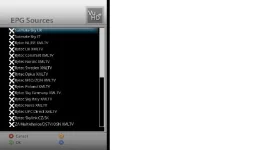
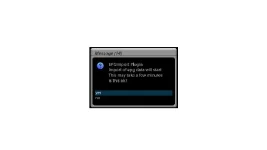
I'm also having some problems with the EPG Update.
I just get 0 Events each time I've tried to update it?

If I select a more than a couple of providers I get a crash. (but I don't seem to have had a crash log generated?)

are you using SATMATE ?, if so, that why, the 'Events' is for Rytec only
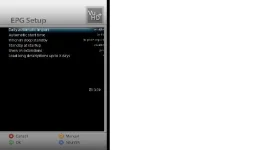
 
i used the rytek uk epg and all working fine for me now, the manual update done it all
 
Don't think I'm using SATMAN.
I think it's the one that's pre-installed.

When I do that I just seem to get 0 Events?
 

Attachments

  • EPG.webp
    EPG.webp
    8.7 KB · Views: 31
  • epg_select.webp
    epg_select.webp
    16 KB · Views: 28
  • Import_y_n.webp
    Import_y_n.webp
    4.8 KB · Views: 25
Don't think I'm using SATMAN.
I think it's the one that's pre-installed.

When I do that I just seem to get 0 Events?

lol, you have choose to install ALL, of them ?, i think you have it the wrong way around, X is selected
 
Pls Reply. Tks

Your new release is really very beautiful and functional.
I want to ask only two questions:
1) How do I map the hard drive in your image? There is a plugin to do so? I see the HD in FTP but I can not format it.
2) When a new release will come with drivers for DVBT?

Thanks for the work you do for us all.
Polimario
 
Your new release is really very beautiful and functional.
I want to ask only two questions:
1) How do I map the hard drive in your image? There is a plugin to do so? I see the HD in FTP but I can not format it.
2) When a new release will come with drivers for DVBT?

if you can see it in FTP '/hdd' then it should be mounted allready ?, if you can see it why format it ?, if you can;t see either, then go to SETUP --> SYSTEM -- HARDDISK

as for DVBT not just yet, other thing to do first, but i'm sure we add the just as soon as we can :)
 
Ok people having a few glitches when playing back my recording !! anyone else seeing this ? I'm getting stuttering and freezes constantly, this was never seen before on VTI or DE ? I will add however that i have not reinitialize the HD since changing from DE as the Vix image had no problems seeing the HD and therefor saved all my previous recordings.
 
Autoresolution is the 3 plug-in down in the system plug-ins menu..

One thing i noticed last night was it took about a minute to load all the plugins in the menu..

This was just a 1st time issue.. and they loaded right away each time after that..

Hope this helps..

No cant se it, i think i allready installed it and the nfi backup plugin also but they dont show up in plugin menu.
That maybe why they don been seen in download dont know?
I think i go back to OpenPli until its has gone some time and newer vers shows up, but nice work
 
Thanks. I know this very well, but as I mention in my request for help, this sources are very limited to just a few providers. I need for 39E, Bulsatcom. With the other images EPG working like a charm and I don't need to download or import anything. I like this image, but I will go back to VTI until this issue is fixed somehow.

I think bulsat might have been missed on our EPG sources file. I'll add to mine and test this evening. If everything is ok I'll upload the updated sources file this evening.
 
No cant se it, i think i allready installed it and the nfi backup plugin also but they dont show up in plugin menu.
That maybe why they don been seen in download dont know?
I think i go back to OpenPli until its has gone some time and newer vers shows up, but nice work

if autoresolution installed then configure it via the Menus
 
No cant se it, i think i allready installed it and the nfi backup plugin also but they dont show up in plugin menu.
That maybe why they don been seen in download dont know?
I think i go back to OpenPli until its has gone some time and newer vers shows up, but nice work

OK.. Dont go to back to OpenPli just yet.. Stick with it.. You will get it sorted..

If you have downloaded it.. it will be in your plugin browser..

Just a long press of your blue button and it should be there in the list of other plugins..
 
I downloaded the nfiflash from the plugins menu but that did not do anything. I also tried to manually install the nfi flash backup plugin but that did not work either.

To remove....go back to the plugin menu...press red to remove plugins... i think the backup pplugin will be bought in to the next release.
 
I think bulsat might have been missed on our EPG sources file. I'll add to mine and test this evening. If everything is ok I'll upload the updated sources file this evening.

This will be great. Thanks a lot in advance.
 
OK.. Dont go to back to OpenPli just yet.. Stick with it.. You will get it sorted..

If you have downloaded it.. it will be in your plugin browser..

Just a long press of your blue button and it should be there in the list of other plugins..

Dont helps is not there and its not in downloading plugins, maybe my memory is full with pluggins i have a lot in the plugin list.
But thanks for your help;)
 
Ok people having a few glitches when playing back my recording !! anyone else seeing this ? I'm getting stuttering and freezes constantly, this was never seen before on VTI or DE ? I will add however that i have not reinitialize the HD since changing from DE as the Vix image had no problems seeing the HD and therefor saved all my previous recordings.

Did you install the fix for the ecm times being nan?! i.e. the libgcc.so or whatever the filename is?! If so, that is your culprit. As mentioned in the thread, it causes problems with the box, and had problems with the recordings when I put that fix in too. The actual recording was fine (well, was for me, but that was from a fta channel). When I press the rewind button, it would show what had stuttered perfectly fine...

So, restore the file and you should be fine...
 
I flashed my vu+ duo first time yesterday with VIX image.

I have a quesiton.

I basically followed the instrucs and copied those reuired files on the usb stick, and then put it in the usb slot and restart my vu.

now I saw NOTHING on the screen, but on the display of my vu+ duo it said "reading from usb ...." so I just waited!

TV was showing black screen, after 10 minutes or so, I got a msg on my VU+ display that ready for reboot.

So I just rebooted and VIX image was installed and was there!

So is this normal? I thought one would see instrucs on the screen when you flash?
 
Dont helps is not there and its not in downloading plugins, maybe my memory is full with pluggins i have a lot in the plugin list.
But thanks for your help;)

As was said previously, the autoresolution plugin appears in the settings menu from what I remember, not in the plugins list...
 
I flashed my vu+ duo first time yesterday with VIX image.

I have a quesiton.

I basically followed the instrucs and copied those reuired files on the usb stick, and then put it in the usb slot and restart my vu.

now I saw NOTHING on the screen, but on the display of my vu+ duo it said "reading from usb ...." so I just waited!

TV was showing black screen, after 10 minutes or so, I got a msg on my VU+ display that ready for reboot.

So I just rebooted and VIX image was installed and was there!

So is this normal? I thought one would see instrucs on the screen when you flash?

No, that is perfectly normal. Whilst it is flashing, it does not display anything to a tv from the outputs. All communication is made from the vfd. It will have gone through the process of:

Starting... -> Reading USB -> Programming -> Reading USB -> Programming -> Remove usb and restart box.

Shouldn't take 10 minutes though. Only usually takes about 2 or 3 minutes from what I remember (maybe even less as I've never really timed it :p)...
 
I cannot find where to put Keys and SCCE on this image, can you advise please, there are still a few channels open with this method. TIA
Otherwise all working fine, a different skin (Default ) does not have the bar across the media player menu I reported earlier.
rgds
dmgp
 
Status
Not open for further replies.

OpenViX Feeds Status

Back
Top