Well........
The more I play with it, the image tooit's great.
The functionalities are almost limitless
Gonna try get ECM info to work later.
I have the file to FTP to var/lib and will report if any slowing down, as has been feared that might be the case?
Well........
The more I play with it, the image tooit's great.
The functionalities are almost limitless Gonna try get ECM info to work later.
I have the file to FTP to var/lib and will report if any slowing down, as has been feared that might be the case?
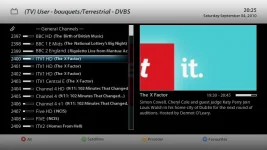
In the bouquet display I can't get the time banner up as in the screenshot here to the right side of the channel number.
Have messed with the settings to no avail.
Am using Catseye settings.
This site uses cookies to help personalise content, tailor your experience and to keep you logged in if you register.
By continuing to use this site, you are consenting to our use of cookies.


 it's great.