Superb quality and spec AB-Com PULSe 4K SE. Crazy offer! Only £99! FREE UK DELIVERY! 4K UHD, Enigma 2, Multiboot 4 images & more!...
Superb quality and spec AB-Com PULSe 4K Rev II Twin Satellite tuner only £149! FREE UK DELIVERY! 4K UHD, Enigma 2, SATA HDD facility, Multiboot 4 images & more!...

VIX Team Vu+ Duo Image v2.0 - 09/02/2011

I can access the internet via my box, as it does download EPG data.
It just doesn't find the Plug-in or update data.

I will give it untill this afternoon before sulking off back to 1.2

On your router, does it have any firewall protection at all? Might be worth disabling all firewall and anything like that...
 
i put the ipk file i need to install in temp but when i Select IPK installer the file isnt there? any ideas
 
Anyone using swap on USB?

Swap doesnt work anymore after reboot. Can anyone confirm this? USB key is properly detected after reboot.
This is know issue on openpli 2.0, i thought that you fixed this...

Blue button > VIX Menu > Device manager > Assign usb stick to /media/usb

Reboot.

Blue button > VIX Menu > Swap mananger > Create on usb stick.

Yes it works.

Mae sure its set to Autostart.
 
Just tried it mine is working fine on USB after a reboot!
You have set it to Autostart?

of course. Doesnt work. I need to create swap again and activate it. Then it works... till i restart receiver.
 
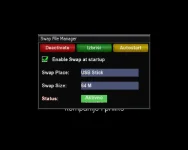
Here is my settings. As you can see everything is correct, but after reboot i get:
Swap size: 0
Status: Inactive
Autostart is still enabled.

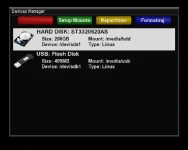
USB stick is properly formated. I also have EPG file on USB stick. Maybe this is the issue.

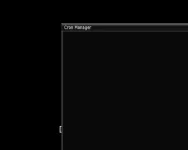
I am also attaching image of cron manager. I am using magic SD skin and apperantly it isnt compatible with cron manager. I think it is only compatible with HD skins but not sure. Soeone should check and fix this.
 

Attachments

  • screensho2t.webp
    screensho2t.webp
    13.5 KB · Views: 21
  • screenshot.webp
    screenshot.webp
    19.7 KB · Views: 25
  • screenshot3.webp
    screenshot3.webp
    2.4 KB · Views: 13
Last edited:
i'm using the same skin as you (although mine is in English) but my USB shows as Type: W95 FAT32 & not Linux
 
Update to V2 turns my screen purple

Hey guys, i tried installing VIX v2 4 times and redownloaded it twice. My issue is that everything seems to go well and then when the Vu Duo finishes booting and the rotating VIX graphics changes to the small version my screen turns purple. The screensize also changes to a wrong format. Ive updated the box but that changes nothing. My box is and allways has been connected thru a component cable. I have allways run VIX since version 1 and havent touched any tv setting or cable for that matter. I know that having wrong settings in the tv could cause these problems but i havent changed any. I reverted back to version 1.3 with no problems. I did a search , but it seems am the only lucky 1? If not I am very sorry for asking same question again, Can anybody help??
 
Hey guys, i tried installing VIX v2 4 times and redownloaded it twice. My issue is that everything seems to go well and then when the Vu Duo finishes booting and the rotating VIX graphics changes to the small version my screen turns purple. The screensize also changes to a wrong format. Ive updated the box but that changes nothing. My box is and allways has been connected thru a component cable. I have allways run VIX since version 1 and havent touched any tv setting or cable for that matter. I know that having wrong settings in the tv could cause these problems but i havent changed any. I reverted back to version 1.3 with no problems. I did a search , but it seems am the only lucky 1? If not I am very sorry for asking same question again, Can anybody help??

There is an issue using component out with VIX2.0 on the Duo.
 
ive noticed in 1.3 there was an option under AV settings to default to dolby cant see it in 2.0 tho?
 
Sicillian i tried now with FAT32 formatted stick and now it seems that SWAP works after reboot. Strange.
 
Sicillian i tried now with FAT32 formatted stick and now it seems that SWAP works after reboot. Strange.

I've had problems with the Swap too, but on the HD. I had swap under 1.3, after installing 2.0 I activated it and it seemed to work but after a while I checked and it was "inactive", trying to activate it it said that I have to create it, but there was no "create swap" button,("swapfile" was present on /media/hdd), and it was set on "Autostart" but there was no "stop autostart" button.
At this point I deleted the file with "filebrowser" but then there was no "create swap" button, but pressing green(I think) it asked me if I wanted to creat swap on /media/hdd, the creation failed("check space on device") but the swap manager showed an active swap file...

I am confused.

G
 
so this is the result :
HTML:
root@bm750:~# /usr/softcams/hypercam
Starting hypercam V2.11
Invalid or missing configuration file [/var/bin/hypercam.cfg]
root@bm750:~#
but if the command line is like this
HTML:
root@bm750:~# /usr/softcams/hypercam -c /usr/softcams/hypercam.cfg
so, it launchs :
HTML:
Starting hypercam V2.11
Settings reloaded from [/usr/softcams/hypercam.cfg]
Logs are disabled
Host       : Broadcom STB4380
Platform   : Marusys VU+ DUO
root@bm750:~#
This is why I would try to launch it automatically with this command line...

i will add support in next update, but the config file should be stored in /etc/hypercam.cfg, thats where will make sure looked for.
 
Anyone having problems with youtube and PC (adult theme)

All worked great on VIX 1.3. Now either not working (PC) or with youtube crashing the box or alternatively the box just lags with the vix logo spinning.

Happened earlier and the box showed dec 09 as the date.
 
Anyone having problems with youtube and PC (adult theme)

All worked great on VIX 1.3. Now either not working (PC) or with youtube crashing the box or alternatively the box just lags with the vix logo spinning.

Happened earlier and the box showed dec 09 as the date.

try turning on debug in vix settings, retsart gui, then try the plugin. then post the log file stored in /home/root

then turn off debug and restart gui
 

OpenViX Feeds Status

Back
Top