Superb quality and spec AB-Com PULSe 4K SE. Crazy offer! Only £99! FREE UK DELIVERY! 4K UHD, Enigma 2, Multiboot 4 images & more!...
Superb quality and spec AB-Com PULSe 4K Rev II Twin Satellite tuner only £149! FREE UK DELIVERY! 4K UHD, Enigma 2, SATA HDD facility, Multiboot 4 images & more!...

VIX Team Vu+ Duo Image v2.0 - 09/02/2011

Hi! The language settings... I'm having problems with this function, as the settings I make are not beeing stored. When I restart the box, the settings are back to basic. My kids is dependant of the correct language (of course), and they're to small to learn and do this each and every time they zap to Disney Channel. Any advice..?

By the way; any advice in how to set up a serial card reader in CCcam.cfg?

Sorry, just wanted to edit this, but it was impossible... If the language settings just don't work, please let me know, so I can roll back to my previous image until it is fixed. I'm doing my very best in trying to get this sorted out, but so far without any kind of success.
 
Language issue solved! I had to choose "Yes" for Prefer audio stream stored by service, as simple as that. ;)
 
I have done a search and can't find anyone else with the same problem. When I select Menu within CCcam info plugin it shows the four configs and if I press the blue buttons on any of them it shows the config. Now if I select with the green button I get a green screen.
I was going to include the crash log but the log file gives the wrong file type to upload in manage attachments.
 
Hi,

In the channel list when you press OK this takes you back to the full sceen mode, does anyone know if there's an option that makes the OK button zap to the new channel with it showing in the PIP but still staying in the channel list?

thanks

Any help with this please?
 
Hi,

In the channel list when you press OK this takes you back to the full sceen mode, does anyone know if there's an option that makes the OK button zap to the new channel with it showing in the PIP but still staying in the channel list?

It's not possible,yet. I asked about this a few days ago and Andy said they were looking into it.
G
 
It's not possible,yet. I asked about this a few days ago and Andy said they were looking into it.
G

Ah ok thanks mate. Thought I'd seen it mentioned somewhere but couldn't remember where.
 
any new on the screen going pink with a component connection yet ???

thanks

Cozmo
 
I know you guys must be busy working on v2.1 for the VU+ (or at least we hope so as your image seems to be getting updated for other receivers first now) but can I request some further work done on the Media Player as many people haven't seen alot of progress with this and v2.0 for me seems in many ways worse for GSODing than previous releases.
 
I know you guys must be busy working on v2.1 for the VU+ (or at least we hope so as your image seems to be getting updated for other receivers first now) but can I request some further work done on the Media Player as many people haven't seen alot of progress with this and v2.0 for me seems in many ways worse for GSODing than previous releases.

Contact VU+ for improved Media Player drivers, nothing we can do with them.

 
The "Media Player" itself has no drivers: it's merely a GUI.
In PLi 2.0 the MediaPlayer has recently been improved dramatically, so I presume that this will reach ViX soon.
 
VUplus NL, do you know if there is a package for the mytube player in PLi 2.0.
Its way better Gui and more stable than the current one in Vix 2.0 but didnt make the transition.
Also is there much to migrating PLi stuff to VIX in light of the same base image.

D
 
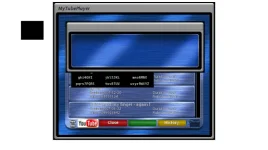
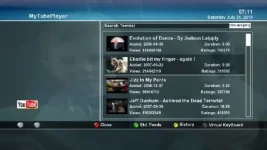
These are screenshots of the 2 versions.

The grey one is from PLi (looking at the date its older than pli 2.0).

The blue one is the one that installs in VIX 2.0.

Its not just the look, they operate totaly different.
 

Attachments

  • mytube - VIX.webp
    mytube - VIX.webp
    22.7 KB · Views: 58
  • new mytube.webp
    new mytube.webp
    25.3 KB · Views: 57
I have done a search and can't find anyone else with the same problem. When I select Menu within CCcam info plugin it shows the four configs and if I press the blue buttons on any of them it shows the config. Now if I select with the green button I get a green screen.
I was going to include the crash log but the log file gives the wrong file type to upload in manage attachments.

All sorted, it was down to one of the cfgs being corrupt.
 
Hi guys,

The ECM time shows as -nan in the InfoBar. Does anyone have a corrected libgcc file to FTP into the /lib folder?
 

OpenViX Feeds Status

Back
Top