Superb quality and spec AB-Com PULSe 4K SE. Crazy offer! Only £129! FREE UK DELIVERY! 4K UHD, Enigma 2, Multiboot 4 images & more!...
Superb quality and spec AB-Com PULSe 4K Rev II Twin Satellite tuner only £179! FREE UK DELIVERY! 4K UHD, Enigma 2, SATA HDD facility, Multiboot 4 images & more!...

ViX Team VU+ Duo Image v2.2 - 11/06/2011 - Discussion

Status
Not open for further replies.
I use Magic HD and I dont have this problem
 
I use Magic HD and I dont have this problem

I will try again with Magic HD and Magic (E)HD but am I sure it was the same as per the screenshot also ..If other people are not having this issue it must be some issue with my setup
:confused:
 
I have asked Andy about this some time ago. The answer was that it was not possible but that he was thinking about it.

G

Yeah I remember you mentioned it in the VIX2.0 thread. I can't believe this doesn't bother people as much. Seems like it's just us that find it a pain in the arse.
 
In the channel list when you press OK this takes you back to the full sceen mode, does anyone know if there's an option that makes the OK button zap to the new channel with it showing in the PIP but still staying in the channel list?

cheers

Rob

You can get this functionality using the graphical epg. Set the ok to zap, and it will stay in epg list.

Personally, can't see the point... if I press ok on a channel, it's cus I wanna watch that channel :confused:

Sent with Tapatalk
 
In the channel list when you press OK this takes you back to the full sceen mode, does anyone know if there's an option that makes the OK button zap to the new channel with it showing in the PIP but still staying in the channel list?

cheers

Rob

Hi
It is precisely what I want the VIXimage/VU to do! It would be a nice feature.
Just scrolling down the channel list and view the selected channel in PIP

Just for the record, VIX / VU is a great combination.

cheers
Overburn
 
You can get this functionality using the graphical epg. Set the ok to zap, and it will stay in epg list.

Personally, can't see the point... if I press ok on a channel, it's cus I wanna watch that channel :confused:

Sent with Tapatalk

It's handy for channel zappers when you don't really know what you wanna watch. You're just scrolling through the endless channel lists and you come across something that seems half interesting, it would be handy if you press the OK button to get teh new channel in PIP and continue scrolling. Once you find something you deffo wanna switch to, you can then press a long OK for instance and this will switch to the channel and take you to full view mode.
 
I have asked Andy about this some time ago. The answer was that it was not possible but that he was thinking about it.


that was then, but i now know ALOT more how enigma2 works :D, just finished coding channel preview for Channel List screen (is an optional item) it works the same way it does in EPG, also coded the option to set the Channel +/- button open Channel List too.

Channel +/- buttons: add an option to setup the buttons to either 'Just change channels' or 'Open channel list'

ChannelSelection: add Channel preview as an option. Default - Not Active. (when enabled, it leaves the channel list screen open after a zap, it requires a second 'OK' press to close the screen on the current channel. if exit is pressed it will Zap back to the channel that was active before you entered channel list)


these will be coming soon, i want to get our beta team to test first before i push to the online update, but just wanted to let you know that am listening :D.
 
Nice one Andy. This will get my arse moving off 2.1 :)
 
Hi guys ,

just installed 2.2 ..and I am having an issue with quick epg (left or right button press)..
Epg is not showing correctly as per screenshot .I am using VuConfinnity HD skin but noticed this also on magic hd skin .Had no issue in 2.1 ...just wwondering if anybody else is having issues with quick epg not showing correctly in vix 2.2?
this should be fixed in 2.2.104
 
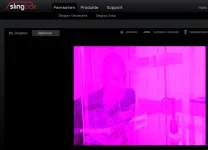
sling.webp

Hi,
image works nicely.
However, I have problems with Slingbox that is attached to component output. It shows a redish picture. Could that be caused by some device driver problems? Hope, it's not my slingbox hardware, that works fine on analog cable.
Thanks.
 
Last edited:
Apart from the correct Component-Settings, you also have to set the scart-setting to component. This is due to the fact that the wiring (scart % component) are interconnected.

Good luck!
 
Thanks. To be more precise... I have a TV connected thru HDMI and the Slingbox in parallel attached to the component output of the box.
It worked nicely with an older image. Nothing changed just new image.
So, where exactly do I have to configure component and scart settings?
 
In that case I would suggest to only set Scart to Component (Menu --> Settings --> System --> A/V-settings --> Scart --> Component and leave the menu).

Edit: but I'm not sure if the box is capable of simultaneous HDMI & Component output. Anyway: give it a try. The purple glow is due to the fact that scart is now set to RGB.
 
Last edited:
In that case I would suggest to only set Scart to Component (Menu --> Settings --> System --> A/V-settings --> Scart --> Component and leave the menu).

Edit: but I'm not sure if the box is capable of simultaneous HDMI & Component output. Anyway: give it a try. The purple glow is due to the fact that scart is now set to RGB.
Thanks. Yes, Scart setting seemed to be the problem. It now works again. Simulatneaous HDMI and Componente output is no problem for the box.
 
Status
Not open for further replies.

OpenViX Feeds Status

Back
Top